How-to
How to Do a Double Exposure on Film: 3 Methods and Settings
The short answer
To make a double exposure on film, expose the same frame twice: set the camera's multiple exposure lever, hold the rewind button on the base while you cock the shutter, or shoot a whole roll and run it through the camera again.
Underexpose each shot by one stop, most easily by setting the ISO dial to double the box speed (ISO 400 film at 800), or the frame comes out too bright. Many guides shoot the darker frame first, because the second image shows up in its shadows, and a lab should be told to return uncut negatives ($2 extra at The Darkroom in October 2026).
- Exposure, two shots
- 1 stop under each: set ISO 400 film to 800web.archive.org
- Exposure, four shots
- -2 EV on each shoten.wikipedia.org
- Shoot first
- Often the darker frame: the second image fills its shadowspopphoto.com
- Best film type
- Color negative or black and white, not E-6 slideweb.archive.org
- Film leader retriever
- $12.00 to $18.95 at Glazer's (Oct 2026)glazerscamera.com
- Uncut negatives
- +$2 at The Darkroom (Oct 2026)thedarkroom.com
What is a double exposure on film?
A double exposure means exposing the same section of film twice, so two scenes overlap in one frame. On a film camera that means keeping the film still between two shots, or running the same roll through the camera a second time.
The two pictures do not blend evenly. The shadows of the first shot are where the second shot shows most clearly, and the reverse, as Popular Photography explains it. The Find Lab, a lab in Salt Lake City, puts it the same way: the second frame fills in the first frame's shadows, and most of the first frame's highlights are lost. A bright sky in shot one leaves little room for shot two; a dark silhouette leaves a window for it.
The other thing to know is light. If both shots are exposed normally, the frame gets twice the light it needs, which is why double exposures tend to look a bit brighter than other film photos (Lens Lurker). Lens Lurker adds that an uncorrected frame is still visible, and some photographers like the dreamy, overexposed look. The standard fix is to cut each exposure by one stop, covered below.
Sources: popphoto.com, thefindlab.com, lenslurker.com
Can your camera do double exposures? The three methods
Some film cameras can shoot double exposures and some cannot, so the manual is the first stop (The Find Lab). What decides it is whether you can cock the shutter again without moving the film. There are three ways to get there, plus built-in modes on a few instant cameras.
1. A multiple exposure lever, switch or button. The easiest route. Popular Photography notes the feature is rare on older cameras but common on models from the 1980s onward, and camera-wiki rates the Nikon F3 as the easiest camera of all for double exposures.
2. The rewind-button trick. On manual-wind SLRs without a lever, such as the Canon AE-1 and the Pentax K1000, you hold the film rewind button on the base while you stroke the advance lever. The film stays put and the shutter is cocked again. Photographer Jason Corning, who shoots a Pentax K1000, wrote in Field Mag that a technician at Samy's taught him to hold the rewind button while cocking the wind lever.
3. Shoot the whole roll twice. This works with any camera, including auto-wind point-and-shoots, but you commit a whole roll and the frames are hard to line up (Popular Photography).
Most rangefinders and TLRs make you advance before the next shot, Melese Miller writes on Shoot It With Film, while many 35mm cameras and most 645 cameras allow multiple exposures. Cameras that never lock the shutter are the simplest of all: on a Diana F+ or a 120 Holga you just fire again before winding, old red-window medium format cameras work the same way, and on large format you reset the shutter and dark slide and expose the same sheet again (Great Big Photography World).
| Camera | Control | What to know |
|---|---|---|
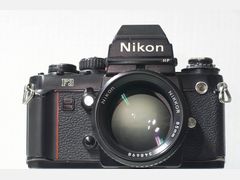 Nikon F3 Nikon F3 | Multiple exposure switch | Just in front of the rewind lever |
| Nikon FM | Multiple exposure button | The frame counter stays put while you use it |
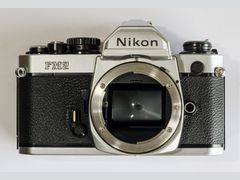 Nikon FM2 Nikon FM2 | Multiple-exposure lever | Listed among its features by Brooklyn Film Camera |
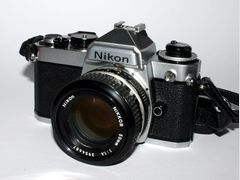 Nikon FE Nikon FE | Double exposure button | Sits on the right side of the film winding lever |
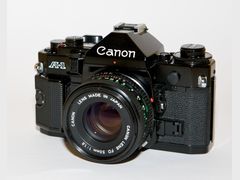 Canon A-1 Canon A-1 | Double-exposure release by the wind lever | Cocks the shutter without advancing the film |
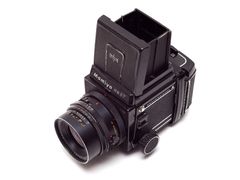 Mamiya RB67 Pro-S Mamiya RB67 Pro-S | Multiple exposure lever on the roll film back | Under the film advance lever |
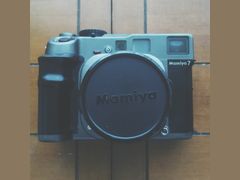 Mamiya 7 II Mamiya 7 II | Multiple exposure | The original Mamiya 7 lacks it |
| Pentax 645NII | Multiple exposure switch | Turn it off after the first shot or it takes a third exposure |
| Canon EOS 620, EOS 300 | Multiple exposure mode | Up to 9 exposures on one frame |
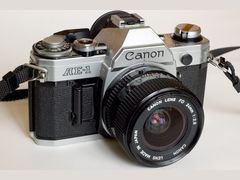 Canon AE-1 Canon AE-1 | None: use the rewind-button trick | The film rewind release button is on the base |
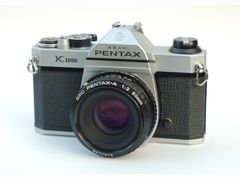 Pentax K1000 Pentax K1000 | None: use the rewind-button trick | Hold the rewind button while cocking the wind lever |
| Nikon F-501, F-301 (auto-wind) | Rewind slide and rewind button | A Q&A quoted on The Photo Forum: hold both until the last exposure, then release |
| Lomography Diana F+ | Uncoupled advance and shutter | Fire as many times as you want before winding |
| Holga K200NM (35mm) | Multiple exposure button | The 120 Holga needs no button |
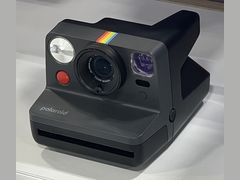 Polaroid Now, Polaroid Go Gen 2, Instax Mini 99 Polaroid Now, Polaroid Go Gen 2, Instax Mini 99 | Built-in double exposure mode | Two shots on one print |
If the manual shows no multiple exposure (ME) control, try the rewind-button trick; the whole-roll method works with any camera.
Sources: thefindlab.com, popphoto.com, camera-wiki.org, camera-wiki.org, fieldmag.com, shootitwithfilm.com, en.wikipedia.org, glazerscamera.com, shootitwithfilm.com, en.wikipedia.org, greatbigphotographyworld.com, imagingpixel.com, brooklynfilmcamera.com, nicovandijk.net, camera-wiki.org, camera-wiki.org, camera-wiki.org, chelseerawephotography.com, lenslurker.com, web.archive.org, thephotoforum.com, polaroid.com, polaroid.com, instaxus.com
How to set exposure for a double exposure
Start by underexposing each shot by one stop, so the two shots add up to one normal exposure. Popular Photography's easy way: set the camera's ISO to double the film's ISO and meter as usual. Lomography gives the example of ISO 400 film set to 800.
If you would rather leave the ISO dial alone, or the camera has none, do it by hand. The Find Lab suggests closing the aperture one stop (f/4 to f/5.6) or making the shutter speed twice as fast (1/125 to 1/250). More layers need bigger cuts: Wikipedia gives -1 EV per shot for two exposures and -2 EV per shot for four. Film ISO explained shows how ISO numbers and stops line up.
One exception: a lit subject shot against a perfectly dark background may need no compensation at all, because the black areas stay essentially unexposed (Wikipedia).
Not everyone underexposes. Melese Miller shoots double exposures the way she always shoots, which typically includes some overexposure, because she dislikes the muddy shadows underexposure brings. Chelsee Rawe underexposes only the first shot and exposes the second normally, and Polaroid suggests slightly underexposing the first photo on the Polaroid Now. With forgiving negative film, one stop under on each shot is the safe place to start; adjust once you see your own negatives.
| Shots on one frame | Cut each shot by | ISO 400 film: set the dial to | Or change aperture or shutter |
|---|---|---|---|
| 2 | 1 stop (-1 EV) | 800 (400 x 2) | f/4 to f/5.6, or 1/125 to 1/250 |
| 4 | 2 stops (-2 EV) | 1600 (400 x 4) | f/4 to f/8, or 1/125 to 1/500 |
| Lit subject on a black background | Often nothing | 400 | Meter normally |
Doubling the ISO dial splits the exposure between your shots: Lomography says two underexposed images produce one properly exposed image.
Sources: popphoto.com, web.archive.org, thefindlab.com, en.wikipedia.org, shootitwithfilm.com, chelseerawephotography.com, web.archive.org
How to double expose one frame with an ME lever or the rewind button
This is the classic method on manual SLRs and many medium format cameras. Check your manual for the exact control first.
- 1
Load forgiving film and set exposure
Use color negative or black and white film, not slide film. Set the ISO dial to double the box speed (ISO 400 film at 800), or plan to close down one stop on each shot.
- 2
Shoot the first frame, often the dark layer
Guides split on order (see the section on which shot goes first), but several start with the darker frame, such as a silhouette against a bright sky or plain wall. Note where the dark areas fall, because that is where the second image will show.
- 3
Re-cock the shutter without moving the film
With a multiple exposure lever, set it and stroke the advance lever; on a Nikon FM the frame counter stays put. Without one, turn the rewind crank gently until the film is snug, press and hold the rewind button on the base, and stroke the advance lever while you keep the rewind crank still with a finger.
- 4
Shoot the second frame: the subject or detail
Hold the camera the same way as before, landscape or portrait, and place the main subject in the dark areas of the first frame. Melese Miller saves the element she most wants to stand out for this second exposure.
- 5
Switch multiple exposure off
Flip the lever or switch back. A Pentax 645NII left on will take a third exposure on the same frame.
- 6
Fire a blank frame after the rewind trick
A Nikon F-501 Q&A quoted on The Photo Forum warns that the film may not wind on one complete frame after you release the rewind button, and says to take the next photograph with the lens cap on. It describes an auto-wind F-501, so check how your own camera behaves; a blank frame costs one exposure.
- 7
Tell the lab
Mark the roll as double exposed and ask for uncut negatives, because shifted frame spacing can get negatives sliced in half by automatic cutters. The Darkroom charges $2 for its 'do not cut' option.
Sources: web.archive.org, popphoto.com, lenslurker.com, thefindlab.com, imagingpixel.com, uniquephoto.com, shootitwithfilm.com, chelseerawephotography.com, thephotoforum.com, thedarkroom.com
How to double expose a whole roll of film (works with any camera)
This is the only way on most auto-wind point-and-shoots, and it suits a planned project, such as a roll of textures first and portraits on the second pass. On 120 film, rewinding for a second pass means a dark bag, as Alec Pain found with his Holga.
- 1
Mark the film before closing the back
After loading, draw a line across the film with a marker, using the mouth of the cartridge as the guide (Lens Lurker). 35mmc lines up the first sprocket hole with the first tooth of the advance sprocket instead.
- 2
Shoot the first pass at double box speed
Shoot every frame, for example all textures or all city scenes. Keep notes of what is on each frame if you want to pair them later.
- 3
Rewind slowly and keep the leader out
On a manual-rewind camera, rewind slowly and stop when the film separates from the take-up spool. Most compacts pull the leader all the way into the canister, though some, like the Nikon L35AF, leave it sticking out.
- 4
Rescue a swallowed leader
Use a film leader retriever ($12.00 for the Ars-Imago, $18.95 for the ProMaster at Glazer's), or Lens Lurker's trick: wet the leader of a second roll, push it into the first cartridge, twist until they stick and pull.
- 5
Reload with the mark in the same place
Load the roll again with your mark at the cartridge mouth, close the back and wind on to frame 1 as usual. How to load film walks through loading on common cameras.
- 6
Shoot the second pass and expect some drift
Shoot it at double box speed again. Even careful shooters get frames that are slightly off: 35mmc's writer noted where the leader sat in a Rollei 35B and the frames still did not line up perfectly.
- 7
Order uncut negatives
Tell the lab the roll is double exposed and tick the 'do not cut' box, since frames that drifted can be cut through the middle.
Sources: shootitwithfilm.com, lenslurker.com, 35mmc.com, popphoto.com, shootitwithfilm.com, glazerscamera.com, glazerscamera.com, thephotoforum.com, thedarkroom.com
Double exposures on Polaroid and Instax cameras
Several instant cameras do the work for you. On the Polaroid Now, press the self-timer button twice: the display flashes 1 until the first shot, then 2 until the second, and the photo ejects as usual. You can pick flash or no flash for each exposure and combine the mode with the self-timer, according to Polaroid's support page.
Polaroid's rule is that the first photo should be quite dark: a dark subject, or a backlit subject shot without flash. Then shoot a texture or a repeating pattern second. Polaroid also suggests slightly underexposing the first shot to lower the chance of an overexposed print.
The Polaroid Go Generation 2 also has a double exposure mode, and so does the Fujifilm Instax Mini 99, which superimposes two shots on one print. The Go Gen 2 is the cheapest of the three at $89.99 (Abt Electronics, October 2026); all three are in the price table below. Polaroid Go vs Polaroid Now compares the two Polaroids.
Each double exposure still uses one print, so failed attempts cost real money. For the Polaroid Now, Color i-Type film is $18.99 for 8 photos on Polaroid's US store, about $2.37 a print ($18.99 / 8).
Sources: web.archive.org, polaroid.com, polaroid.com, instaxus.com, abt.com, abt.com, polaroid.com
Which shot goes first in a double exposure?
The guides agree on the mechanics: the second image appears in the dark areas of the first. They split on the order. Polaroid and Great Big Photography World start with a darker frame, such as a backlit subject or a low-key scene, and layer lighter detail on top; Lens Lurker calls a silhouette first with a pattern second one of the most common techniques. Melese Miller shoots the texture first and the subject she most wants to show second, because the second image tends to stand out more. ProGrade Digital's guide puts the subject, usually a portrait, first.
A practical way to decide: pick where you want the second image to show, and make that part of the first frame dark. For a portrait filled with leaves or city lights, shoot the person against a blank, bright background such as the sky or a plain wall; The Find Lab says that gives a clean outline.
A few habits help either way. Keep the camera in the same orientation for both shots (Chelsee Rawe). Work in medium to low light, which Wikipedia calls ideal. A tripod is optional when you combine different scenes, but Chelsee Rawe uses one when the second exposure has to line up with the first.
For ideas, Lens Lurker suggests turning the camera 180 degrees between two shots from the same spot for a mirrored effect, or a film swap: you shoot a roll, hand it to a friend and let them shoot over it. Lomography's Expose Both Sides (EBS) technique reloads a shot roll with the opposite side of the emulsion facing the lens, for redscale-like double exposures.
Sources: lenslurker.com, web.archive.org, greatbigphotographyworld.com, shootitwithfilm.com, progradedigital.com, thefindlab.com, chelseerawephotography.com, en.wikipedia.org, web.archive.org
What film is best for double exposures?
Color negative or black and white. Lomography recommends both over E-6 slide film because of their wider exposure latitude, which leaves more room for error when you meter for multiple exposures.
Black and white versus color is taste, and the sources split. Lomography warns that on color film the overlapping colors can look confusing or too busy, and SlashGear calls black and white a safe bet for beginners because it handles overexposure well. Lens Lurker, on the other hand, usually finds double exposures more interesting on color film.
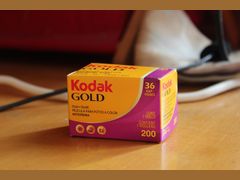
Budget stocks are fine while you learn. Kentmere Pan 400 and Kodak Gold 200 both cost under $9 for 36 exposures at Glazer's Camera in Seattle, against $18.50 for a roll of Kodak Portra 400 at Brooklyn Film Camera (October 2026). Best black and white film compares the main black and white stocks.
Sources: web.archive.org, slashgear.com, lenslurker.com, glazerscamera.com, glazerscamera.com, brooklynfilmcamera.com
What you need for double exposures on film
The kit is short, and you may own most of it already. The cheapest start is a camera you have, a budget roll and develop-only processing: Kentmere Pan 400 at $8.49, plus $11 for develop-only at The Darkroom (no scans) and $2 for uncut negatives, comes to $21.49 in film and processing ($8.49 + $11 + $2).
- A camera that can re-cock the shutter without advancing (see the table above), or any camera for the whole-roll method
- Color negative or black and white film
- A marker, to mark the film for the whole-roll method
- A film leader retriever, if your camera rewinds the leader into the canister
- A lens cap, for the blank frame after the rewind-button trick
- Notes on what is on each frame, on paper or your phone
- A tripod, only when the two exposures must line up
- A lab that will return the negatives uncut
Sources: glazerscamera.com, thedarkroom.com, lenslurker.com, thephotoforum.com, fieldmag.com, chelseerawephotography.com
How much double exposure gear costs
| Seller | Item | Price | Note |
|---|---|---|---|
| Glazer's Camera (Seattle, WA) | Holga 120N, new (120 film) | $39.99 | Toy camera; fire again before winding |
| Glazer's Camera (Seattle, WA) | Lomography Diana F+ with flash, new | $99.00 | Uncoupled advance and shutter |
| Glazer's Camera (Seattle, WA) | Lomography Diana F+, used, very good | $59.00 | Single used unit |
| Glazer's Camera (Seattle, WA) | Canon A-1, used, CLA'd | $199.00 | Double-exposure release; single used unit |
| Brooklyn Film Camera (Brooklyn, NY) | Nikon FM2, silver, A grade, serviced | $960.00 | Top-grade serviced copy |
| Cute Camera Co. (Austin, TX) | Nikon FE with Nikkor 50mm f/1.4, restored to order (black, average condition) | $514.99 | Double exposure button; grades start at $489.99 |
| Brooklyn Film Camera (Brooklyn, NY) | Canon AE-1, serviced | $410.00 | No ME lever: rewind-button trick |
| Abt Electronics (Glenview, IL) | Polaroid Go Gen 2, black | $89.99 | Double exposure mode |
| Abt Electronics (Glenview, IL) | Polaroid Now Gen 3, pebble white | $129.99 | Double exposure mode |
| Fujifilm Instax US | Instax Mini 99 | $234.95 | List price; double exposure mode |
| Polaroid US store | Color i-Type film, 8 photos | $18.99 | About $2.37 a print |
| Glazer's Camera (Seattle, WA) | Kentmere Pan 400, 35mm, 36 exp. | $8.49 | Budget black and white |
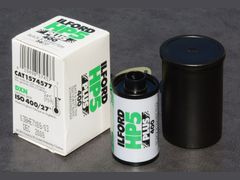
| Glazer's Camera (Seattle, WA) | Ilford HP5 Plus 400, 35mm, 36 exp. | $9.99 | About 28 cents a frame |
| Glazer's Camera (Seattle, WA) | Ilford HP5 Plus 400, 35mm, 24 exp. | $8.49 | About 35 cents a frame |
| Glazer's Camera (Seattle, WA) | Kodak Gold 200, 35mm, 36 exp. | $8.99 | Budget color negative |
| Brooklyn Film Camera (Brooklyn, NY) | Kodak Portra 400, 35mm, one roll | $18.50 | Add-on price on a camera listing |
| Glazer's Camera (Seattle, WA) | Ars-Imago metal film retriever, 35mm | $12.00 | Pulls a rewound leader back out |
| Glazer's Camera (Seattle, WA) | ProMaster film leader retriever, 35mm | $18.95 | Pulls a rewound leader back out |
| The Darkroom (mail-in, San Clemente, CA) | Develop only: C-41, B&W or E-6, no scans | $11 | Per roll |
| The Darkroom (mail-in, San Clemente, CA) | Do not cut negatives | +$2 | Add-on for double-exposed rolls |
Prices checked October 2026. They change often.
Common double exposure mistakes
Slips that come up in guides and forum threads, with the fix for each.
- Exposing both shots normally. The frame gets twice the light it needs. Cut each shot by one stop.
- Leaving the multiple exposure lever on. A Bronica ETRS owner on Talk Photography only noticed when the frame counter would not budge, and a Pentax 645NII left on takes a third exposure.
- Skipping the blank frame after the rewind trick. A Nikon F-501 Q&A warns the film may not advance a full frame, so the next picture can overlap. Fire one frame with the lens cap on.
- Rewinding the leader into the canister on a roll you plan to reshoot. Stop when the film lets go of the take-up spool, or keep a retriever on hand.
- Knocking a switch mid-roll. On Kosmo Foto, a whole-roll project on a Lomo LC-Wide drifted out of alignment after the half-frame switch got flipped in a bag.
- Using slide film. E-6 has less exposure latitude than negative film and handles overexposure badly, Lomography says.
Sources: lenslurker.com, talkphotography.co.uk, thephotoforum.com, popphoto.com, kosmofoto.com, web.archive.org
Troubleshooting double exposures on film
Match what you see on the negatives or scans to the likely cause. Lab machines assume even spacing: as one answer on Unique Photo's community explains, automated processing finds the first frame and then advances eight sprocket holes at a time, so a shifted frame can land across the cut line.
| What you see | Likely cause | Fix next time |
|---|---|---|
| The whole frame is too bright | Both shots exposed normally: twice the light the frame needs | Rate the film at double box speed, or close down one stop per shot |
| The second image barely shows | The first frame was mostly bright, so there were few shadows to fill | Shoot the darker frame first and put the second subject in its shadows |
| Shadows look muddy | Underexposure, the reason Melese Miller skips it | Expose the second shot normally, as Chelsee Rawe does, or both, as Miller does |
| Frames on a reshot roll do not line up | The film went back in at a slightly different position | Mark the film at the cartridge mouth, and accept some offset: Lens Lurker says alignment can't be guaranteed |
| The double is slightly offset, or the next frame overlaps it | The take-up spool crept during the rewind trick, or the film did not advance a full frame afterward | Hold the rewind crank, then fire a blank frame with the lens cap on |
| Negatives are cut through the middle of a frame | Frame spacing changed and the cutter assumed even spacing | Order uncut negatives (+$2 at The Darkroom) and say the roll is double exposed |
| The frame counter will not move | The multiple exposure lever is still on | Switch it off and check it before each new frame |
| A double-exposure Polaroid print is overexposed | The first photo was too bright | Make the first photo dark (backlit, no flash) and slightly underexposed |
The Darkroom returns negatives cut and sleeved unless you check its 'do not cut' box, so tick it before you mail a double-exposed roll.
Sources: uniquephoto.com, lenslurker.com, popphoto.com, shootitwithfilm.com, chelseerawephotography.com, 35mmc.com, thephotoforum.com, thedarkroom.com, talkphotography.co.uk, web.archive.org, thedarkroom.com
Questions people ask
How do you do a double exposure on film?
Expose one frame twice: use the camera's multiple exposure lever, hold the rewind button on the base while you stroke the advance lever, or shoot a whole roll, rewind it with the leader out and shoot it again. Underexpose each shot by one stop, for example by setting ISO 400 film to 800.
Sources: popphoto.com, web.archive.org
Can you do double exposures on a Canon AE-1?
Yes, with the rewind-button trick. The Canon AE-1 has no multiple exposure lever, but its film rewind release button is on the base: hold it while you stroke the advance lever and the shutter cocks without moving the film. Keep the rewind crank still, and consider firing a blank frame with the lens cap on afterward, since the film may not advance a full frame.
Sources: camera-wiki.org, popphoto.com, uniquephoto.com, thephotoforum.com
How many exposures can you put on one frame?
As many as the camera allows and the exposure can take. The Canon EOS 620 and EOS 300 allow up to 9, a Pentax 645NII left in multiple exposure mode takes a third, and an uncoupled camera like the Diana F+ has no limit. Cut exposure for every extra layer: Wikipedia gives -2 EV per shot for four exposures.
Sources: lenslurker.com, web.archive.org, chelseerawephotography.com, glazerscamera.com, en.wikipedia.org
Is 24 or 36 exposures better for double exposures?
A 36-exposure roll is cheaper per frame: at Glazer's in October 2026, Ilford HP5 Plus was $9.99 for 36 (about 28 cents a frame) and $8.49 for 24 (about 35 cents). A 24-exposure roll is less of a commitment, which Digital Camera World recommends when trying a new film stock, and that makes it a sensible first whole-roll experiment.
Sources: glazerscamera.com, glazerscamera.com, digitalcameraworld.com
Do I need a tripod for double exposures?
Not for most creative blends. Wikipedia says a tripod may not be necessary when you combine different scenes, while work like recording a lunar eclipse in several exposures needs a stable one. Chelsee Rawe uses a tripod when the second exposure has to keep the same alignment as the first.
Sources: en.wikipedia.org, chelseerawephotography.com
Is a double exposure on film better than one made in Photoshop?
It is different rather than better. Lens Lurker notes the effect is easy on digital cameras or in Photoshop, but on film you don't know exactly what you got until the roll is developed, and that surprise is much of the appeal. Digital lets you preview and adjust; film makes you plan.
Sources: lenslurker.com
What is the 20 60 20 rule in photography?
It is a shooting workflow, not an exposure rule. You spend the first 20% of a shoot on safe shots, the middle 60% on creative play and the last 20% on wild experiments; wildlife photographer Paul Nicklen adapted it from a corporate strategy. The last 20% is a natural moment to try a double exposure.
Sources: whosaidphotography.com, ulanzi.com
Why is 35mm film so expensive now?
Several things at once, according to PhotoWorkout: higher silver costs, distributor price hikes (Kodak Alaris raised its distributed film prices 1% to 39% on February 1, 2026) and fewer labs and stocks. A roll of Portra 400 that cost about $9 in 2016 runs $18 to $22 now, while Kodak Gold 200 was $8.99 at Glazer's in October 2026. [Why is film so expensive?](/film/why-is-film-so-expensive/) has the full story.
Sources: photoworkout.com, glazerscamera.com
Sources
Every fact on this page comes from one of these. How we choose and check sources is in our methodology.
Show all 52 sources
retailer 17
- Glazer's Camera: Ars-Imago metal film retriever
- The Darkroom: Film developing only
- Glazer's Camera: Lomography Diana F+ with flash
- Brooklyn Film Camera: Nikon FM2
- Glazer's Camera: ProMaster film leader retriever
- Abt: Polaroid Go Instant Film Camera in Black (Gen 2)
- Abt: Polaroid Now Instant Film Camera in Pebble White (Gen 3)
- Glazer's Camera: Kentmere Pan 400 35mm
- Glazer's Camera: Kodak Gold 200 35mm
- Brooklyn Film Camera: Canon AE-1
- Glazer's Camera: Holga 120N
- Glazer's Camera: Used Lomography Diana F+
- Glazer's Camera: Used film cameras
- Cute Camera Co.: Nikon FE
- Glazer's Camera: Ilford HP5 Plus 35mm 36 exp
- Glazer's Camera: Ilford HP5 Plus 35mm 24 exp
- The Darkroom: FAQ
Independent blogs 13
- The Find Lab: How to Shoot Double Exposures on Film
- Lens Lurker: How to take double exposures on film
- Shoot It With Film: 5 Tips for Shooting Double Exposures on Film (Melese Miller)
- Shoot It With Film: Double exposures with neon, LED screens and contact sheets (Alec Pain)
- Great Big Photography World: Double Exposure Photography, How It Works and How to Create It
- Imaging Pixel: Nikon FM
- Nico van Dijk: Nikon FM/FE/FA
- Chelsee Rawe Photography: How to Create Double Exposures on Film
- 35mmc: Double exposures with a Rollei 35B
- ProGrade Digital: Seeing Double, a Guide to Multiple Exposure Photography
- Kosmo Foto: A failed double-exposure experiment?
- Who Said Photography: The 20-60-20 rule in photography
- Ulanzi: What Is the 20-60-20 Rule in Photography?
official 7
- Lomography School: What is the best type of 35 mm film for double exposures? (archived copy)
- Ilford Photo: Multiple exposures as a medium (Benoit Felten, archived copy)
- Polaroid: Polaroid Now instant camera
- Polaroid: Polaroid Go Generation 2
- Instax US: Instax Mini 99
- Polaroid Support: How do I do double exposures with Polaroid Now camera? (archived copy)
- Polaroid: Color i-Type film
Manuals and references 7
Editorial reviews 5
Forums 3
Keep reading
Film cameras
The Canon A-1 (1978) is widely called the first SLR with Program mode. Owner views, US used prices, the 4LR44 battery and the squeal to check before you buy.
Film cameras
The Nikon FM2 is a fully mechanical 1982 SLR with a 1/4000 shutter. What 145 owner and reviewer opinions say, 2026 prices, versions and common problems.
Film cameras
The Pentax K1000 is a fully mechanical 35mm SLR made 1976-1997. What 150-plus owners and reviewers say, plus used prices ($250-$400), lenses and problems.
Techniques and editing
The exposure triangle links aperture, shutter speed and ISO: one stop on any side doubles or halves the light. How it works on film, where the roll sets ISO.
Techniques and editing
Light leaks are stray light fogging your film, usually from worn seals or an opened back. How to find the source, fix it for $80-120 or get the look on purpose.
Film stocks
Ilford HP5 Plus is an ISO 400 black-and-white film known for latitude and easy pushing. What 112 opinions say, how to shoot it, and US prices from $9.99.