How-to
How to Load Film in Any Camera: 35mm, 120 and Instant
The short answer
To load 35mm film, open the back in shade, drop the canister into the left chamber, pull about 4-6 inches of leader across to the take-up spool, then close the back and advance about two frames until the counter reads 0 or 1.
If the rewind knob turns every time you wind, the film is catching. 120 film winds onto an empty spool and is never rewound, while Instax and Polaroid packs simply drop in.
- Leader to pull out (35mm)
- About 4-6 inches, past the take-up spoolkubusphoto.com
- Frames to wind before shooting
- 2 (some do 3), or until the counter reads 0 or 1kubusphoto.com
- Light needed
- Shade or indoor light; no darkroom for 35mmmyphotolounge.com
- Proof it caught
- The rewind knob turns as you advancemyphotolounge.com
- Blank rolls from loading
- 5-10% of rolls, one Brooklyn lab estimateskubusphoto.com
- Common 35mm roll lengths
- 24 or 36 exposuresoldcamsbyjens.com
How to load 35mm film in a manual SLR
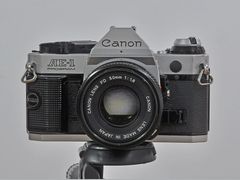
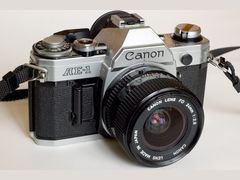
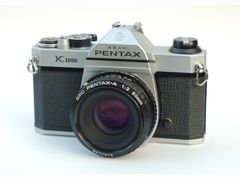
These steps fit most manual 35mm SLRs, including the Canon AE-1, Pentax K1000, Minolta X-700 and Nikon FM or FE. UK repairer Cameras By Max says manual-wind cameras are the ones people load wrong most often, so the check in step 9 matters more than speed.
- 1
Make sure the camera is empty
Look at the frame counter: 0, E or S usually means no film. Then turn the rewind knob gently clockwise; if you feel resistance, a roll is probably inside, so rewind it before you open anything.
- 2
Fit a battery and find shade
If the camera has a built-in meter or an electronic shutter, put in a fresh battery first, since a weak one can stop the shutter firing. Load indoors or in shade, never in direct sun.
- 3
Open the back
On most manual SLRs, pull straight up on the rewind knob and the back pops open. Some bodies add a safety lock or a separate latch.
- 4
Drop the canister into the left chamber
The canister goes in the left chamber, and it only fits one way, so the emulsion ends up facing the lens. Push the rewind knob back down to lock it in.
- 5
Pull the leader across
Pull out about 4-6 inches of leader so it reaches past the take-up spool, keeping it flat. Do not touch the shutter in the middle or the pressure plate on the door.
- 6
Hook the leader on the take-up spool
Tuck the tip of the leader into a slot on the take-up spool. Both rows of sprocket holes must sit on the sprocket teeth, or the spool will turn without pulling film out of the canister. On an old camera with a worn spool, bend the tip slightly so it grips better.
- 7
Test it with the back open
Fire the shutter and advance once or twice. The film should wind onto the spool snugly, without slipping or bunching.
- 8
Close the back and wind to frame 1
Close the door until it clicks, then keep firing and advancing until the counter reads 0 or 1, usually about two frames. Frames before 0 are partly exposed from loading, so they are sacrificed.
- 9
Watch the rewind knob
Turn the rewind knob gently until you feel tension, which takes up the slack. From then on it should turn every time you advance; if it does not move, the film is not moving, so open the back and reload.
- 10
Set the ISO
Turn the ISO dial (marked ASA on older bodies) to the number on the film box so the meter reads correctly. Many automatic cameras read the DX code on the canister and set this themselves, but on a manual SLR it is up to you.
Sources: kubusphoto.com, myphotolounge.com, oldcamsbyjens.com, thedarkroom.com, camerasbymax.co.uk
How to load film in a point-and-shoot or auto-advance camera
Point-and-shoots skip the fiddly part. You pull the leader to a marked line or graphic near the take-up spool instead of threading it into a slot, close the back, and the camera winds to frame 1 by itself.
On most point-and-shoots with an LCD counter, the counter only starts counting shots when film has loaded correctly, according to Cameras By Max, and The Darkroom says an E on the LCD means the camera still thinks it is empty. Electronic SLRs with auto-advance load almost exactly the same way and usually have a rewind button, so you can rewind a roll early to switch film.
- Open the back with its latch and drop the canister into the chamber.
- Pull the leader until its tip reaches the marked line, keeping the film flat over the gate.
- Close the back. The motor winds the film on and the LCD counter changes from E to 1.
- At the end of the roll, the camera rewinds the film into the canister on its own.
If the counter still shows E, or the camera rewinds right after loading or shows an error, the camera is not detecting the film: Kubus Photo blames a leader short of the mark, dirty DX contacts or weak batteries.
Sources: thedarkroom.com, camerasbymax.co.uk, kubusphoto.com
How to load film in rangefinders and half-frame cameras
Older rangefinders such as the Leica III, Canon rangefinders and Soviet Zorki and FED bodies load through the bottom: take off the bottom plate first and do not force the back. Canon's Quick Load (QL) models, such as the Canonet QL series, have a built-in clamp that secures the leader automatically.
On any manual camera you can also reverse the order. The Darkroom recommends a leader-first method: slot the leader into the take-up spool, then pull the canister across into its chamber. Most other guides put the canister in first, and both end with the same rewind-knob check.
The Pentax 17 half-frame camera is wound with a lever and rewound with a crank, and it can rewind a roll midway. You set the film speed by hand. Ricoh's instructions say to load it in a dark location, which is stricter than the shade most guides ask for, not to open the back until the film is fully rewound, and to tell the lab the roll was shot half-frame. It runs on one CR2 lithium battery, which Ricoh rates for about 10 rolls of 36 exposures with half the shots using flash; rechargeable CR2s are not compatible. More in our half-frame cameras comparison.
Sources: kubusphoto.com, thedarkroom.com, ricoh-imaging.co.jp, ricoh-imaging.co.jp
How to load 120 film
120 roll film has paper backing, winds from one spool onto an empty take-up spool and is never rewound. There is no single standard method: some 120 cameras use removable backs or inserts, some stop at frame 1 by themselves and others need the start arrows lined up by hand. TLRs such as the Rolleiflex, Yashica Mat 124 and Minolta Autocord usually load from the bottom part of the camera. For the format itself, see 35mm vs 120 film.
- 1
Move the empty spool across
Put the empty spool from your last roll on the take-up side. The Darkroom lists forgetting this among the most common 120 mistakes.
- 2
Insert the new roll
Put the fresh roll on the supply side with the paper backing facing you and the black shiny side facing into the camera.
- 3
Thread the tongue
Pull the paper tongue across and push it into the slot of the take-up spool. Keep the paper snug, since loading it too loosely is another common mistake.
- 4
Wind to the start mark
Wind until the start arrows on the paper line up with the marks in the camera, or until the start line appears. Do not wind past them.
- 5
Close the back and wind to 1
Close the back and keep winding until 1 shows in the red window; cameras with automatic frame counting stop at 1 on their own. Red-window cameras cannot use 220 film, which is double-length 120 with no backing paper.
- 6
Finish and seal the roll
After the last frame, wind until all the paper is on the take-up spool, then open the back in subdued light. Hold the full spool tight as you lift it out and seal it with its paper band: most are lick-to-seal, Fuji's are peel-and-stick, and you do not need extra tape.
Sources: rolandandcaroline.co.uk, thedarkroom.com, talkphotography.co.uk
How to load Instax and Polaroid cameras
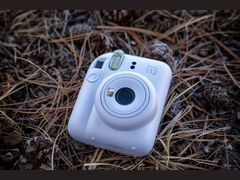 Mini 12
Instax. Check that the counter shows S, which means the camera is empty and safe to open. Line up the yellow stripe on the cartridge with the yellow mark in the film compartment and let it drop in; Fujifilm says never to force it. Close the door, switch the camera on and press the shutter once: the safety sheet comes out and goes in the trash, and an Instax Mini counter then shows 10. Opening the door with film inside resets the counter, and Fujifilm lists it as a usual cause of blank, white or all-black photos. The Instax Mini 12 review covers that camera in detail.
Polaroid i-Type (Now, Now+). Slide the pack in belly up, with the sticker facing out, until it clicks. Close the door and the dark slide ejects. When the pack is empty, pull it out by the sticker tab. Polaroid suggests keeping film in the fridge but taking it out about an hour before you shoot.
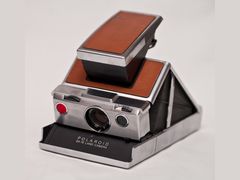
Polaroid SX-70. Unfold the camera, press the small yellow tab on the side to drop the film door, slide the pack in and close it; the dark slide ejects. Analog.Cafe suggests testing a vintage SX-70 with an empty pack and a dark slide before risking a full pack. Which pack fits which camera is in the Polaroid film guide.
Sources: instaxus.com, instaxus.com, cameralabs.com, polaroid.com, analog.cafe
How to rewind and unload 35mm film
Never open the back of a 35mm camera until the film is back inside the canister. Most point-and-shoots rewind on their own at the end of the roll; manual cameras need you to do it. Loading film onto a developing reel is a separate job, covered in how to develop film at home.
- 1
Stop at the end of the roll
When the advance lever will not move any further, the roll is finished. Do not force it.
- 2
Press the rewind release
Press the rewind release button, usually on the bottom of the camera.
- 3
Turn the rewind crank
Flip out the crank on the rewind knob and turn it in the direction of the arrow. You will feel steady resistance.
- 4
Feel for the tension to drop
Keep going until the tension suddenly loosens; you may hear the film slip back into the cartridge. That means it has left the take-up spool.
- 5
Open the back and take the canister out
Once the tension has dropped, open the back and lift the canister out. Most people rewind until the leader disappears so a shot roll cannot be reloaded by mistake; some stop early to leave the leader out. Kubus Photo says its lab handles both.
- 6
Changing film mid-roll
Note the frame count, rewind but leave the leader out, and when you reload that roll later, advance past the frame where you stopped.
Sources: oldcamsbyjens.com, myphotolounge.com, thedarkroom.com, kubusphoto.com
What you need to load film, and what it costs
Loading film takes no tools: a roll in the right format and, for many cameras, a working battery. Two optional extras rescue a roll when something goes wrong. Prices are from US camera stores, checked on October 28, 2026.
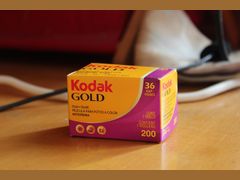
- Film. Kodak Gold 200 in 35mm (36 exposures) is $8.99 at Glazer's and K&M Camera and $9.25 at Pictureline; Kodak UltraMax 400 is $9.95 to $10.49. In 120, Kodak Gold 200 is $7.99 and Portra 400 is $15.99 at Glazer's.
- A battery, if your camera uses one. At Glazer's an LR44 button cell is $2.95, a 4LR44 is $3.95 and a CR2 2-pack (the Pentax 17 takes one CR2) is $16.95. Look up your camera's cell in the film camera battery finder.
- Instant film. An Instax Mini twin pack is $18.17 for 20 photos at Glazer's, about $0.91 each. Polaroid Color i-Type is $18.99 for 8 photos at Polaroid's US store, about $2.37 each.
- Optional: a film leader retriever ($12.00 to $29.99) pulls a leader back out of a canister without opening it.
- Optional: a changing bag ($32.95 to $42.99) is a light-tight bag you work inside with your hands, for freeing a torn or jammed roll in total darkness.
Sources: glazerscamera.com, kmcamera.com, pictureline.com, glazerscamera.com, polaroid.com
Where to buy film and loading accessories in the US
| Seller | Item | Price | Note |
|---|---|---|---|
| Glazer's Camera (Seattle, WA) | Kodak Gold 200, 35mm, 36 exposures | $8.99 | In stock on Oct 28, 2026 |
| K&M Camera | Kodak Gold 200, 35mm, 36 exposures (part 7518236) | $8.99 | In stock on Oct 28, 2026 |
| K&M Camera | Kodak UltraMax 400, 35mm, 36 exposures (part 7518244) | $9.95 | In stock on Oct 28, 2026 |
| Glazer's Camera (Seattle, WA) | Kodak Gold 200, 120, single roll | $7.99 | In stock on Oct 28, 2026 |
| Glazer's Camera (Seattle, WA) | Ilford HP5 Plus 400, 120, single roll | $9.99 | Black and white; in stock on Oct 28, 2026 |
| Glazer's Camera (Seattle, WA) | Kodak Portra 400, 120, single roll | $15.99 | In stock on Oct 28, 2026 |
| Glazer's Camera (Seattle, WA) | Instax Mini film twin pack (20 photos) | $18.17 | About $0.91 per photo |
| Polaroid (official US store) | Polaroid Color i-Type film (8 photos) | $18.99 | About $2.37 per photo |
| Glazer's Camera (Seattle, WA) | Ansmann LR44 button cell | $2.95 | Check your camera's cell first |
| Glazer's Camera (Seattle, WA) | Ansmann 4LR44 alkaline battery | $3.95 | Check your camera's cell first |
| Glazer's Camera (Seattle, WA) | Energizer CR2 lithium, 2-pack | $16.95 | The Pentax 17 takes one CR2 |
| Glazer's Camera (Seattle, WA) | Ars-Imago metal film leader retriever, 35mm | $12.00 | Cheapest of the three retrievers checked |
| K&M Camera | Arista Deluxe 35mm film retriever | $29.99 | In stock on Oct 28, 2026 |
| Glazer's Camera (Seattle, WA) | Kalt changing bag, 27 x 30 in | $32.95 | For torn or jammed film |
| K&M Camera | Paterson changing bag, 27.5 x 27.5 in | $37.68 | In stock on Oct 28, 2026 |
| Art's Cameras Plus (Greenfield, WI) | Paterson changing bag, 27.5 x 27.5 in | $42.99 | Same bag as the K&M listing, priced higher |
Prices checked October 2026. They change often.
Common film loading mistakes
Kubus Photo, a Brooklyn lab, estimates that loading failures hit 15-20% of true beginner rolls, the most common first-roll disaster. The usual causes are below.
- Leader not hooked, or sprocket holes off the teeth. The take-up spool turns but the film stays in the canister.
- Skipping the rewind-knob check. On a manual camera it is the easiest sign, while you shoot, that film is moving.
- Opening the back before the film is rewound. Rewind until the tension drops first.
- Loading in direct sun. Shade or indoor light is enough.
- Forgetting the ISO. A manual camera's meter only knows the film speed you set.
- A weak or dead battery. On electronic bodies it can stop the shutter, and the lever will not wind until the shutter fires.
- Forcing the lever at the end of the roll. When it stops, rewind.
- 120 slips. Start arrows not lined up, backing paper loaded loosely, the empty spool left on the wrong side, or winding past the start marks.
- Instax slips. Forcing the cartridge instead of matching the yellow marks, or opening the door with film inside.
Sources: kubusphoto.com, kubusphoto.com, myphotolounge.com, oldcamsbyjens.com, thedarkroom.com, instaxus.com
Troubleshooting: film won't advance, won't rewind or tore
Most problems show up at the advance lever or the rewind knob. Match the symptom to the fix below, and never force a lever or crank that has stopped: torn film can only come out in total darkness.
| Problem | Likely cause | What to do |
|---|---|---|
| Rewind knob does not turn when you wind | Leader slipped out of the spool slot, or the sprocket holes missed the teeth | Open the back, reload and recheck before shooting more frames |
| Advance lever will not move | Shutter not fired yet, end of the roll, or a dead battery on an electronic body | Fire the shutter; at the end of the roll, rewind; otherwise fit a fresh battery, or try the mechanical shutter speed some bodies have that fires without one (often marked X) |
| Point-and-shoot shows E or rewinds right after loading | Leader short of the mark, dirty DX contacts or weak batteries | Clean the contacts, fit new batteries and reload with the leader on the line |
| Film will not rewind | Rewind release not pressed in | Press the release and try again; if it still will not turn, stop and have it rolled back by hand in a dark room or by a lab |
| Film tore during rewind | Forcing a stuck crank or lever | Open the camera in complete darkness or inside a changing bag and take the roll out by hand |
| Leader disappeared into the canister | Rewound all the way in | Fish it out with a film leader retriever, no need to open the canister |
| Back opened by accident | Light reached the frames around the film gate | Close it at once; usually only the frames near the gate are lost. Advance two frames and keep shooting |
| Leader keeps slipping on an old camera | Worn take-up spool | Bend the leader tip slightly for more grip |
| Minolta X-700 lever stuck | Dirty battery contacts, or failed capacitors | One owner fixed it by cleaning the contacts with a pencil eraser; a forum reply says capacitors are the usual cause |
Sources: myphotolounge.com, kubusphoto.com, oldcamsbyjens.com, talkphotography.co.uk, thephotoforum.com
Why did my roll come back blank? Reading the negatives
Your negatives show whether loading was the problem. Kubus Photo says 5-10% of the rolls it sees come back blank because the film never advanced.
- Completely clear, with the frame numbers and maker's name printed on the edge: the lab developed it correctly and the film was never exposed. Usually a loading failure, sometimes a shutter that never opened.
- Black frames, with the black running onto the borders: light hit the film when it was unloaded or during developing, not in the camera.
- Overlapping frames: the film usually slipped on the spool during loading.
- Light streaks: old, sticky or crumbling light seals around the back door can let light in.
If a roll comes back clear even though the rewind knob turned on every frame, the shutter is the next thing to check.
Sources: kubusphoto.com, kubusphoto.com, camerasbymax.co.uk, oldcamsbyjens.com
Questions people ask
Do you need to load film in the dark?
No. 35mm and 120 load fine in shade or ordinary indoor light; just stay out of direct sun. Kodak's Portra 400 data sheet says: "Load and unload roll-film cameras in subdued light." The few inches exposed while loading are wound past before your first frame.
Sources: kodakprofessional.com, myphotolounge.com
How do I know if my film is loaded correctly?
On a manual camera, watch the rewind knob: once the slack is taken up, it should turn every time you advance. On most point-and-shoots, the counter moves from E to 1 only when the film has caught. If neither happens, open the back and reload before shooting more.
Sources: myphotolounge.com, camerasbymax.co.uk
How many frames should I advance before the first shot?
Two is the usual answer, and some photographers wind three. A Photo Forum regular says wind two to four times, and The Darkroom says to keep going until the counter reads 0 or 1, since earlier frames are partly exposed.
Sources: kubusphoto.com, thephotoforum.com, thedarkroom.com
Can I open the camera back in the middle of a roll?
Not without losing frames. If it happens by accident, close it at once; usually only the frames near the gate are lost, and Kubus Photo suggests advancing two frames before shooting again. Cameras By Max says that if you are truly unsure a roll caught, you can open the back after a couple of shots and accept losing them; most other guides have you test with the back still open before closing it, then watch the rewind knob.
Sources: kubusphoto.com, camerasbymax.co.uk
Which way does the film go in?
A 35mm canister only fits the left chamber one way, which puts the emulsion toward the lens automatically. With 120, the paper backing faces you and the black shiny side faces into the camera.
Sources: kubusphoto.com, rolandandcaroline.co.uk
Do you rewind 120 film?
No. 120 winds onto an empty take-up spool and the backing paper wraps the exposed film so it stays light-tight. Wind to the end, lift the spool out holding it tight, seal it with the paper band and move the empty spool across for your next roll. A UK lab tech asks shooters to leave the band on, since some films are hard to identify without it.
Sources: rolandandcaroline.co.uk, talkphotography.co.uk
How do you rewind film in a Canon AE-1?
Press the rewind button on the bottom of the camera, flip out the rewind crank and turn it in the direction of the arrow. Keep going until the tension suddenly drops, then pull up on the rewind knob to open the back. The [Canon AE-1 guide](/cameras/canon-ae-1/) covers the rest of the camera.
Sources: thedarkroom.com, kubusphoto.com
Can you reload a disposable camera?
Not most of them. Single-use cameras such as the Kodak FunSaver come pre-loaded with 27 exposures and are not designed to be reloaded. Lomography's Simple Use cameras are the exception: they can be reloaded and take 36 exposures.
Sources: digitalcameraworld.com, thedarkroom.com
Sources
Every fact on this page comes from one of these. How we choose and check sources is in our methodology.
Show all 26 sources
Independent blogs 10
- Kubus Photo: How to Load 35mm Film
- Kubus Photo: First Roll of Film Mistakes
- The Darkroom: How to Load Any Film Camera
- PhotoLounge: How to Load a Film Camera
- OldCamsByJens: How to Load and Shoot Your First Roll of 35mm Film
- Cameras By Max: How To Load Film Correctly
- Cameras By Max: My roll of film came out blank
- Roland and Caroline: Rollfilm camera guide
- Analog.Cafe: Polaroid SX-70 guide
- The Darkroom: Disposable cameras reviewed and compared
official 7
- Kodak Professional: Portra 400 technical data sheet E-4050 (PDF)
- Ricoh Imaging: Pentax 17 how to load and unload the film
- Ricoh Imaging: Pentax 17 specifications
- Fujifilm instax US: How do I insert instax film?
- Fujifilm instax US: Support and FAQ
- Polaroid: How to use Polaroid Now and Now+ Gen 3
- Polaroid: Color i-Type film
Forums 4
retailer 3
Editorial reviews 2
Keep reading
Film cameras
The best film camera for beginners is usually a used Canon AE-1 Program or Pentax K1000. Compare 8 picks, October 2026 US shop prices and what to check first.
Film stocks
35mm vs 120 film: common 120 frames are 2.7 to 5.4 times bigger than 35mm but give 8 to 16 shots a roll. Cost per frame, lab prices and which to pick.
Film cameras
A half frame camera gets 72 shots from a 36-exposure roll. Pentax 17 ($500) vs Kodak Ektar H35 ($46-$50): lens, focus, film, labs and who should buy which.
Film stocks
Kodak Gold 200 is a warm ISO 200 color film in 35mm and 120, $8.99 to $10.90 a 36-exposure roll. What 139 opinions say about grain, skin and low light.
Instant cameras
Polaroid 600 film is ISO 640 with a battery in every 8-photo pack and costs $20.99. See which cameras take 600, i-Type, SX-70 or Go film, and how to store it.
Developing and scanning
How to develop film at home: the gear and chemistry you need with October 2026 prices, black and white and C-41 steps with times, and fixes for bad negatives.