How-to
Scanning Film with a DSLR vs Flatbed: How to Scan Film at Home
The short answer
Scanning film with a DSLR or mirrorless camera means photographing each negative over an even, high-CRI light (CRI 90 or higher) with a macro lens at f/8, base ISO and raw, then inverting the files in software such as Negative Lab Pro ($99) or free darktable.
For 35mm it is usually sharper and much faster than a flatbed: a whole roll takes minutes, versus about 2 to 4 minutes per frame on an Epson V600. A flatbed costs less to start if you have no macro lens, removes dust automatically on color film and was judged good enough for most uses in Casual Photophile's side-by-side test.
- Light source
- CRI 90+, daylight balanced (5000K to 5500K)negativelabpro.com
- Camera settings
- Raw, base ISO (usually 100 or 200), manual, f/8negativelabpro.com
- Megapixels for 35mm
- Over 20 MP captures all the grain, per a 35mmc contributor35mmc.com
- Epson V600 real resolution
- About 1560 ppi (6400 ppi claimed)filmscanner.info
- Starter carrier and light
- $179 (Negative Supply Simple 35mm system, Oct 2026)glazerscamera.com
- Negative Lab Pro
- $99, needs Lightroom Classicnegativelabpro.com
Is scanning film with a DSLR better than a flatbed?
For 35mm, usually yes, on both sharpness and speed. In Casual Photophile's 2020 side-by-side, the Epson V550 flatbed scans were clearly softer than both the camera scan (a Canon 70D) and the lab scan. The writer could camera-scan a whole roll in minutes but needed about 10 minutes per frame on the flatbed. Other sources are less harsh: Filmscanner.info clocked 2 to 4 minutes per 35mm frame on a V600 at 3200 ppi and a 35mmc writer says 2 to 3 minutes, so your time depends on the scanner, resolution and whether dust removal is on.
Lab measurements point the same way. Filmscanner.info measured the Epson V600 at an effective 1560 ppi, less than a quarter of the 6400 ppi Epson advertises, which leaves about 3.6 megapixels of real detail in a 35mm frame. A 35mmc contributor says any digital camera over 20 megapixels captures all the grain detail of a 35mm negative, and Negative Lab Pro's developer says a good camera setup rivals drum scanners costing over $10,000.
The flatbed still has real advantages. It is cheaper to start with if you do not already own a macro lens and a stand, it needs no alignment, and it can remove dust with an infrared channel (Digital ICE) on color film, which a camera cannot do. The same Casual Photophile test called the flatbed scan acceptable for more than 90% of uses, and some commenters on that post argued the Epson V550 and V600 can do much better than the test showed.
Flatbeds look their best on medium format, where the bigger negative needs less enlargement: a 35mmc commenter says a flatbed might match a 24 MP camera copy there.
Rule of thumb: if you shoot 35mm often and already own an interchangeable-lens camera, camera scanning is the better buy; if you want the least fuss or mostly shoot 120, a flatbed is still a sensible choice.
Sources: casualphotophile.com, filmscanner.info, 35mmc.com, negativelabpro.com
DSLR vs flatbed scanning at a glance
| Camera scanning (DSLR or mirrorless) | Flatbed (Epson V600 or V850 Pro) | |
|---|---|---|
| Detail on 35mm | A camera over 20 MP captures all the grain, per 35mmc | About 1560 ppi real on the V600 and 2300 ppi on the V850 Pro (Filmscanner.info) |
| Time for a roll of 35mm | Minutes; Negative Supply says its roll carrier does a full roll in 2 minutes or less | About 2 to 4 minutes per frame on a V600 at 3200 ppi; 1 to 2 hours a roll, per a 35mmc writer |
| Dust removal | Manual only, since cameras have no infrared channel | Digital ICE on color film and chromogenic black and white |
| Starting cost, October 2026 | $179 for a carrier and light, plus camera, macro lens and stand | V600 discontinued (Epson refurbished $299.99, out of stock); V850 Pro $1,999 |
| Setup | Alignment, light masking and the room lights off | Load the holder, close the lid, scan |
| Frames per batch | A whole roll in a roll carrier | 12 frames of 35mm, 4 mounted slides or 2 medium format frames on a V600 |
| Medium format | One shot, or several shots stitched together | Where flatbeds hold up best |
Pick the Camera scanning (DSLR or mirrorless) if
- You shoot 35mm regularly and already own an interchangeable-lens camera
- You want the sharpest home scans and a roll done in minutes
- You want raw files to invert in Negative Lab Pro
Pick the Flatbed (Epson V600 or V850 Pro) if
- You have no macro lens and do not want to align a rig
- You want automatic dust removal on color film
- You mostly shoot medium format or scan only a few rolls a year
Sources: 35mmc.com, filmscanner.info, filmscanner.info, glazerscamera.com, negativelabpro.com, epson.com, epson.com, epson.com
What you need for scanning film with a DSLR (with prices)
Negative Lab Pro lists four basics for a camera scanning setup: a lens, a light source, a tripod or copy stand, and a film holder. Add the camera and conversion software and you have the whole kit. Prices below were checked on October 28, 2026, mostly at Glazer's Camera in Seattle; used listings change daily.
Bundles save some shopping. The Negative Supply Simple 35mm system pairs the Basic Film Carrier 35 MK2 with the Light Source 35 for $179 instead of $188 bought separately ($89 plus $99). The Essential Kit for 35mm costs $449 and adds a Basic Riser Mini MK3 stand to the same carrier and light. Valoi's easy35 v2 takes another route: it attaches straight to the macro lens, so no copy stand is needed, though you still supply the camera and lens.
On lenses, Negative Lab Pro prefers a native lens (no adapter) and longer focal lengths, which keep the lens farther from the film and cut down on reflections. It warns that every adapter or extension tube adds light variances that can throw off color. Budget rigs still work: the Film Photography Project's affordable favorite is a 30-plus-year-old Nikon 55mm macro with an extension tube.
| Part | What to look for | Examples and prices |
|---|---|---|
| Camera | Any DSLR or mirrorless body over 20 MP; Casual Photophile's tester puts the 35mm sweet spot at 24 to 45 MP | The one you already own |
| Macro lens | A true macro that reaches 1:1 on full frame; the Film Photography Project says 55mm to 105mm works best | Nikon Z MC 50mm f/2.8, $669.95 on sale (list $719.95); Sony FE 50mm f/2.8 Macro, $699.99 new or $429 used; used Minolta MC 50mm f/3.5 Macro, $59 |
| Light source | Even, daylight balanced (5000K to 5500K), CRI 90 or higher | CineStill CS-Lite with CS-LiteMask, $44.95 (CRI 95+); Negative Supply Light Source 35, $99 |
| Film carrier | Holds film flat, lifted off the light, with stray light masked | Negative Supply Basic Film Carrier 35 MK2, $89; Nikon ES-2 adapter set with FH-4 strip and FH-5 slide holders, $163.95 |
| Stand | Holds the camera parallel to the film | Tripod with the center column inverted; Negative Supply Basic Riser MK3 copy stand, $349 |
| Software | Inverts color negatives from raw files | Negative Lab Pro, $99 (Lightroom Classic plugin); darktable's negadoctor module, free |
| Cleaning | Lint-free gloves, a rocket blower or anti-static brush | Skip canned air that contains a bitterant |
Cheapest route on these prices: the camera you own, a used vintage macro such as Glazer's $59 Minolta listing (check its maximum magnification and add a mount adapter), the $179 Negative Supply Simple system and free darktable, which comes to $238 ($59 plus $179) before the adapter, assuming you already have a tripod.
Sources: negativelabpro.com, glazerscamera.com, glazerscamera.com, glazerscamera.com, glazerscamera.com, casualphotophile.com, filmphotographyproject.com, valoi.co, negativelabpro.com, docs.darktable.org, crawfordphotoschool.com
Is scanning film at home cheaper than paying for lab scans?
Labs charge for scans on top of developing. At Perfect Image Camera in Lancaster, Pennsylvania, 35mm developing is $8.00 and developing with a basic scan is $14.00, so the scan costs $6 a roll. Mike's Camera charges $10.00 to develop by mail and $19.99 with a low-res scan, about $10 more (both checked October 2026).
At those rates the $179 Negative Supply Simple system pays for itself after about 30 rolls at $6 a roll ($179 divided by $6), or about 18 rolls at $10 ($179 divided by $10), if you already own a camera, macro lens and tripod and use free software. Developing is the other half of the bill; see how to develop film at home, the full price table for developing film, and mail-in film labs if you would rather keep paying a lab.
Sources: perfectimagecamera.com, mikescamera.com, glazerscamera.com
Best camera settings for scanning film with a DSLR
These settings, from Negative Lab Pro and Tone Photographic, aim for a clean, evenly exposed raw file that conversion software can invert consistently across a roll.
Sources differ a little on exposure. Negative Lab Pro suggests the meter reading or about 1 stop brighter, with the negative just right of center on the histogram; Tone Photographic pushes until the border clips and then backs off; darktable's manual says expose to the right without clipping. All three agree on the part that matters: pick one exposure and keep it for the whole roll.
| Setting | Use | Why |
|---|---|---|
| File format | Raw | TIFF and JPEG bake in settings that distort color once the negative is inverted |
| ISO | Base ISO, usually 100 or 200 | Negative Lab Pro's recommendation; it varies a little by camera |
| Mode | Manual, one exposure for the whole roll | Auto exposure changes frame to frame and adds variance in processing |
| Aperture | f/8 | Minimizes vignetting, which inversion would exaggerate |
| Focus | Manual, on the grain, wide open in magnified live view, then stop down to f/8 | Grain is easy to judge wide open; f/8 adds depth of field |
| Exposure | Brighten until the film border starts to blink, then back off 1/3 to 2/3 stop | Tone Photographic's method for using the full range without clipping |
| White balance | Any | With raw files it does not matter at capture |
| Shutter release | 2-second self-timer or a remote | Avoids camera shake |
Sources: negativelabpro.com, negativelabpro.com, tonephotographic.com, docs.darktable.org
How to scan film with a DSLR, step by step
These steps follow Negative Lab Pro's scanning guide and Tone Photographic's introduction to camera scanning. They assume 35mm negatives in a carrier on a light pad; slides work the same way without the inversion.
- 1
Set up the light and carrier
Put the light on a desk and the carrier on top of it. Keep the film lifted off the panel: Negative Lab Pro warns that film laid directly on a light table can show Newton rings and every small variance in the light.
- 2
Mount the camera square to the film
Use a copy stand, or a tripod with its center column inverted to point straight down. Lay a small mirror on the light pad and adjust the camera until the reflection of the lens sits exactly in the center of the frame.
- 3
Clean and load the film
Wear lint-free gloves, blow dust off both sides with a rocket blower and load the film emulsion (matte) side toward the lens. The matte side reflects less, and loading it this way bends the film against its natural curl so it lies flatter.
- 4
Kill stray light
Mask any light around the frame with dark paper or card, turn off the room lights, use a lens hood and take off UV or other filters. Stray light and reflections are what cause orange blotches after conversion.
- 5
Set the camera
Raw, base ISO, manual mode, f/8, and a 2-second timer or remote release, as in the settings table. Leave white balance wherever it is.
- 6
Focus on the grain
Open the aperture fully, zoom in on live view and focus on the film grain. Then stop down to about f/8.
- 7
Lock one exposure for the roll
Raise exposure until the brightest part of the film border starts to blink, back off 1/3 to 2/3 stop and keep that shutter speed for every frame.
- 8
Shoot the roll
Advance frame by frame and fire. With a roll carrier the whole roll takes minutes; re-check focus and exposure periodically, as Tone Photographic advises.
- 9
Invert and edit
Import the raw files and convert them with Negative Lab Pro in Lightroom Classic or darktable's free negadoctor module. Slides only need normal editing.
Sources: negativelabpro.com, negativelabpro.com, tonephotographic.com, negativelabpro.com, docs.darktable.org
How to invert color negatives after scanning
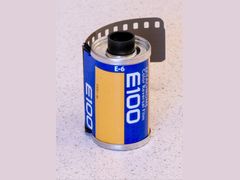 Ektachrome E100
A camera scan of a color negative is still a negative, orange base and all, so it needs inverting. The usual tool is Negative Lab Pro, a $99 plugin that requires Lightroom Classic (or Lightroom 6). Its free trial is the full program with no watermarks, limited to 24 conversions, enough to judge it on a roll.
darktable's negadoctor module does the job for free. Its manual asks you to include some unexposed part of the film in each capture, so the software can set the film base (Dmin) value.
Slide film such as Kodak Ektachrome E100 is already positive and needs no inversion software. Expect any raw negative scan to look flat at first: Christopher Crawford notes the file straight from the scanner needs more contrast, especially from negatives, and that is normal.
Sources: negativelabpro.com, docs.darktable.org, tonephotographic.com, crawfordphotoschool.com
Can you scan 120 medium format film with a DSLR?
Yes. A 6x6 or 6x7 negative can be captured in one shot, or in several overlapping shots stitched into one file for more resolution. Casual Photophile captured a 6x6 negative as six separate images and stitched them in Lightroom, and Adam Perfect made 100-megapixel scans of 6x6 film with a 16-megapixel Fujifilm X-T1 the same way.
You need a carrier and light sized for 120. Negative Supply's Light Source 35 is designed for 35mm and smaller film, while the Lomography DigitaLIZA Max ($109.90 at Glazer's) holds both 35mm and 120 and includes a smartphone mount. For how the two formats differ in detail and cost, see 35mm vs 120 film.
Sources: casualphotophile.com, adamperfect.com, glazerscamera.com
How to scan film on a flatbed scanner (Epson V600 or V850 Pro)
These steps follow Epson's user guide for its V800-series scanners and Negative Lab Pro's flatbed advice; check your own model's manual for holder details. Epson lists the V600 as discontinued, so a V600 now means a refurbished or used unit.
- 1
Remove the document mat
Take the white document mat out of the lid; removing it uncovers the transparency unit the scanner uses to scan film. Wipe the transparency window and the glass with a soft cloth.
- 2
Load the film holder
Blow dust off the strips and slide them into the holder as its diagram shows, shiny side up in Epson's V800 holder. Do not cover the holder's cutouts, which the scanner uses to adjust its light, then close the covers until they click.
- 3
Place the holder on the glass
Turn the holder over, line it up with the upper right corner, match the symbol on the holder's edge to the one on the glass, and close the lid. A V600 holder takes 12 frames of 35mm, 4 mounted slides or 2 medium format frames.
- 4
Choose the settings
If you will invert in Negative Lab Pro, scan as a positive (not in the software's negative mode), as a 48-bit TIFF (16 bits per channel), with every color correction off. On a V600, 3200 ppi captures all the real detail.
- 5
Set dust removal and exposure
Turn on Digital ICE only for color film or chromogenic black and white such as Ilford XP2 Super; it does not support traditional black and white negatives or Kodachrome. In VueScan, lock exposure once per roll.
- 6
Scan and add contrast
Expect about 2 to 4 minutes per 35mm frame on a V600 at 3200 ppi. The file will look flat and gray; add contrast with levels or curves, or let the conversion software do it.
Sources: support.epson-europe.com, epson.com, negativelabpro.com, filmscanner.info, support.epson-europe.com, crawfordphotoschool.com
Flatbed, dedicated and phone scanner prices (October 2026)
| Seller | Item | Price | Note |
|---|---|---|---|
| Epson Clearance Center | Epson Perfection V600, Certified ReNew (refurbished) | $299.99 | Out of stock on October 28, 2026; the new V600 is discontinued |
| Epson | Epson Perfection V850 Pro | $1,999.00 | New; 6400 dpi optical, 4.0 Dmax |
| Glazer's Camera | Epson Perfection V850 Pro | $1,999.00 | New |
| Glazer's Camera | Plustek OpticFilm 8200i Ai | $499.00 | Dedicated 35mm film scanner |
| Hamrick Software | VueScan Professional (one-time purchase) | $199.95 | List price; the edition with raw DNG output; on sale for $149.96 until October 30, 2026 |
| Glazer's Camera | Lomography DigitaLIZA Max | $109.90 | 35mm and 120, with smartphone mount |
| Glazer's Camera | Kodak Mobile Film Scanner | $44.95 | Small box that works with your phone |
Prices checked October 2026. They change often.
Common mistakes when scanning film at home
Most bad home scans come down to a handful of habits, on a camera rig or a flatbed. Focus and stray light are covered in the steps above; these are the others that catch people.
- Laying film straight on the light pad. It invites Newton rings and shows every unevenness in the light; use a carrier that lifts the film.
- Leaving auto exposure on. Each frame gets a different exposure and the conversions drift; set one manual exposure per roll.
- Capturing JPEG or TIFF on the camera. Settings baked into the file distort color once the negative is inverted; shoot raw.
- Stacking adapters and extension tubes. Negative Lab Pro says each one adds light variances that can throw off color.
- Cleaning film with canned air. Christopher Crawford warns most US canned air contains a bitterant that leaves residue on film and scanner glass.
- Scanning a V600 at 6400 ppi. Filmscanner.info found 3200 ppi captures the same real detail, with smaller files.
- Using Digital ICE on traditional black and white film. Epson supports it only on chromogenic black and white, and ICE scans can look softer.
- Leaving the document mat in the lid or covering the holder's cutouts. The mat blocks the transparency unit, and the cutouts are how the scanner adjusts its light.
Sources: negativelabpro.com, crawfordphotoschool.com, filmscanner.info, support.epson-europe.com, support.epson-europe.com
Troubleshooting film scans: orange edges, Newton rings, dust and blur
Match the symptom to the cause below. The camera scanning fixes come from Negative Lab Pro's image issues page; the flatbed fixes come from Epson's own guides and Scantips.
| Problem | Likely cause | Fix |
|---|---|---|
| Orange blotches or uneven color after inversion | Uneven light, or reflections on the lens, sensor or film | Mask light that isn't hitting the negative, use a lens hood, remove filters, shoot emulsion side toward the lens at f/8 |
| Bright orange edges around the frame | Film sits too far above the diffuser, so the holder casts a shadow | Bring the negative closer to the diffusing surface |
| Strong blue cast on TIFF scans | Sampling the film border with Lightroom's color picker, or scanner color correction left on | Skip the picker on TIFFs, turn off scanner corrections, try Negative Lab Pro's AutoWarm setting |
| Black and white conversion has a tint | Color model left on color | Set Negative Lab Pro's color model to B+W, or reset saved toning |
| Newton rings (rainbow ring patterns) | Film not held flat against the glass, often because it is curled | Use a proper holder; Epson suggests base side up and mirroring the preview; Scantips says a thin spacer prevents them |
| Blurry flatbed scans | Uneven film height in an adjustable holder | Set all the holder's height adjusters to the same height |
| Dust spots on camera scans | No infrared dust removal on cameras | Gloves, a rocket blower or anti-static brush right before capture, then spot-heal what remains |
| Scans look flat and gray | Normal for raw negative scans | Add contrast in editing or let the conversion software set it |
Sources: negativelabpro.com, negativelabpro.com, epson.co.uk, support.epson-europe.com, scantips.com, crawfordphotoschool.com
Questions people ask
Do you need a macro lens to scan film with a camera?
A true macro lens gives the best results; the Film Photography Project recommends macros between 55mm and 105mm that reach 1:1 on full frame. Extension tubes on an older lens also work, and its affordable favorite is an old Nikon 55mm macro with a tube. Negative Lab Pro warns, though, that each tube or adapter adds light variances that can throw off color.
Sources: filmphotographyproject.com, negativelabpro.com
How many megapixels do you need to scan 35mm film?
Around 20 or more. A 35mmc contributor says any camera over 20 MP captures all the grain detail of a 35mm negative, and Casual Photophile's tester puts the sweet spot at 24 to 45 MP. With a lower-resolution camera you can stitch several overlapping shots: Adam Perfect made 100-megapixel scans of 6x6 film with a 16 MP camera that way.
Sources: 35mmc.com, casualphotophile.com, adamperfect.com
Can you scan film with your phone?
Yes. The Kodak Mobile Film Scanner ($44.95) and the Lomography DigitaLIZA Max ($109.90, 35mm and 120, with a smartphone mount) are built around a phone camera; both were at Glazer's Camera in October 2026. Everything else on this page assumes a camera with a macro lens shooting raw, the setup Negative Lab Pro's scanning guide describes.
Sources: glazerscamera.com, glazerscamera.com
Which side of the film should face the camera when scanning?
The emulsion side, which is the matte one. Negative Lab Pro says it is less reflective, and Tone Photographic adds that loading it this way bends the film against its curl so it lies flatter. On an Epson flatbed, follow the holder's diagram instead; Epson's V800 guide loads strips shiny side up, then turns the holder over onto the glass.
Sources: negativelabpro.com, tonephotographic.com, support.epson-europe.com
What resolution should I scan 35mm film at on an Epson V600?
3200 ppi. Filmscanner.info measured the V600's real resolution at about 1560 ppi and found 3200 ppi captures the same detail as 6400 ppi, so the higher setting only makes bigger files. At 3200 ppi a 35mm negative took Filmscanner.info about 2 to 4 minutes, depending on whether dust removal was on.
Sources: filmscanner.info
Is the Epson V600 discontinued?
Yes. Epson's US site lists the Perfection V600 as discontinued, and its Certified ReNew refurbished unit ($299.99) was out of stock on October 28, 2026. New, the step up is the V850 Pro at $1,999 from Epson and Glazer's Camera, and a dedicated 35mm scanner such as the Plustek OpticFilm 8200i Ai is $499. Compare the options in [best film scanners](/developing/best-film-scanners/).
Sources: epson.com, epson.com, epson.com, glazerscamera.com
Can Digital ICE remove dust from black and white film?
Not from traditional black and white negatives. Epson supports Digital ICE only on chromogenic black and white film such as Ilford XP2 Super, plus color film, and not on Kodachrome slides. Epson also warns ICE scans can look softer, so for silver black and white, blow the film clean and spot the rest in editing.
Sources: support.epson-europe.com
How long does it take to scan a roll of film at home?
With a camera and a roll carrier, a few minutes; Negative Supply says its Simple 35mm system scans full rolls in 2 minutes or less. On a flatbed, a 35mmc writer estimates 1 to 2 hours per roll, and Filmscanner.info reports 67 minutes for a batch of 18 small-format negatives at 4800 ppi with dust and scratch correction on, using Epson Scan on a V850 Pro.
Sources: glazerscamera.com, 35mmc.com, filmscanner.info
Sources
Every fact on this page comes from one of these. How we choose and check sources is in our methodology.
Show all 30 sources
official 13
- Negative Lab Pro: Scanning Guide
- Negative Lab Pro: Image Issues
- Negative Lab Pro: Buy (pricing)
- Epson: Perfection V600 Photo Scanner
- Epson: Perfection V850 Pro Photo Scanner
- Epson: Perfection V600 Certified ReNew
- Epson V800 User's Guide: Placing Film or Slides
- Epson V800 User's Guide: Digital ICE Technology
- Epson V800 User's Guide: Scan Quality Problems
- Epson UK FAQ: Newton rings or blur when scanning film
- Hamrick Software: VueScan pricing
- darktable user manual: negadoctor
- Valoi: easy35 v2
retailer 8
- Glazer's Camera: Camera Scanning collection
- Glazer's Camera: Scanners collection
- Glazer's Camera: CineStill CS-Lite
- Glazer's Camera: Negative Supply Simple 35mm Film Scanning System
- Glazer's Camera: Nikon ES-2
- Glazer's Camera: search '50mm macro'
- Perfect Image Camera: Film Processing
- Mike's Camera: Mail-in Film Developing
Independent blogs 3
Editorial reviews 3
Manuals and references 3
Keep reading
Developing and scanning
How to use Negative Lab Pro: gear and prices ($99 plus Lightroom Classic), scan settings, the convert and edit steps, roll analysis and fixes for blue casts.
Developing and scanning
The best film scanner for most 35mm shooters is the Plustek 8200i Ai at $499. Compare the Epson V850 Pro, a used V600 or Coolscan and camera-scanning kits.
Developing and scanning
How to develop film at home: the gear and chemistry you need with October 2026 prices, black and white and C-41 steps with times, and fixes for bad negatives.
Developing and scanning
A roll of 35mm film costs $5 to $11.50 to develop at US labs, or $11.50 to $29 with scans. Prices from 12 labs and the big chains, checked October 2026.
Developing and scanning
The best US labs for mail-in film developing, with October 2026 prices, shipping costs, turnaround times and scan sizes for The Darkroom, Dwayne's and more.