Canon PowerShot V10: is Canon's pocket vlog camera worth it?
The short answer
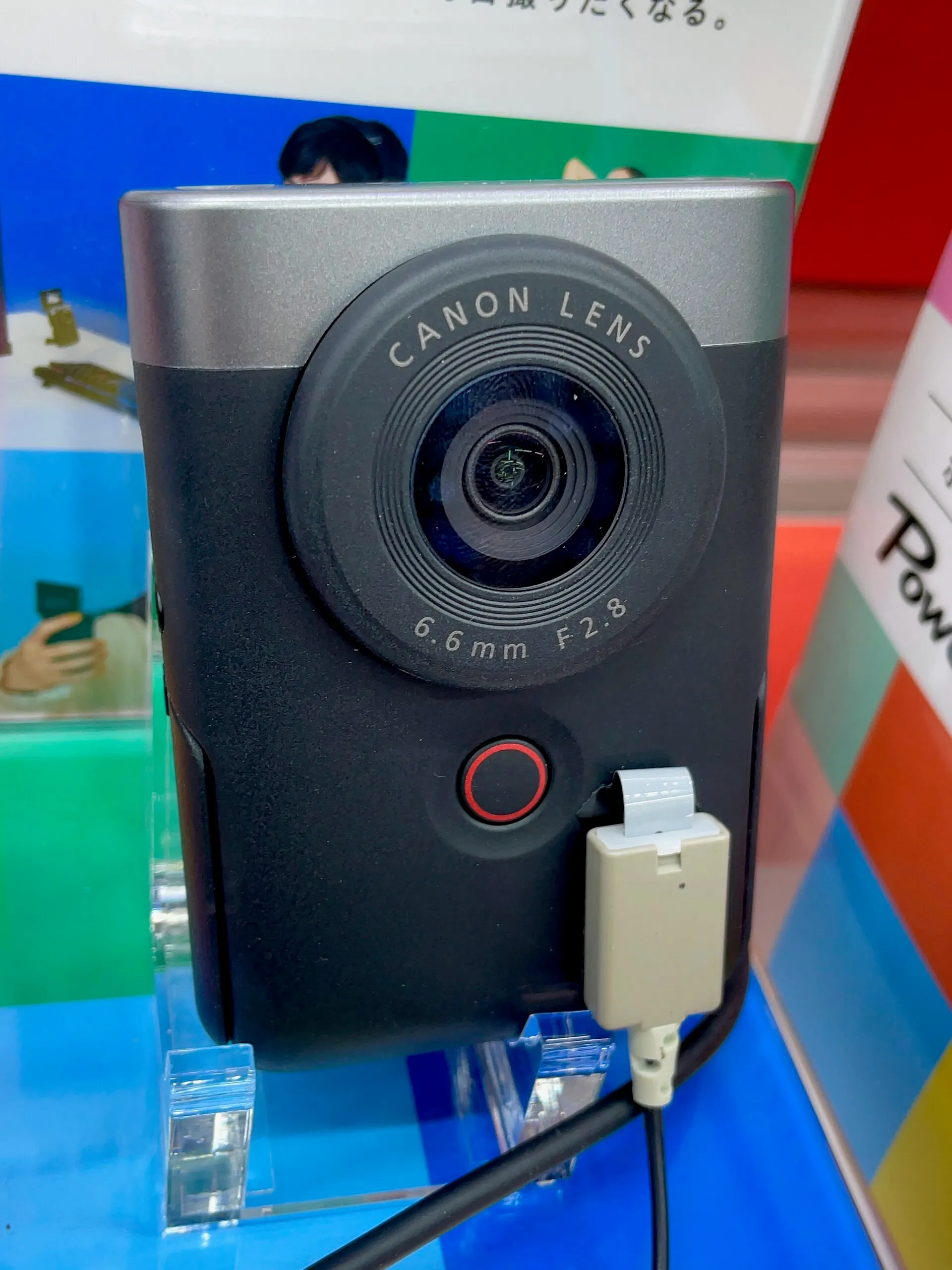
The Canon PowerShot V10 is a 2023 pocket vlogging camera with a 1-inch sensor, a wide 19mm-equivalent f/2.8 lens, 4K video and a built-in stand, and reviewers praise its pocket size and easy one-handed use for quick talking-head clips.
Its weak spots are 4K overheating and a sealed-in battery, but the price has dropped from $429 at launch to about $299 new, with Canon refurbished units at $219 to $239.99 in late October and early November 2026.
- Sensor
- 1-inch type CMOS, 20 MP JPEGs
- Lens
- 19mm equiv. f/2.8, no zoom
- Video
- 4K 30p, Full HD 60p
- Price, Nov 2026
- $299 new, $239.99 refurb
Built from 141 opinions from 23 pages and videos. Not yet tested by Camera Dojo. Updated .
The short version
The praise is consistent: it slips into a jeans pocket at about 211 g, the fold-out stand sets up a shot without a tripod, the screen flips up so you can see yourself, and the built-in mics sound clear. It also works as a plug-and-play USB-C webcam. Cameralabs calls it Canon's best dedicated vlogging camera to date, and Digital Camera World says it could replace your phone for video.
The complaints are just as consistent: contrast-detect autofocus that hunts, a 2-inch screen that is hard to read in sun, about 50 minutes of 4K per charge in PCMag's test, and 4K shutdowns after about 15 to 21 minutes in Tom's Guide and TechRadar reviews. Photos are automatic JPEGs only. Trusted Reviews calls it too underpowered to replace a decent smartphone and tells would-be vloggers to save for a cheap mirrorless camera, and Canon's 2025 PowerShot V1 addresses the focus and heat problems, at $849.00 new.
Good fit if
- You film yourself talking to the camera, at a desk or walking, and want a wide 19mm view without holding a phone at arm's length
- You want a camera that fits a jeans pocket: about 211 g (7.44 oz), with its own fold-out stand
- You want better sound than a phone without extra gear: reviewers praise the built-in stereo mics, and there is a 3.5mm mic jack
- You need a plug-and-play webcam: it works over USB-C at 1920 x 1080 and 30 fps with no app
- You can buy at today's prices: about $299 new or $219 to $239.99 refurbished from Canon, well under the $429 launch price
Think twice if
- You film long 4K takes: reviewers saw overheating shutdowns after about 15 to 21 minutes
- You need all-day battery: the battery is sealed in, and PCMag got about 50 minutes of 4K30 per charge
- You need reliable focus in low light or on moving subjects: it is contrast-detect only, with no manual focus
- You mainly take photos: stills are automatic JPEGs, with no RAW and no zoom
- You already own a recent flagship phone: TechRadar and Trusted Reviews doubt the V10 adds enough
Canon PowerShot V10 vs V1, G7 X Mark III and G10
The V10 started Canon's V series of video-first cameras. Its sensor is a modified version of the G7 X Mark III's, the 2025 V1 is the bigger step up in the same series, and the 2008 G10 shows up in searches only because the names look alike.
| Model | Year | Sensor | Why look for it |
|---|---|---|---|
| PowerShot V10 | 2023 | 1-inch type back-illuminated CMOS, about 20 MP JPEGs | This camera: a fixed 19mm-equivalent f/2.8 lens, 4K up to 30p, a built-in stand and a 2-inch flip-up screen. About $299 new and $239.99 refurbished from Canon on November 2, 2026. |
| PowerShot G7 X Mark III | 2019 | 1-inch type CMOS; the V10 uses a modified version of it | The sibling with a zoom lens and optical lens stabilization, which Cameralabs says the V10 gives up. Cameralabs preferred the V10 for filming and would buy it over the G7 X Mark III for video work. B&H sold a used one at $919.95 in November 2026, against $929.99 new. See the G7 X Mark III page. |
| PowerShot V1 | 2025 | 1.4-type CMOS, roughly twice the area of the V10's (Cameralabs) | The successor, launched in March 2025: dual pixel autofocus ends the focus wobble and a built-in fan extends recording, per Cameralabs. $849.00 new or $649.99 refurbished from Canon in November 2026. |
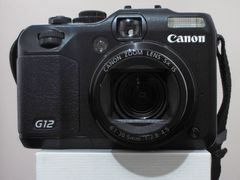
| PowerShot G10 | 2008 | 14.7 MP 1/1.7-inch CCD | Not a vlogging camera: a much older compact with a 28-140mm f/2.8-4.5 zoom that Google lists next to the V10. Used G10 prices are not tracked on this page. Canon's G line from that period also includes the PowerShot G12. |
Sources: cam.start.canon, digitalcameraworld.com, cameralabs.com, cameralabs.com, cpricewatch.com, cpricewatch.com, en.wikipedia.org
What owners and reviewers say, topic by topic
We sorted 141 opinions about the PowerShot V10 from 23 pages and videos on 23 websites and channels. Each row shows how many people raised a topic and how many of them were positive. Open a row to read short quotes, each linked to its source.
Most of these opinions come from editorial reviews written on review units around the 2023 launch, plus five YouTube reviews. Owner voices are thin (a few Lemon8 posts, one Vocal review and one blog), and Reddit, DPReview and retailer reviews could not be read, so the heat and battery reports show what can go wrong, not how often.
Video42% positiveof 26
Mixed but leaning positive: clear audio, sharp 4K, a wide lens and good face tracking win praise. Autofocus hunting, digital stabilization that crops the frame and jerky walking footage are the recurring complaints.
“Unless I’m stationary, there are slight imperfections in the motion.”
“It does have a built-in mic that is pretty good at capturing the audio without too much background noise filtering in.”
“I’ve found the visual and audio quality ideal for filming YouTube shorts, on-the-go vlogs, and voiceovers for longer pieces of content.”
Kyusai reviewOwner
“The stabilisation works well at times (when filming yourself) but can be jerky in other moments”
Sam Kieldsen, Trusted Reviews reviewHands-on review
Ease of use71% positiveof 17
A clear strength: one big record button, true one-handed control and plug-and-play webcam use. The complaints are fiddly touchscreen sub-menus, no grip, accidental recordings and an auto mode some find inflexible.
“It took me a long time to figure out how to adjust the settings to my liking.”
“The settings on the camera itself are also pretty straightforward so if you are new to vlogging or are a camera noob (like myself)”
“it's positively pocket-sized and its ease of use rivals a smartphone”
James Artaius, Digital Camera World reviewHands-on review
“the PowerShot V10 takes away a lot of the guesswork behind creating videos”
The Noisecast long-term reviewHands-on review
Screen and viewfinder35% positiveof 17
Split, leaning negative: the flip-up screen makes filming yourself easy, but at 2 inches it is small, hard to read in sun and makes focus checks difficult. There is no viewfinder.
“The touch-sensitive screen is somewhat awkward to use”
“there's no side-to-side movement or tilting”
Ian Evenden, Creative Bloq reviewHands-on review
“Something I love about the camera is the ability to flip the screen around and film with it facing you.”
Kyusai reviewOwner
“Still, I prefer a screen that folds out to the side.”
Coolblue expert reviewHands-on review
Image look43% positiveof 14
Owners and reviewers find stills crisp, with natural skin tones, for a camera whose photo mode is fully automatic. The limits are JPEG only, no RAW or manual photo exposure, and color profiles you can't fine-tune.
“the auto white balance did struggle to make sense of all the different colours”
T3 reviewHands-on review
“The pictures come out so crisp and beautiful, I only do some light edits”
Lemon8, owner postsOwner
“This sensor provides clear images with lots of detail and little noise.”
Coolblue expert reviewHands-on review
“but it produces clear photos that’d work nicely for thumbnails or social media”
Kyusai reviewOwner
Build quality64% positiveof 14
The fold-out stand is the most praised design touch, and the plastic body feels solid and creak-free. The protruding lens collects fingerprints, and the stick-on wind muffler mounts draw criticism.
“I think it’s a shame that the windshields cover most of the screen.”
Coolblue expert reviewHands-on review
“The case, which feels very well made, is chunky black plastic”
Ian Evenden, Creative Bloq reviewHands-on review
“Its overall design is unusual but genuinely clever: the solid and sturdy built-in kickstand”
Sam Kieldsen, Trusted Reviews reviewHands-on review
“What I really like about this camera is its built-in flip-out stand that can be tucked away.”
Nikita Achanta, Tom's Guide reviewHands-on review
Batteries and charging15% positiveof 13
The most criticized topic: the battery is sealed in, and reviews got roughly 20 to 65 minutes of video per charge. Most sources say it can run from USB-C power while recording, though two sources, The Noisecast and a YouTube owner review, say it can't.
“I have the Canon Powershot v10 and although I think it’s a cute vlogging camera, the battery life takes a huge hit very quickly.”
Lemon8, owner postsOwner
“The mobile control drains the battery very quickly.”
Jan Rybar, PhotoBohemian reviewHands-on review
“you cannot simultaneously use the camera and charge the battery at the same time”
The Noisecast long-term reviewHands-on review
“It’s possible to charge the camera while recording, say via an attached power bank.”
TechRadar reviewHands-on review
Size and weight100% positiveof 13
Unanimous: every mention praises how small and light it is, from jeans pockets to a car cup holder, at about 211 g.
“It is smaller than my iPhone 14 Pro Max and even fits in my back pocket!”
“it’s exceptionally lightweight and easy to take around with you if you’re filming on the go”
Kyusai reviewOwner
“The Canon V10 is really small and fits comfortably in any pocket.”
Jan Rybar, PhotoBohemian reviewHands-on review
“The V10 is small enough to fit into some of the smallest jeans pockets you may have”
EFTM reviewHands-on review
Price and value56% positiveof 9
Split. Owners are happy, including one who paid $200 on Facebook Marketplace, and T3 notes street prices 25-30% below launch. Several reviewers say a recent flagship phone makes it hard to justify.
“you can’t help thinking ‘dated technology’ nonetheless”
Photo Review (Australia) reviewHands-on review
“it’s too quirky and underpowered to replace a decent smartphone, let alone a mirrorless camera”
Sam Kieldsen, Trusted Reviews reviewHands-on review
“btw I bought it on Facebook marketplace for only $200”
Lemon8, owner postsOwner
“I found it to be a worthwhile investment for the quality of my content, both visually and audibly.”
Kyusai reviewOwner
Low light and flash14% positiveof 7
Mostly negative: there is no built-in light, noise climbs with ISO, and night footage gets grainy with focus trouble. One review found Manual Exposure Movie mode helps.
“Footage was grainy and the lens had difficulty focusing on more than one occasion”
Nikita Achanta, Tom's Guide reviewHands-on review
“the lack of on-board lighting means you need to be careful when and where you’re filming”
Sam Kieldsen, Trusted Reviews reviewHands-on review
“the V10 produces its best work when fed sufficient light, and noise creeps in as you move up the ISO settings”
Ian Evenden, Creative Bloq reviewHands-on review
“Of course, poorer light (less bright sun, more contrasts) can complicate things”
Jan Rybar, PhotoBohemian reviewHands-on review
Reliability today0% positiveof 7
Every mention is negative and almost all are about heat: 4K recording brought warnings or shutdowns after about 6 to 21 minutes in reviews. Long-term owner reports are scarce.
“Heat management is a real concern with this camera”
PCMag reviewHands-on review
“it shut down due to overheating after about 15 minutes of 4K shooting”
Nikita Achanta, Tom's Guide reviewHands-on review
“Shooting in 4K resulted in a temperature warning after about 6 minutes.”
Tshepo Thaela, Stuff South Africa review 2024-02Hands-on review
“the camera shut down at the 21-minute mark during my video testing due to overheating”
TechRadar reviewHands-on review
Memory cards and transfer25% positiveof 4
Reviewers warn that full-quality 4K needs a fast microSD card, and the card Canon sent one reviewer was too slow. An owner found moving footage to a phone and PC quick and painless.
“The card Canon sent me was not fast enough to capture video at this rate”
EFTM reviewHands-on review
“the card slot could have done with accepting something faster than Micro SD”
Ian Evenden, Creative Bloq reviewHands-on review
“your record times will be hamstrung unless you insert the highest-performing microSD card available”
TechRadar reviewHands-on review
“transferring my footage over to my phone and PC has been relatively quick and painless”
Kyusai reviewOwner
PositiveMixedNegative
Canon PowerShot V10 specs that matter
Inside is a 1-inch type sensor that Digital Camera World describes as a modified version of the one in the PowerShot G7 X Mark III, behind a fixed ultra-wide lens. Everything else is built around filming yourself: a fold-out stand, a flip-up screen, stereo mics and a mic jack.
Canon's own numbers can look confusing: it lists 20.9 MP total and 15.2 MP effective for stills, yet the largest JPEG is about 20 MP (5472 x 3648). Digital Camera World and TechRadar call it a 20.1 MP sensor.
| Spec | PowerShot V10 |
|---|---|
| Sensor | 1-inch type back-illuminated CMOS; largest JPEG about 20 MP |
| Lens | 6.6mm f/2.8 fixed, about 18mm equivalent for stills and 19mm for 16:9 video; no optical zoom; focuses from 0.05 m (0.16 ft) |
| Video | 4K UHD at 29.97p, 25p or 23.98p; Full HD up to 59.94p; clips stop at about 1 hour |
| ISO in video | Up to 3200 in 4K and 6400 in Full HD (TechRadar) |
| Photos | JPEG only: no RAW, C-RAW or HEIF |
| Autofocus | Contrast detection, face tracking or specified-frame AF; no manual focus |
| Stabilization | Digital only: off, on (about 1.1x crop) or enhanced (about 1.43x crop), per Cameralabs |
| ND filter | Built in, 3 stops; auto, on or off |
| Screen | 2.0-inch touchscreen, about 460,000 dots, flips up about 180 degrees; no viewfinder |
| Stand | Built in; tilts the camera 10 to 30 degrees up or down |
| Battery | Built in, not user-replaceable; about 290 shots or about 55 minutes of 4K at 23 C (73 F) |
| Card | One microSD, microSDHC or microSDXC slot; UHS-I (UHS-II not supported) |
| Ports | USB-C (USB 2.0) for charging, power and webcam use; 3.5mm mic jack; micro HDMI (PCMag) |
| Wireless | Wi-Fi 802.11b/g/n and Bluetooth 4.2 LE |
| Size and weight | 63.4 x 90.0 x 34.3 mm (2.50 x 3.54 x 1.35 in); about 211 g (7.44 oz) with card |
| Weather sealing | None (Digital Camera World) |
Sources: cam.start.canon, cam.start.canon, cam.start.canon, cam.start.canon, digitalcameraworld.com, cameralabs.com, techradar.com, uk.pcmag.com
PowerShot V10 battery, charging and memory cards
The battery is built in, and Canon says it is not user-replaceable. Canon rates it at about 290 shots or about 55 minutes of 4K at 23 C (73 F), and PhotographyBlog adds about 1 hour 20 minutes of Full HD. Reviews ran shorter: PCMag measured around 50 minutes of 4K30, Stuff got about 65 minutes of Full HD, and Tom's Guide was down to the last bar after about 20 minutes of handheld 4K and stills.
Charging is over USB-C, and Canon's manual says the camera can be used while plugged in, so a power bank is the practical fix for long sessions. TechRadar and Trusted Reviews agree; The Noisecast's long-term review says it could not use and charge the camera at once. Charging time is disputed too: Canon quotes about 1 hour 50 minutes from empty with its PD-E1 adapter, while Tom's Guide went from 0 to 100 percent in about 30 minutes with a 30 W adapter.
Cards are microSD only. Canon asks for UHS Speed Class 3 or faster for standard-quality 4K, which runs about 120 Mbps, and a 128 GB card holds about 2 hours 21 minutes of it. Trusted Reviews suggests V30 or faster, and EFTM found the card Canon supplied too slow for 4K.
- Format new cards in the camera. Canon warns that exFAT cards may not be recognized by some computers or card readers.
- Copy movie files over 4 GB with a card reader, because Canon says the computer's standard copy may not handle them.
- Turn on standby low resolution: Canon says it lowers battery use and heat while the camera waits to record.
- Wi-Fi transfers through the Canon Camera Connect app work, but Tom's Guide found them slow even on a fast home connection.
For sit-down recording, a USB-C power bank with the camera on its stand works around the sealed battery; in 4K, heat becomes the next limit.
Sources: cam.start.canon, cam.start.canon, cam.start.canon, cam.start.canon, cam.start.canon, photographyblog.com, uk.pcmag.com, tomsguide.com, techradar.com, trustedreviews.com, thenoisecast.com
Best Canon PowerShot V10 settings for vlogging
These come from Canon's manual and from the reviewers cited, not from Camera Dojo testing.
- 1
Pick the frame rate
In North America (NTSC), 4K records at 29.97 or 23.98 fps, and Canon offers 23.98 for a more film-like look. Full HD goes up to 59.94 fps for smoother motion.
- 2
Lock exposure in Manual Exposure Movie
Cameralabs' recipe is 1/50 shutter, f/2.8, auto ISO and auto ND, so there is nothing to keep adjusting. It also avoids the overexposure TechRadar saw from Auto Movie in bright sun.
- 3
Match stabilization to the shot
Auto Movie ships with stabilization off, while Movie IS Mode defaults to enhanced. Turn it off on the stand, since Canon says it magnifies the image and adds grain; enhanced crops about 1.43x, turning 19mm into about 27mm.
- 4
Use a color filter instead of a log profile
There is no log profile or picture style, but 14 color filters preview live on screen, from Story Teal&Orange to RetroGreen and SepiaTone for a faded look. If you plan to grade, Cameralabs suggests a muted filter.
- 5
Go easy on Smooth Skin
Smooth Skin Movie has five strength levels, and Cameralabs found even the middle one a little unnatural. Canon warns it can alter areas other than skin and limits 4K Smooth Skin recordings to about 5 minutes.
- 6
Turn the camera for vertical video
Held upright, it records 16:9 by default. Rotate it 90 degrees and it switches to vertical on its own, according to Popular Photography and PCMag.
- 7
Plan for wind and low light
TechRadar says the mics have an auto wind filter (Photo Review says there is none), and the optional windshields help more but cover part of the screen. In dim light, Canon recommends turning off auto slow shutter for moving subjects.
Sources: cam.start.canon, cam.start.canon, cam.start.canon, cam.start.canon, cam.start.canon, cam.start.canon, cameralabs.com, techradar.com, popphoto.com, uk.pcmag.com, photoreview.com.au
Canon PowerShot V10 vs DJI Osmo Pocket 3
 Canon PowerShot V10 | DJI Osmo Pocket 3 | |
|---|---|---|
| Sensor | 1-inch type CMOS | 1-inch sensor (Tom's Guide) |
| Stabilization | Digital, crops the frame | Camera on a gimbal; Tom's Guide found it far smoother |
| 4K | Up to 30p; shut down after about 15 minutes in Tom's Guide's review | Up to 60p, and Tom's Guide says it doesn't overheat like the V10 |
| Setup | Built-in stand and flip-up screen | Gimbal camera on a handle (Cameralabs) |
| Price | About $299 new, $219 to $239.99 refurbished (Nov 2026) | $519 in Tom's Guide's review; around $500 per Cameralabs |
Pick the Canon PowerShot V10 if
- You record sit-down or tabletop video and want the built-in stand
- You want the lower price and a camera that fits a jeans pocket
- You mostly shoot short clips
Pick the DJI Osmo Pocket 3 if
- You walk and talk on camera and want gimbal-smooth footage
- You need long 4K takes without heat shutdowns
- You can spend more for it
Sources: tomsguide.com, cameralabs.com, cpricewatch.com, cpricewatch.com
What to check before buying a used PowerShot V10
- 1
Price it against Canon refurbished
Canon's refurbished store listed the V10 at $239.99 on November 2, 2026, with a one-year Canon USA warranty, and ran sales at $219.00 in late October. New was about $299, so a used body only makes sense below those numbers.
- 2
Run a long 4K test on the stand
Record a long 4K clip and watch the 10-level heat indicator, and note how fast the battery drops, because the cell can't be replaced.
- 3
Look at the lens and body edges
The protruding lens attracts smudges and the matte finish scuffs easily, according to TechRadar, so check both in good light.
- 4
Work the screen hinge and stand
Canon warns against forcing the screen too far open because it strains the hinge. Flip the screen and fold the stand a few times.
- 5
Ask what is in the box
Kits vary. PhotographyBlog lists a power cable, soft case, lens cap, windshield and wrist strap in the $429.99 US kit, while Popular Photography says Canon doesn't include a lens cap.
- 6
Test pairing and webcam mode
Pair from inside the free Camera Connect app, since Canon says pairing from the phone's Bluetooth settings screen won't work. Then plug it into a computer to confirm it shows up as a webcam.
Sources: cpricewatch.com, cpricewatch.com, cpricewatch.com, cpricewatch.com, cam.start.canon, cam.start.canon, cam.start.canon, techradar.com, photographyblog.com, popphoto.com
Known problems and what fixing them costs
No recall or service notice for the V10 turned up in the sources checked; these problems come from reviews and Canon's own manual, so they show what can go wrong rather than how often.
Overheating and shutdowns in 4K
Raised in 6 opinions
- How you notice
- A white, then red, temperature icon appears and recording stops. Tom's Guide saw 4K shut down after about 15 minutes handheld, TechRadar at 21 minutes on the stand, and Stuff got a warning after about 6 minutes.
- Fix
- Shoot Full HD or short 4K takes, use the stand instead of holding the camera, and watch the heat gauge. Canon's auto power off temperature setting can be raised to High for more time, with a warning that the camera and card get hotter.
- Typical cost
- Free. Heat is a design limit, so no repair applies.
Sources: tomsguide.com, techradar.com, cam.start.canon, cam.start.canon
Short battery life and a battery you can't swap
Raised in 10 opinions
- How you notice
- The battery drains in well under an hour of 4K in reviews, and Canon says it is not user-replaceable, so there is no spare to pop in.
- Fix
- Run it from a USB-C power bank, turn on standby low resolution, and shoot Full HD when 4K isn't needed.
- Typical cost
- No US repair or Canon service price for a V10 battery turned up in the sources checked.
Sources: cam.start.canon, cam.start.canon, cam.start.canon, techradar.com
Recording stops with a slow microSD card
Raised in 3 opinions
- How you notice
- Movie recording stops by itself. Canon says a slow-writing card can cause this, and EFTM found the card Canon supplied too slow for 4K.
- Fix
- Use a UHS-I card rated UHS Speed Class 3 or better for standard 4K, format it in the camera and test a few clips before a trip.
- Typical cost
- The price of a faster card; no repair.
Sources: cam.start.canon, cam.start.canon, cam.start.canon
Autofocus hunts, worst in low light
Raised in 6 opinions
- How you notice
- Focus wobbles between face and background at times, and night footage gets grainy with focus misses. Canon's manual lists low light as a hard case for its contrast-detect AF.
- Fix
- Shoot in good light and keep your face near the center: Canon's manual says face tracking can miss faces at the edges of the frame or ones that are too bright or dark. Specified-frame AF lets you tap a single focus point instead. There is no manual focus.
- Typical cost
- Free. It is a design limit, not a fault.
Sources: cameralabs.com, tomsguide.com, cam.start.canon
Smudged lens and scuffed body
Raised in 2 opinions
- How you notice
- TechRadar cleaned the lens several times on one walk and found the matte finish scuffs easily; Digital Camera World calls the lens a fingerprint magnet.
- Fix
- Carry a lens cloth, wipe the lens before each take, and consider a lens cap, such as the SmallRig rubber cap Cameralabs mentions.
- Typical cost
- Only the cost of a lens cloth; no repair price found.
Sources: techradar.com, digitalcameraworld.com, cameralabs.com
Mistaps on the tiny touchscreen
Raised in 2 opinions
- How you notice
- Tom's Guide needed at least two tries to switch between photo and video with the small on-screen icon, and T3 calls the sub-menus too small and fiddly.
- Fix
- Tap deliberately with a fingertip. Cameralabs says a button on the back also toggles movie and photo, but Tom's Guide found no dedicated button, so check your unit.
- Typical cost
- Free.
Sources: tomsguide.com, cameralabs.com
Condensation inside the lens in humid conditions
- How you notice
- Canon warns that condensation may form inside the lens when you record 4K Smooth Skin Movie in humid environments.
- Fix
- Avoid 4K Smooth Skin Movie in humid air, and keep the camera out of rain, since it has no weather sealing.
- Typical cost
- No US repair price for moisture damage turned up in the sources checked.
Sources: cam.start.canon, digitalcameraworld.com
Camera freezes or buttons stop responding
- How you notice
- Erratic operation, unresponsive buttons, or charging that won't start with the cable plugged in.
- Fix
- Canon's manual says an internal error may be the cause: force the camera off by holding the two buttons it shows together for 8 seconds, wait a while, then restart.
- Typical cost
- Free for the reset. If it keeps happening, Canon says to contact the dealer or a Canon service center; no price is published.
Sources: cam.start.canon
Canon PowerShot V10 price today: new and refurbished
On November 2, 2026, Canon Price Watch showed the V10 at $299.00 new at B&H and $299.99 at Adorama, both marked down from $399. Canon's refurbished store had it at $239.99 with a one-year warranty. Refurbished sales dipped to $219.00 in late October and sold out within days.
Canon Store
Refurbished, 1-year Canon USA warranty, in stock, PowerShot V10, black
$239.99
See listingCanon Store
Refurbished sale, Oct 24 and Oct 26, 2026 (sold out), PowerShot V10, black
$219.00
See listingB&H Photo (via Canon Price Watch)
New, PowerShot V10, black; was $399
$299.00
See listingAdorama (via Canon Price Watch)
New, PowerShot V10, black or silver; was $399
$299.99
See listingCanon Store
Refurbished sale, Aug 30, 2024 (sold out), PowerShot V10, black; shown for history
$199.00
See listingSmallRig
New accessory, Furry wind mufflers for the V10, price cited by Tom's Guide
$13
See listing
Prices checked on November 2, 2026. They move every week, so treat them as a range, not a quote. The new prices come from Canon Price Watch's price list, an undated snapshot read on November 2, 2026, not from the retailers' own pages. MPB, KEH, eBay, B&H and Adorama block automated checks, so used dealer prices are not listed. Launch price depends on the source: $429 (Tom's Guide) or $429.99 (PCMag) versus $399 (TechRadar). One Lemon8 owner says they paid $200 on Facebook Marketplace.
Video reviews worth your time

Canon PowerShot V10 REVIEW: move over G7X!
The Canon PowerShot V10 is a cleverly designed vlog camera with solid 4K video, an ultra-wide lens, and a built-in stand, though it suffers from contrast-detect autofocus hunting and a non-removable battery.

Canon Powershot V10 - It's Terrible (And I Love It)
The Canon PowerShot V10 is a fun, pocket-sized vlog camera with easy automated controls and built-in stand, though limited picture profile customization and lower 1080p quality hold it back.

Canon Powershot V10 First Look - Can't Believe They Made This Camera
The Canon PowerShot V10 is a compact, pocket-friendly vlogging camera with an integrated stand and web streaming support, though its contrast-detect autofocus and electronic image stabilization cropping limit its versatility.

what canon powershot v10 footage looks like for shy vloggers
The reviewer recommends the Canon PowerShot V10 as an exceptionally compact and user-friendly vlogging camera, despite minor issues with low-light performance and image stabilization cropping.

Canon PowerShot V10 - Watch Before You Buy
The Canon PowerShot V10 features a compact smartphone-like design, excellent 4K video, and a built-in stand, but is held back by its non-removable battery and webcam power limitations.
Questions people ask about the PowerShot V10
Is the Canon PowerShot V10 worth it?
It depends on what you film and what phone you have. Kyusai says yes for a beginner vlogger upgrading without breaking the bank, while Trusted Reviews calls it too quirky and underpowered to replace a decent phone and suggests saving for a mirrorless camera. At about $299 new or $219 to $239.99 refurbished from Canon in late 2026, it is easier to justify than at its $429 launch price.
Sources: kyusaimedia.com, trustedreviews.com, cpricewatch.com, cpricewatch.com
Does the Canon PowerShot V10 overheat?
Yes, in 4K. Tom's Guide saw it shut down after about 15 minutes of 4K, TechRadar at 21 minutes, and Stuff got a temperature warning after about 6 minutes. Canon's manual says a red temperature icon means recording will stop soon; Full HD and the stand help.
Sources: tomsguide.com, techradar.com, cam.start.canon
How long does the PowerShot V10 battery last, and can you charge it while recording?
Canon rates about 290 shots or 55 minutes of 4K, and PhotographyBlog adds about 1 hour 20 minutes of Full HD; PCMag measured around 50 minutes of 4K30. Canon's manual says the camera can be used while plugged in over USB-C, and TechRadar and Trusted Reviews recommend a power bank for long clips, though The Noisecast says it could not charge and record at once.
Sources: cam.start.canon, photographyblog.com, uk.pcmag.com, cam.start.canon, trustedreviews.com
How do I take a photo on a Canon PowerShot V10?
Switch to photo mode with the on-screen mode icon or the button on the back; Cameralabs says either toggles movie and photo, while Tom's Guide found no dedicated stills button and used the icon. Then tap your subject to focus and press the Start/Stop button. For tap-to-shoot, turn on Touch Shutter in the menu.
Sources: cameralabs.com, tomsguide.com, cam.start.canon
Does the Canon PowerShot V10 shoot RAW photos?
No. Canon's manual says stills are JPEG only, with no RAW, C-RAW or HEIF, and Digital Camera World says photo mode is completely automatic. PCMag notes JPEGs hold up less well to editing, and TechRadar found bright highlights like white clouds can clip.
Sources: cam.start.canon, uk.pcmag.com, techradar.com, digitalcameraworld.com
Can you use the PowerShot V10 as a webcam or with an external mic?
Yes to both. Choose video calls and streaming in the USB menu, connect the USB-C cable, and it works as a UVC/UAC webcam at 1920 x 1080 and 30 fps with no app. There is also a 3.5mm microphone jack.
Sources: cam.start.canon, photographyblog.com, cam.start.canon
What memory card does the Canon PowerShot V10 use?
A microSD, microSDHC or microSDXC card; UHS-I works and UHS-II is not supported. Canon asks for UHS Speed Class 3 or faster for standard 4K, and Trusted Reviews suggests V30 or faster.
Sources: cam.start.canon, trustedreviews.com
What's the best Canon PowerShot?
There isn't one answer. For pocket vlogging the V10 is the low-cost pick and the 2025 V1 the step up, while the [G7 X Mark III](/cameras/canon-powershot-g7-x-mark-iii/) keeps the zoom lens and optical stabilization that Cameralabs says the V10 gives up. Our [Canon G7X alternatives](/digicams/canon-g7x-alternatives/) guide covers more options.
Sources: cameralabs.com, cameralabs.com
What people compare it with
Canon PowerShot V1
The 2025 successor with a 1.4-type sensor about twice the V10's area, dual pixel autofocus and a cooling fan, per Cameralabs. It costs far more: $849.00 new or $649.99 refurbished from Canon in November 2026.
The 2019 compact whose 1-inch sensor the V10 borrows, with a zoom lens instead of the ultra-wide prime. Cameralabs prefers the V10 for filming, and B&H sold a used G7 X Mark III at $919.95 in November 2026, about three times the V10's $299 new price.
DJI Osmo Pocket 3
A 1-inch camera on a gimbal: Tom's Guide found its stabilization far smoother and said it doesn't overheat like the V10, at $519 in that review.
Sony ZV-1F
The rival PCMag compares it with throughout: fixed wide lens, $499.99 against $429.99 for the V10 at launch, with PCMag putting them on even footing. TechRadar says the Sony is less pocketable.
Every source behind this page
Read them yourself. How we pick and count them is in our methodology.
Show all 48 sources
Manuals and references 25
- cam.start.canon: Canon : Product Manual : PowerShot V10
- cam.start.canon: Canon : Product Manual : PowerShot V10
- cam.start.canon: Canon : Product Manual : PowerShot V10
- cam.start.canon: Canon : Product Manual : PowerShot V10
- cam.start.canon: Canon : Product Manual : PowerShot V10
- cam.start.canon: Canon : Product Manual : PowerShot V10
- cam.start.canon: Canon : Product Manual : PowerShot V10
- cam.start.canon: Canon : Product Manual : PowerShot V10
- cam.start.canon: Canon : Product Manual : PowerShot V10
- cam.start.canon: Canon : Product Manual : PowerShot V10 : Standby
- cam.start.canon: Canon : Product Manual : PowerShot V10
- cam.start.canon: Canon : Product Manual : PowerShot V10
- cam.start.canon: Canon : Product Manual : PowerShot V10
- cam.start.canon: Canon : Product Manual : PowerShot V10
- cam.start.canon: Canon : Product Manual : PowerShot V10
- cam.start.canon: Canon : Product Manual : PowerShot V10
- cam.start.canon: Canon : Product Manual : PowerShot V10
- en.wikipedia.org: Canon PowerShot G
- cameralabs.com: Canon PowerShot V1 review
- cameralabs.com: Canon PowerShot V10 review
- cameralabs.com: DJI Osmo Pocket 3 review
- cpricewatch.com: Refurbished Sale: PowerShot V10 Vlog Camera $199 (vs. $399 New) | Canon Camera and Lens Deals
- cpricewatch.com: Canon PowerShot V10 Vlog Camera (Black) | Canon Camera and Lens Deals
- cpricewatch.com: Canon Camera and Lens Price Comparisons
- cpricewatch.com: Canon Used Watch
Editorial reviews 13
- Digital Camera World review: Canon PowerShot V10 review
- PhotographyBlog review: Canon PowerShot V10 Review
- Popular Photography hands-on: Hands-on with the Canon PowerShot V10: A compact video-centric camera
- PCMag review: Canon PowerShot V10 - Review 2023
- Creative Bloq review: Canon PowerShot V10 review: a small but clever vlogging camera
- Tom's Guide review: Canon PowerShot V10 review
- Trusted Reviews review: Canon PowerShot V10 Review
- Stuff South Africa review: Canon PowerShot V10 review - Vlogging it out with your smartphone's camera
- T3 review: Canon Powershot V10 review: it's like a DSLR in your pocket
- TechRadar review: Canon Powershot V10 review: this quirky vlogging camera keeps things simple
- EFTM review: Review: Canon Powershot V10 -- the vlogging camera to make everyone a star?
- Photo Review (Australia) review: Canon PowerShot V10
- Coolblue expert review: Expert review of the Canon PowerShot V10
Video reviews 5
- Gordon Laing: Canon PowerShot V10 REVIEW: move over G7X!
- Connor McCaskill: Canon Powershot V10 - It's Terrible (And I Love It)
- Kai W: Canon Powershot V10 First Look - Can't Believe They Made This Camera
- hannahdaraa: what canon powershot v10 footage looks like for shy vloggers
- CameraXplorer: Canon PowerShot V10 - Watch Before You Buy
Independent blogs 4
- The Noisecast long-term review: The Canon PowerShot V10 Long-Term Review
- Vocal, personal review: The Canon PowerShot V10: A Controversial Camera Making Waves in the Vlogging World
- Kyusai review: Canon PowerShot V10 camera review: Small but mighty
- PhotoBohemian review: Canon PowerShot V10 review - small size, large sensor (+ video)
Other 1
Keep reading
Digicams
Canon PowerShot G7 X Mark III: what reviewers and owners say, overheating and autofocus problems, best settings, and why used ones topped $1,500 in 2026.
Digicams
Canon G7X alternatives you can buy: Sony ZV-1 II ($998), ZV-1F ($598) and RX100 VII ($1,498, on order). Eight picks by use, US prices checked October 2026.
Digicams
Sony RX100 I to VII: what owners and reviewers say, which model to buy, lens errors to check, battery tips, and prices from $455 certified used to $1,498 new.
Digicams
Canon PowerShot G12: what reviewers and owners say, the lens and screen faults to check, the best settings, and what a used one costs in November 2026.
Digicams
A digicam is a digital camera, but today the word means a 2000s compact point-and-shoot. Why they're back, US prices and how a digicam compares with an iPhone.