How-to
Y2K Digital Camera Guide: How to Get the Direct Flash Digicam Look
The short answer
To get the Y2K digicam look, force the flash on, zoom all the way out and stand about 3 to 10 feet from your subject in a dim room.
A Y2K digital camera is a 2000s compact point-and-shoot, and much of its look comes from the tiny built-in flash firing straight at the subject: Canon rates the PowerShot SD1000's flash at 11 ft at wide angle but only 6.6 ft zoomed in. Refurbished digicams with batteries, a card and a reader are listed at $125 to $179 at Retrospekt (October 2026).
- Flash reach, zoomed out
- About 11 ft (Canon SD1000: 1.6-11 ft; Kodak CX7430: 2-11.8 ft)global.canon
- Flash reach, zoomed in
- About 6.6-6.9 ft on the same camerasresources.kodak.com
- Closest distance
- About 2 ft before the picture comes out too light (Kodak CX7430)resources.kodak.com
- Refurbished digicam
- $125-$179 listed at Retrospekt with batteries, card and reader (Oct 2026; many are 'from' prices)retrospekt.com
- New camera option
- Kodak PIXPRO FZ45, $129.99 MSRP (Oct 2026)kodakpixpro.com
- Card rule
- SD-only cameras need SD cards of 2GB or lesssdcard.org
What is the Y2K digicam look?
A Y2K digital camera, or digicam, is a compact digital camera from the 2000s, the decade when digital cameras went mainstream and became part of what is now called the Y2K aesthetic. WhatCameraGear sums up the look people are after as direct flash, high contrast, slightly grainy shadows and warm colors.
Much of that comes from the flash. A built-in flash sits right next to the lens, so the light is harsh and wipes out shadows, and it is weak: Wikipedia notes that built-in flashes often don't light a scene well past about 3 m (10 ft). FilmLab says a small camera's flash lights a person well at about 1 to 3 m but won't light a large room, so the background often stays dark.
Bright face, hard edges, dark room: that is the photo. The digicam hub covers the cameras themselves; this page is about getting the look out of one.
The weak flash is the point: it lights the person in front and lets the room behind fall dark.
Sources: filmlab.lv, en.wikipedia.org, whatcameragear.com, en.wikipedia.org
Do you need a CCD sensor for the Y2K look?
No, though sources disagree on how much the sensor matters. Cameras from roughly before 2010 used CCD sensors, and since the late 2010s CMOS sensors have largely replaced them, so most true Y2K digicams are CCD cameras by default.
Retro Camera Land calls a CCD 'a fundamental criterion for the Y2K look.' Camera Market answers that Y2K 'is not a sensor, it is an era'. FilmLab credits the look to the flash and to how older cameras process images. A new CMOS compact such as the Kodak PIXPRO FZ45 has the same forced Fill Flash mode, so the flash-in-a-dim-room effect is available without a CCD.
Sources: whatcameragear.com, en.wikipedia.org, retrocameraland.com, cameramarket.us, filmlab.lv, kodakpixpro.com
What you need for the Y2K look, and what it costs
Four things: a 2000s compact with a built-in flash, batteries that hold up to constant flash use, a memory card the camera can read, and a card reader to get the files off. Retrospekt in Milwaukee kits each refurbished digicam with batteries, a memory card and a card reader, which covers all four in one box.
Buying used is cheaper but riskier. WhatCameraGear's 2026 estimates for five popular lines are in the table below; they are editorial estimates, not seller prices. Model guides: Canon PowerShot ELPH and SD1000, Sony Cyber-shot and Nikon Coolpix, plus the longer list of best vintage digicams.
Plan on new batteries. WhatCameraGear points out that most original batteries from 2006 are dead, and its rule is simple: if you can buy a new battery for $10, buy the camera; if the battery doesn't exist anymore, skip it. Cameras that run on AA batteries avoid the problem, since rechargeable AAs are easy to find, like the IKEA pack in the price table below.
Check the card slot too. WhatCameraGear says to avoid cameras that use SmartMedia, Memory Stick or xD cards because those formats are now rare, expensive and prone to failure, and Retrospekt notes that xD and SmartMedia cards are no longer made. For SD cameras, standard SD tops out at 2GB and SDHC (over 2GB to 32GB) only works in SDHC-compatible devices, so Retrospekt's advice is to buy the same size card the camera came with.
| Camera line | Estimated used price |
|---|---|
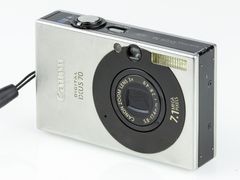
| Canon PowerShot SD1000 (Digital IXUS 70), 7.1 MP CCD, 2007 | $80 to $150 (trending high) |
| Fujifilm FinePix F-series (F10, F20, F30) | $60 to $120 |
| Sony Cyber-shot W-series (W55, W80, W220) | $50 to $90 |
| Nikon Coolpix S-series (S210, S51, S220) | $40 to $80 |
| Olympus Camedia or Stylus | $30 to $70 |
Sources: retrospekt.com, whatcameragear.com, global.canon, retrospekt.com, sdcard.org, sdcard.org, ikea.com
Y2K digital camera and accessory prices at US sellers
| Seller | Item | Price | Note |
|---|---|---|---|
| Retrospekt (Milwaukee, WI) | Nikon Coolpix L4, refurbished, lowest cosmetic grade | $125.00 | Starting price; kit includes batteries, card and reader |
| Retrospekt (Milwaukee, WI) | Nikon Coolpix L4, refurbished, A-grade | $179.00 | 4.0 MP, two AA batteries, 2GB SD card |
| Retrospekt (Milwaukee, WI) | Polaroid i533, refurbished | $139.00 | Starting price |
| Retrospekt (Milwaukee, WI) | Nikon Coolpix L3, refurbished | $149.00 | Starting price |
| Retrospekt (Milwaukee, WI) | Nikon Coolpix L18 (red), refurbished | $169.00 | Starting price |
| Kodak PIXPRO (US store) | Kodak PIXPRO FZ45, new | $129.99 | US MSRP; CMOS sensor, not CCD |
| Wasabi Power (Pomona, CA) | Canon NB-4L battery 2-pack and charger | $22.99 | Fits the PowerShot SD1000 and other NB-4L ELPHs; some NB-4L listings showed sold out |
| Wasabi Power (Pomona, CA) | Sony NP-BN1 battery 2-pack and charger | $26.99 | For Cyber-shot models that take NP-BN1 |
| Wasabi Power (Pomona, CA) | Nikon EN-EL10 battery 2-pack and charger | $19.99 | For Coolpix S models that take EN-EL10 |
| IKEA US | LADDA NiMH AA rechargeable, 2450mAh, 4-pack | $11.99 | For AA digicams |
| IKEA US | STENKOL battery charger | $8.99 | Charges the LADDA cells |
| Glazer's Camera (Seattle, WA) | SanDisk Ultra 32GB SDHC card | $25.00 | Only for SDHC-compatible cameras; SD-only cameras need 2GB or less |
Prices checked October 2026. They change often.
How to get the Y2K digicam look, step by step
These steps work on a basic point-and-shoot with only automatic modes. The menu names come from Canon, Kodak and Sony manuals; yours may differ slightly.
- 1
Charge the batteries and format the card
Flash use drains batteries fast. On AA cameras, use NiMH rechargeables: Canon rates the PowerShot A570 IS at about 400 shots on NiMH versus about 120 on alkaline, and Kodak does not recommend or support alkaline batteries in the EasyShare CX7430. Sony recommends formatting a card in the camera the first time you use it.
- 2
Force the flash on
Switch the flash from Auto to the setting that fires every time: Flash On on Canon, On on Sony, Fill on Kodak. Kodak's manual says the default flash setting comes back when you exit the mode or turn the camera off, so check the flash icon every time you power up.
- 3
Zoom all the way out
Canon rates the SD1000's flash at 1.6 to 11 ft at wide angle and 1.6 to 6.6 ft at telephoto; Kodak rates the CX7430 at 2 to 11.8 ft wide and 2 to 6.9 ft tele. Sony's W800 guide warns the lens barrel can cast a shadow at full wide with flash; if you see one, zoom in a touch.
- 4
Stand about 3 to 10 feet away
Closer than 2 ft, Kodak says the picture comes out too light; past the rated range it comes out too dark. FilmLab's 1 to 3 m (about 3 to 10 ft) sits inside both limits at wide angle. Keep the distance steady, because doubling it cuts the light to a quarter.
- 5
Shoot somewhere dim
A dark room or a night street gives the classic bright subject on a dark background. FilmLab suggests having a wall or other objects behind your subject if you want the background to show.
- 6
Pick normal flash or slow synchro
Normal forced flash leaves anything beyond its range dark. Slow synchro fires the flash and slows the shutter so the background shows, as Sony describes it. Hold still, because the shutter is slow, and watch for a color cast: Imaging Resource saw a noticeable orange cast from the SD1000's slow-sync mode.
- 7
Turn red-eye reduction off for candids
Red-eye mode fires pre-flashes, and Sony says it usually takes a second before the shutter releases. That delay kills candid timing, so save it for posed close-ups.
- 8
Leave ISO on Auto, or set 200 to 400
Canon's SD1000 flash ranges are rated at ISO Auto, and Imaging Resource found the camera only needed ISO 250 to reach 11 ft at wide angle. Retro Camera Land suggests ISO 200 to 400 if you set it by hand.
- 9
Add the date stamp if you want it
Retro Camera Land and WhatCameraGear both suggest turning on the date stamp, if your camera has one. Sony warns that once you shoot images with the date, you cannot delete it from them later, so set the clock first.
- 10
Copy the files with a card reader
Retrospekt includes a card reader with its refurbished cameras. For xD or Memory Stick cameras you need a reader with that slot.
Sources: global.canon, resources.kodak.com, helpguide.sony.net, resources.kodak.com, global.canon, helpguide.sony.net, resources.kodak.com, filmlab.lv, theinspiredeye.net, imaging-resource.com, helpguide.sony.net, retrocameraland.com, helpguide.sony.net, retrospekt.com
Y2K digital camera settings: what each brand calls forced flash
The cameras in the table below all have an always-fire flash mode, but the name changes by brand. The table comes from official manuals and spec pages; your model may use slightly different wording.
Two popular tips don't work on every camera. WhatCameraGear suggests switching white balance from Auto to Cloudy or Daylight, but Sony's W800 guide says that with the flash set to On or Slow Synchro, white balance can only be Auto or Flash. Check whether your camera lets you change it before you count on it.
The same goes for exposure compensation. WhatCameraGear recommends -0.3 or -0.7 for richer colors, while Sony says exposure adjustment may not be effective when you use flash, and Imaging Resource found the SD1000's flash slightly underexposed an indoor subject, needing +0.7 EV. If your camera has true flash exposure compensation (the Canon PowerShot A570 IS offers plus or minus 2 stops in 1/3-stop steps), that is the setting that turns the flash itself up or down.
| Camera | Forced flash is called | Related modes and notes | Watch out for |
|---|---|---|---|
| Canon PowerShot SD1000 | Flash On | Flash On with red-eye reduction; Flash On with slow synchro | Recycling can take up to 10 seconds between shots |
| Kodak EasyShare CX7430 | Fill | Fires on every picture, regardless of the lighting | Flash goes back to its default when you exit the mode or power off |
| Sony Cyber-shot W800 | On | Slow Synchro; Advanced Flash raises the ISO ceiling for more reach | White balance locked to Auto or Flash; no flash in continuous, Night Scene or High Sensitivity modes |
| Kodak PIXPRO FZ45 (new) | Fill Flash | Slow Synchro | Flash range is rated at ISO 800, so it reads longer than older specs |
Sources: global.canon, resources.kodak.com, helpguide.sony.net, helpguide.sony.net, helpguide.sony.net, kodakpixpro.com, whatcameragear.com, helpguide.sony.net, imaging-resource.com, global.canon
Common mistakes with direct flash on a digicam
Four habits cause trouble with a digicam flash, according to the manuals and buying guides.
- Leaving the flash on Auto. In a bright room the camera may skip the flash (Retro Camera Land says to keep it on even by day), and on the Kodak CX7430 the flash returns to its default every time you switch the camera off.
- Zooming in for a tighter shot. On the Canon SD1000, flash reach falls from 11 ft to 6.6 ft at telephoto, 4.4 ft shorter, a 40% cut. Walk closer instead.
- Covering the flash. FilmLab warns that fingers drift in front of the flash and lens because both sit close to the edge of small cameras.
- Buying blind. WhatCameraGear says never buy a listing marked untested or as-is, and Camera Market suggests asking the seller for a photo of a white sky or light wall, which shows sensor spots or lines.
Sources: resources.kodak.com, global.canon, resources.kodak.com, imaging-resource.com, filmlab.lv, whatcameragear.com, cameramarket.us, retrocameraland.com
Troubleshooting Y2K digicam flash photos
Find what you see in the first column. Check how far you stood before you change any setting: Kodak's manual says a picture is too dark when the subject is beyond the flash range and too light when it is closer than 2 ft.
Purple or green frames are different: Imaging Resource documented a widespread CCD failure in consumer cameras made between 2002 and 2004 that left some recording no picture at all, or extreme distortion with severe purple or green casts. Camera Market adds that some aging CCDs develop spots or horizontal lines. No setting fixes a failing sensor, which is why the white-wall test before buying matters.
| What you see | Likely cause | Fix |
|---|---|---|
| Whole frame dark | Subject beyond flash range, or flash not set to fire | Stay within 11.8 ft at wide angle (6.9 ft zoomed in on the Kodak CX7430), zoom out, check the flash icon |
| Face white or washed out | Too close for the flash, or shooting in macro mode | Back up to at least 2 ft (Imaging Resource's lab test found the SD1000's flash blew out most of the exposure in macro mode); turn flash exposure compensation down if the camera has it |
| Bright subject, black background | The flash lights the nearby subject while the camera records very little ambient light | Use slow synchro and hold still, or put a wall close behind the subject |
| Orange or warm cast | Slow synchro recording the room light along with the flash | Imaging Resource saw a noticeable orange cast from the SD1000's slow-sync mode; switch back to plain forced flash |
| Blurry shots in dim light | Slow shutter in slow synchro or a night mode | Brace the camera; Sony recommends a flash or tripod when the shutter slows at night |
| White circles (orbs) | Dust or pollen floating close to the lens, lit by the flash | Not a camera fault; reshoot away from the dust or when the air clears |
| Red eyes | Flash sitting right next to the lens | Turn on red-eye reduction for posed shots; Sony warns it may not work well at some distances or if the subject looks away from the pre-flash |
| Flash doesn't fire | Continuous, Night Scene or High Sensitivity mode, or the flash is still recharging | Change modes; wait, since the SD1000's flash can take up to 10 seconds to recycle |
| Dark shadow in the frame at widest zoom | Lens barrel blocking the flash | Zoom in slightly |
| Purple or green distortion, lines or spots | Failing or aging CCD | Not fixable with settings; test before you buy |
Sources: resources.kodak.com, debbiephotos.com, imaging-resource.com, helpguide.sony.net, helpguide.sony.net, en.wikipedia.org, helpguide.sony.net, global.canon, global.canon, old.imaging-resource.com, cameramarket.us, helpguide.sony.net
Can you get the digicam look with a modern camera?
Yes, as long as it has a flash. One new option is the Kodak PIXPRO FZ45 at $129.99 MSRP (October 2026): a CMOS compact with a 4x zoom, two AA batteries and a Fill Flash mode. Kodak rates its flash at about 0.3 to 5.2 m at wide angle (roughly 1 to 17 ft), but measured at ISO 800, so it may not be directly comparable with the older Canon and Kodak ratings.
With a mirrorless camera or DSLR and a flash, Debbie Photos gives a dark-background starting point of f/4, 1/160 to 1/200 sec, ISO 100 to 400 and TTL at 0 EV. Behind the Shutter's approach is to underexpose the ambient light by about 1.5 to 2 stops with exposure compensation, then let the flash light the subject. The flash photography guide goes deeper on guide numbers and sync.
To finish the look in editing, WhatCameraGear's recipe is about 15-20% grain and white balance shifted slightly toward green or magenta. Film emulation software and free Lightroom presets are where to look for ready-made grain and color looks.
Sources: kodakpixpro.com, debbiephotos.com, behindtheshutter.com, whatcameragear.com
Questions people ask
How much does a Y2K digital camera cost?
WhatCameraGear estimates its five used picks at about $30 to $150 in 2026, with the Canon PowerShot SD1000 at $80 to $150. Refurbished cameras from Retrospekt are listed at $125 to $179 with batteries, a card and a reader included (October 2026). A new Kodak PIXPRO FZ45 lists at $129.99.
Sources: whatcameragear.com, retrospekt.com, kodakpixpro.com
Can I get the Y2K digicam look with my iPhone?
Partly. Shoot with the flash on in a dim room, then edit: WhatCameraGear's recipe for phone photos is about 15-20% grain (in the Pixlr editor) and a slight white balance shift toward green or magenta. A real digicam gives you the flash look in the camera, without the edit.
Sources: whatcameragear.com
Can you do direct flash photography with a camera's built-in flash?
Yes. Built-in flashes are weak, often not enough past about 10 ft, and Inspired Eye says a camera's own flash isn't strong enough for most uses and burns through batteries. For the Y2K look that weakness is the effect: stay within the rated flash range and let the background fall off.
Sources: en.wikipedia.org, theinspiredeye.net
Why do so many photographers dislike on-camera direct flash?
Because the light comes from practically the same spot as the lens, Wikipedia notes it is very harsh and loses the shadows in the scene. That harsh, shadowless light is the core of the 2000s flash look.
Sources: en.wikipedia.org
What memory card does an old digital camera use?
Many take SD cards; others use xD, SmartMedia or Memory Stick, which WhatCameraGear calls rare, expensive and prone to failure. Older SD-only cameras need a card of 2GB or less, since SDHC cards only work in SDHC-compatible devices. Retrospekt suggests buying the same size card the camera came with.
Sources: whatcameragear.com, sdcard.org, retrospekt.com
Can you still get batteries for old digital cameras?
For common models, yes. Wasabi Power sells two-packs with a charger for the Canon NB-4L ($22.99), Sony NP-BN1 ($26.99) and Nikon EN-EL10 ($19.99), checked October 2026. AA cameras are simplest: an IKEA LADDA NiMH 4-pack is $11.99 and the STENKOL charger is $8.99, so $11.99 + $8.99 = $20.98 together.
Sources: wasabipower.com, wasabipower.com, wasabipower.com, ikea.com
Sources
Every fact on this page comes from one of these. How we choose and check sources is in our methodology.
Show all 36 sources
official 16
- Canon Camera Museum: PowerShot SD1000 Digital ELPH specifications
- Canon Camera Museum: PowerShot A570 IS specifications
- Kodak EasyShare CX7430 User's Guide: Using the flash
- Kodak EasyShare CX7430 User's Guide: Camera problems
- Kodak EasyShare CX7430 User's Guide: Important battery information
- Sony DSC-W800 Help Guide: Flash
- Sony DSC-W800 Help Guide: Flash does not work
- Sony DSC-W800 Help Guide: Red Eye Reduction
- Sony DSC-W800 Help Guide: White Balance
- Sony DSC-W800 Help Guide: Exposure Compensation
- Sony DSC-W800 Help Guide: Write Date
- Sony DSC-W800 Help Guide: Memory card
- Sony DSC-W800 Help Guide: Image is blurred
- SD Association: Capacity (SD/SDHC/SDXC/SDUC)
- SD Association: SD, SDHC, SDXC and SDUC Card Capacity Choices
- Kodak PIXPRO: FZ45 Friendly Zoom Camera
retailer 8
- Retrospekt: Digital Cameras collection
- Retrospekt: Nikon Coolpix L4 Point and Shoot Digital Camera
- Retrospekt: What kind of memory card do I need for my early 2000s digital camera?
- Wasabi Power: Canon NB-4L Battery (2-Pack) and Charger
- Wasabi Power: search results for NP-BN1
- Wasabi Power: search results for EN-EL10
- IKEA US: LADDA rechargeable battery, HR06 AA 1.2V, 2450mAh
- Glazer's Camera: SanDisk 32GB Ultra UHS-I SDHC Memory Card
Independent blogs 7
- FilmLab: Y2K Digital Camera: Why It's Popular and How to Choose
- WhatCameraGear: The 'Y2K' Aesthetic: 5 Forgotten Digicams below $100
- Retro Camera Land: Y2K Digital Cameras Are Back!
- Camera Market: The best Y2K digital cameras (CCD) in 2026
- Inspired Eye: Flash street photography tips
- Debbie Photos: Best Camera Settings for Direct Flash Photography
- Behind the Shutter: On Camera Direct Flash Tutorial
Manuals and references 3
Editorial reviews 2
Keep reading
Digicams
A digicam is a digital camera, but today the word means a 2000s compact point-and-shoot. Why they're back, US prices and how a digicam compares with an iPhone.
Digicams
The best vintage digital camera for most people is a Canon ELPH like the SD1000, $199 at a shop that tests. 7 digicam picks, US prices and what to check.
Digicams
Canon PowerShot ELPH (IXUS) and SD1000: what owners say, which CCD models to look for, common faults, and used prices from $80 to $199 in 2026.
Digicams
Vintage Sony Cyber-shot CCD cameras: which models to look for, used prices of $59.99 to $265 (Oct 2026), batteries, Memory Stick cards and common faults.
Digicams
Vintage Nikon Coolpix CCD compacts sold refurbished for $125-$229.99 in October 2026. Which models to look for, what reviewers say and what to check first.
Techniques and editing
How to use flash photography: stay at or below sync speed (1/60 on a Canon AE-1), set aperture as guide number divided by distance, then bounce and gel it.