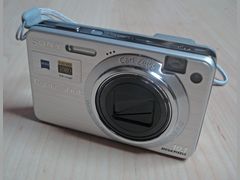
Sony Cyber-shot DSC-W570: is the 2011 CCD compact worth buying?
The short answer
Going by reviewers, the Sony Cyber-shot DSC-W570 is worth buying only as a simple daylight point-and-shoot, and only from a seller who accepts returns: they praised its size and easy Intelligent Auto mode, but faulted its noise at higher ISOs, slow shot-to-shot times, weak flash and basic 720p video.
It is a 2011 pocket CCD compact with a 16.1 MP 1/2.3-inch sensor and a 25-125mm Carl Zeiss 5x zoom that launched at $179.99; on November 2, 2026, three used ones were listed on Poshmark for $140 to $208.
- Sensor
- 1/2.3-inch, 16.1 MP CCD
- Lens
- 25-125mm, f/2.6-6.3 (5x)
- Battery
- NP-BN1, 220 shots (CIPA)
- Used price
- $140 to $208 (Nov 2026)
Built from 58 opinions from 12 pages and videos. Not yet tested by Camera Dojo. Updated .
The short version
Launch reviews in 2011 were mixed. CNET's review by Joshua Goldman scored it 7.2 and called it a very good take-everywhere ultracompact for the price (a second CNET review, by Nik Rawlinson, gave 8.3), while Imaging Resource gave it 3.5 out of 5 and said it was okay but not one of Sony's strongest efforts. Reviewers did agree on the size: about 19 mm thick and 116 g (4.1 oz) with battery, it is easy to slip into a pocket or bag.
Today it is a used CCD digicam, and it suits people who want the camera to make the decisions more than people who like to tweak settings. Files look best in daylight at ISO 80 to 200, but reviewers split on color: CNET and PhotographyBLOG liked it, while Imaging Resource found hues off for yellow, orange and cyan and Reviewed measured a high color error of 3.95. Owner reports are thin, so test any used one before you keep it: the lens, both edges of the frame, the screen and the battery.
Good fit if
- You want a CCD compact that slips into a pocket or bag: about 19 mm thick and 116 g with battery
- You shoot daylight snapshots and print at 5x7 inches or smaller
- You want the camera to pick the scene and focus mode for you in Intelligent Auto
- You like stitched panoramas: Sweep Panorama sits on its own slider position
- You want cheap spares: third-party NP-BN1 batteries cost $13.49 at Wasabi Power
Think twice if
- You shoot kids, pets or sports: CNET measured 4.6 seconds between shots and advised against it for them
- You want manual exposure or RAW files: Program Auto is the most control you get, and there is no RAW mode
- You shoot mostly indoors or at night: image quality drops quickly from ISO 400 (Imaging Resource) and the flash reaches just over 12 feet (Reviewed)
- You want a viewfinder: there is none, and reviewers disagree on how well the 2.7-inch screen reads in bright sun
- You care about video: it records 720p with a mono microphone
Sony Cyber-shot W series around the W570: W350 to W730
There is no single best Cyber-shot W: the models trade resolution, zoom, screen size and price, and the table below lays them out. The W570 replaced the 2010 W350 and shared the NP-BN1 battery with the cheaper W510; the later 16.1 MP models below all kept 720p video and differ in zoom and screen size. For the wider Cyber-shot family, see the Sony Cyber-shot guide.
| Model | Year | Sensor | Why look for it |
|---|---|---|---|
| DSC-W350 | 2010 | 14.1 MP 1/2.3-inch Super HAD CCD | The predecessor, with a 26-105mm lens, launched at $199.00. CNET called it a favorite and said it would not bother trading up to the W570. |
| DSC-W510 | 2011 | 12.1 MP Super HAD CCD | The entry model, launched at $109.99, with a 26-105mm lens and the same NP-BN1 battery. |
| DSC-W530 | 2011 | 14.1 MP Super HAD CCD | A step up from the W510, launched at $129.99, also with a 26-105mm lens. |
| DSC-W570 | 2011 | 16.1 MP 1/2.3-inch Super HAD CCD | This camera: a wider and longer 25-125mm lens, a 2.7-inch screen and 720p video, launched at $179.99. |
| DSC-W580 | 2011 | 16.1 MP | Same 5x zoom and 720p video as the W570 with a bigger 3.0-inch screen. |
| DSC-W650 | 2012 | 16.1 MP | 5x zoom and a 3.0-inch screen. |
| DSC-W670 | 2012 | 16.1 MP | 6x zoom and a 2.6-inch screen. ccdgear listed one at $200 on November 2, 2026. |
| DSC-W690 | 2012 | 16.1 MP | The longest zoom of this group, 10x, with a 3.0-inch screen. |
| DSC-W710 / W730 | 2013 | 16.1 MP | 5x and 8x zooms, both with 2.7-inch screens. |
Sources: imaging-resource.com, imaging-resource.com, imaging-resource.com, imaging-resource.com, cnet.com, en.wikipedia.org, ccdgear.com
Sony Cyber-shot DSC-W570 reviews: what reviewers and owners say, topic by topic
We sorted 58 opinions about the W570 from 12 pages and videos on 11 websites and channels. Each row shows how many people raised a topic and how many of them were positive. Open a row to read short quotes, each linked to its source.
Owner voices are thin. Most of these 58 opinions come from editorial reviewers writing in 2011 (PhotographyBLOG, CNET, Imaging Resource and Trusted Reviews; Reviewed's page carries no date) and five YouTube reviews; the only written owner account is a 2011 blog post. Reddit, DPReview and retailer reviews could not be read, so the reliability section rests on Sony's help guide and iFixit, not on long-term owner reports.
Image look45% positiveof 11
Mostly favorable in daylight: reviewers and owners describe vivid color and plenty of detail for prints up to 5x7 inches. Color is disputed, though: CNET and PhotographyBLOG liked it, Imaging Resource found hues off for yellow, orange and cyan, and Reviewed measured a high color error of 3.95. Reviewers also report noise from ISO 200 to 400 upward and muddy colors at ISO 1,600 and 3,200, and Reviewed blames soft results on imprecise autofocus.
“Colors get muddy as well, especially at ISO 1,600 and ISO 3,200”
Joshua Goldman, CNET (sample photos) 2011-05Hands-on review
“Thanks to the Optical Steadyshot image stabilization feature, I’m able to kick my old habits out.”
Sharifah Sharomsah, My Baking Notebook 2011-03Owner
“Colours are recorded nicely and there's lots of detail, but if you go above ISO 200 you're going to get noise.”
Matt Grayson, PhotographyBLOG 2011-08Hands-on review
“If you’re printing at and below 5×7 inches and not doing heavy cropping, the results are very good.”
Joshua Goldman, CNET (sample photos) 2011-05Hands-on review
Ease of use70% positiveof 10
The clearest praise: Intelligent Auto chooses the scene and focus mode, and the menus are simple enough for beginners. The complaints are about the hardware: small, bunched buttons, a rear zoom switch and a thin, boxy body that is hard to hold steady.
“the main reason why I purchased this camera is because of the sweep panorama feature.”
Sharifah Sharomsah, My Baking Notebook 2011-03Owner
“Using the Sony Cyber-shot DSC W570 is very easy, it responds well to commands”
Matt Grayson, PhotographyBLOG 2011-08Hands-on review
“Switching from a normal camera to one that features intelligent auto is like moving from a manual gearbox to an automatic.”
Nik Rawlinson, CNET 2011-09Hands-on review
“so the external controls are on the small side and are bunched close together”
Greg Scoblete, Shawn Barnett, Zig Weidelich, Stephanie Boozer, Imaging Resource 2011-09Hands-on review
Video57% positiveof 7
Basic but usable: Reviewed calls it a decent video device despite the 720p limit, and a video reviewer found clips smooth enough for casual use. Imaging Resource saw washed-out color and pixelation, and CNET's autofocus struggled with fast scenes shot while walking.
“Even though the W570's video resolution maxes out at 720p, this is a decent video device.”
Christopher Snow, ReviewedHands-on review
“Very fast-moving, complex scenes, shot while walking, occasionally fooled the autofocus, which struggled to keep the video sharp.”
Nik Rawlinson, CNET 2011-09Hands-on review
“The quality is disappointing, especially when compared to some other higher-end Sony Cyber-shots. Colors frequently appeared washed out with plenty of noticeable pixilation.”
Greg Scoblete, Shawn Barnett, Zig Weidelich, Stephanie Boozer, Imaging Resource 2011-09Hands-on review
Size and weight86% positiveof 7
Near-unanimous praise: just under 2 cm deep, it slips into a pocket or bag. CNET's one caveat is that the slim body is not very comfortable to hold.
“One of the unquestioned benefits of the Cyber-shot W570 is its portability”
Greg Scoblete, Shawn Barnett, Zig Weidelich, Stephanie Boozer, Imaging Resource 2011-09Hands-on review
“At just under 2cms deep it’s easy to slip in a pocket or bag and take with you anywhere.”
Mike Lowe, Trusted Reviews 2011-06Hands-on review
“while it’s easily slipped into a pocket and highly portable, it’s not massively comfortable to use”
Nik Rawlinson, CNET 2011-09Hands-on review
Low light and flash20% positiveof 5
The weakest topic. CNET found ISO 800 and 1,600 smeary from noise reduction, PhotographyBLOG saw heavy shadow noise in night shots, and Reviewed rates the flash at just over 12 feet; one owner liked that Intelligent Auto switches to night scenes on its own.
“even at a low ISO setting, substantial noise shows through in the darker areas”
Matt Grayson, PhotographyBLOG 2011-08Hands-on review
“Photos at ISO 800 and 1,600 look painterly from noise reduction, so subjects will appear soft and smeary”
Joshua Goldman, CNET (sample photos) 2011-05Hands-on review
“Whether I want a macro setting to shoot near objects or shooting images at night, the intelligent auto will select the scene selection”
Sharifah Sharomsah, My Baking Notebook 2011-03Owner
“Auto ISO selection produced results that were reasonable up as far as ISO 800”
Mike Lowe, Trusted Reviews 2011-06Hands-on review
Screen and viewfinder40% positiveof 5
Split. Two video reviewers found the 2.7-inch screen sharp and clear, and Imaging Resource found it fairly easy to read in bright sun, though images often looked washed out there. Reviewed called the default brightness too dim outdoors, and Trusted Reviews and Reviewed found the viewing angle poor. There is no viewfinder.
“Viewing angle is also poor, and the screen's default brightness is too dim for outdoor shooting”
Christopher Snow, ReviewedHands-on review
“The W570's 2.7-inch display is fairly easy to read when in bright sun, but images frequently appear washed out onscreen”
Greg Scoblete, Shawn Barnett, Zig Weidelich, Stephanie Boozer, Imaging Resource 2011-09Hands-on review
“The W570’s rear 2.7in LCD does a fine job of playing images back when viewed straight on, but steeper angles can cause viewing issues.”
Mike Lowe, Trusted Reviews 2011-06Hands-on review
Batteries and charging50% positiveof 4
Split. An owner got about 200 photos in a day and Imaging Resource calls the 220-shot rating enough for a day, while Reviewed had trouble with battery drain on its test unit. The battery charges only in the external charger supplied in the box.
“We had lots of trouble with energy consumption while using the W570.”
Christopher Snow, ReviewedHands-on review
“The battery could last me up to 200 photos during a whole day shooting”
Sharifah Sharomsah, My Baking Notebook 2011-03Owner
“which is on the lower side of the longevity scale but still sufficient for more than a day's worth of shooting”
Greg Scoblete, Shawn Barnett, Zig Weidelich, Stephanie Boozer, Imaging Resource 2011-09Hands-on review
Build quality67% positiveof 3
Only three voices. PhotographyBLOG praises the tightly packed metal case and a YouTube reviewer likes the Carl Zeiss lens, while CNET says it feels cheaper than its already low price suggests.
“this camera feels somewhat cheaper than its fairly low price already suggests”
Nik Rawlinson, CNET 2011-09Hands-on review
“The build quality of the W570 is very nice. Because of the diminutive size, the components are all packed inside the metal case”
Matt Grayson, PhotographyBLOG 2011-08Hands-on review
PositiveMixedNegative
Best settings for the Sony Cyber-shot W570
Reviewers agree the W570 does its best work in good light at low ISO. These settings come from CNET, PhotographyBLOG, Imaging Resource, Reviewed and Sony's own help guide.
- 1
Start in Intelligent Auto
For everyday snapshots, leave the camera in Intelligent Auto. CNET found its scene recognition reliable, and it handles close-ups by itself, which matters because you cannot switch on a macro mode manually, according to Imaging Resource.
- 2
Set ISO 80 or 100
Switch to Program Auto and choose ISO 80 or 100 for the cleanest files. CNET found ISO 80 and 100 relatively sharp with low noise, PhotographyBLOG saw noise above ISO 200, and Reviewed measured noise under 1 percent only at ISO 80.
- 3
Turn on DRO for contrasty scenes
Program Auto also opens up white balance, metering, exposure compensation and DRO, Sony's dynamic range optimizer for shadow detail. CNET says highlights tend to blow out and Imaging Resource saw over-exposed highlights outdoors, so try a little minus exposure compensation on bright days.
- 4
Zoom in a little from 25mm
Imaging Resource found very strong corner blur at the wide end and only mild blur at telephoto. Zoom in slightly and keep faces and text away from the edges of the frame.
- 5
Focus, then recompose
Autofocus is the most common complaint: Reviewed calls it imprecise and inconsistent, and Imaging Resource says iAuto missed moving subjects. Half-press on your subject, wait for focus, then reframe and press all the way.
- 6
Pan steadily for panoramas
Move the slider on the right edge to Sweep Panorama, hold the shutter and pan in an arc at a constant speed along the on-screen guide. Sony says it is not suitable for moving or very close subjects or for low-contrast scenes such as sky, sandy beach or lawn, and it fails if you pan too fast or too slowly. CNET says the results are on par with a video still, fine for web use or very small prints.
Sources: cnet.com, photographyblog.com, imaging-resource.com, reviewed.com, helpguide.sony.net
Is the Sony W570 good in low light?
Not very, though reviewers word it differently. CNET's summary calls its low-light photos decent, but the same review found ISO 800 and 1,600 painterly from noise reduction and ISO 3,200 unusable. Imaging Resource says image quality drops quickly from ISO 400, while Trusted Reviews found auto ISO results reasonable up to ISO 800.
The flash will not rescue a dark room. Imaging Resource rates it from 0.2 to 3.7 m (about 12 feet) at wide angle with auto ISO, and only 1.0 to 1.5 m (about 3 to 5 feet) at full zoom. Reviewed puts the maximum at just over 12 feet, below average for the class.
For flash shots indoors, stay at the wide end and close to your subject, the same close, direct-flash approach behind the Y2K digicam look. Slow Synchro fires the flash and keeps the shutter open longer, so a dark background shows up behind the person you are photographing.
Round white spots in flash photos are dust or pollen near the lens lit by the flash, not a fault, according to Sony. Turn the flash off and use the room's light or High Sensitivity mode to avoid them.
Sources: cnet.com, imaging-resource.com, imaging-resource.com, trustedreviews.com, reviewed.com, helpguide.sony.net
How to charge the Sony Cyber-shot DSC-W570
The W570 cannot charge its battery inside the camera, and Sony says its optional AC adaptor will not charge it either, so a USB cable is no help. You need the external charger from the box (BC-CSNB per Imaging Resource, BC-CSN per Reviewed) or a third-party NP-BN1 charger.
- 1
Take out the NP-BN1
Open the battery door and remove the NP-BN1 lithium-ion pack. If the camera will not turn on, wipe the pack's terminals with a soft cloth, since Sony lists dirty terminals as a cause.
- 2
Put it in the charger
Seat the pack in the charger and plug it in. The supplied charger runs on 100 to 240 V, so abroad you need only a plug adapter; Sony warns that a voltage transformer may cause a malfunction.
- 3
Read the charge lamp
A fast flash means remove and reseat the pack, and if it repeats, the pack or charger may be faulty. A slow flash means charging is paused because the temperature is outside 10 to 30 C (50 to 86 F).
- 4
Allow 3 to 4 hours
CNET says a charge takes between 3 and 4 hours, depending on how empty the pack is. Take it out once it is full, because Sony says leaving it in the charger can shorten its life.
- 5
Plan for about 220 shots
Sony's CIPA rating is 220 shots per charge, and CNET quotes 100 minutes of video. In cold weather Sony suggests keeping the pack in a warm pocket and carrying spares for two or three times the shooting you expect.
Sources: helpguide.sony.net, helpguide.sony.net, helpguide.sony.net, helpguide.sony.net, helpguide.sony.net, cnet.com, imaging-resource.com
Sony W570 memory cards and getting photos off it
The W570 takes SD, SDHC and SDXC cards plus the Memory Stick Duo family; MultiMediaCard does not work. Sony tested SD cards up to 64 GB and Memory Stick Duo up to 32 GB. For 720p video Sony recommends SD Class 4 or faster, and Imaging Resource suggests Class 6 or higher.
Format every card in the camera, not on a computer: Sony says a computer-formatted card is not guaranteed to work. HD movies cannot be recorded to the small internal memory, so keep a card in it.
To copy files, pull the SD card into any card reader, or connect the supplied USB cable with USB Connect set to Mass Storage. In PTP/MTP mode movies cannot be exported, so switch to Mass Storage to copy videos. PhotographyBLOG separately found that its videos did not show up in the computer's folder view and had to be located through Sony's PMB software.
| Card size | Stills at 16M | 720p Fine video |
|---|---|---|
| 2 GB | about 265 | about 25 minutes |
| 4 GB | about 530 | about 55 minutes |
| 8 GB | about 1,050 | about 1 hour 50 minutes |
Sources: helpguide.sony.net, helpguide.sony.net, helpguide.sony.net, helpguide.sony.net, imaging-resource.com, photographyblog.com
What to check before buying a used Sony W570
With few long-term owner reports to lean on, test the parts that cause trouble on this model: the lens, the screen, the battery and the card slot. Buy from a seller who accepts returns.
- 1
Watch the lens
Turn the camera on and off a few times with a charged battery. The lens should extend and retract smoothly. Sony says a C:32 code means trouble with the camera's hardware, and that a lens which has stopped moving can just be a flat battery, so charge the pack first and never force the barrel; if the fault returns, the camera may need repair.
- 2
Shoot a flat wall at both ends of the zoom
Photograph a brick wall or a newspaper page at 25mm and at full zoom, then compare the left and right edges. CNET's first test unit was extremely soft on one side, which CNET believed was a damaged lens, while even softness in the corners is how this lens behaves, per Imaging Resource.
- 3
Check the screen and playback
Make sure the screen shows a live image and that photos appear in playback. iFixit says a screen that lights up but stays black for both photos and video points to the lens unit.
- 4
Test the battery and the door
Check that the battery lasts through a few dozen shots and that the battery door latches shut, since iFixit's student-written wiki names a broken latch as a reason the door will not stay closed.
- 5
Count what is included
The retail kit had the camera, charger, NP-BN1 battery, USB/AV cable, wrist strap and a software CD. A body-only listing means adding a charger ($11.99) and a battery ($13.49) from a seller such as Wasabi Power.
- 6
Format a card and record a clip
Insert an SD card, format it in the camera, then shoot a few stills and a short 720p video to check the card slot and the movie mode.
Sources: helpguide.sony.net, cnet.com, ifixit.com, imaging-resource.com, wasabipower.com, wasabipower.com
Sony W570 problems: lens errors, battery and card faults
Sony's online help guide for the W570 still explains most error messages, and the fixes below come from it, CNET and iFixit's student-written wiki; no US repair-shop price for this model turned up, so costs are for parts or not given.
Lens will not extend or retract (lens error, C:32)
- How you notice
- The lens stays out or does not move, or the camera shuts off with the lens extended. A C:32 code means a hardware problem.
- Fix
- Try a fully charged battery first, since Sony says a flat battery can cause it. Then switch off, remove the battery for 30 seconds (iFixit's advice) and restart. Do not force the barrel, as Sony warns; if the code returns, Sony says the camera may need repair.
- Typical cost
- No US repair-shop price was found, and iFixit has no W570 repair guide. For scale, working used W570s were listed at $140 to $208 on Poshmark in November 2026.
Sources: helpguide.sony.net, helpguide.sony.net, ifixit.com, ifixit.com
One side of the frame is blurry (reported on one CNET review unit)
- How you notice
- CNET's first review unit was extremely soft on the right side of every frame; its second unit was evenly soft, and CNET believed the first unit's lens had been damaged.
- Fix
- No fix is documented. Test before buying: shoot a flat, detailed subject at both ends of the zoom and compare the edges. Even corner softness at 25mm is how this lens behaves, per Imaging Resource.
- Typical cost
- No repair cost found; buy from a seller who accepts returns.
Sources: cnet.com, imaging-resource.com
Battery runs down fast or the charger lamp flashes
Raised in 1 opinion
- How you notice
- Short runs between charges, a camera that will not power on, or a charge lamp that flashes fast. Reviewed had trouble with battery drain on its test unit, which it thought might have an old battery.
- Fix
- Clean the terminals, reseat the pack, charge at 10 to 30 C (50 to 86 F) and replace a pack that keeps flashing fast or gives much shorter runs. Sony says capacity falls with age.
- Typical cost
- $13.49 for a Wasabi Power NP-BN1, $11.99 for its charger, or $26.99 for two batteries plus a charger (Wasabi Power, Pomona, CA, November 2026).
Sources: helpguide.sony.net, helpguide.sony.net, wasabipower.com, wasabipower.com, wasabipower.com
Memory card errors (C:13, card not accepted)
- How you notice
- A C:13 code means the camera cannot read or write the card; unformatted, unsupported or damaged cards trigger format or replace prompts.
- Fix
- Switch off and on, or remove and reinsert the card a few times. Format it in the camera (this erases it) and use a supported type: SD, SDHC or SDXC up to 64 GB, or Memory Stick Duo up to 32 GB.
- Typical cost
- Usually just a replacement SD card.
Sources: helpguide.sony.net, helpguide.sony.net, helpguide.sony.net
Date and time reset every time
- How you notice
- The clock-set screen appears at power-on after the camera has sat unused for about a month, because its internal rechargeable clock battery has drained.
- Fix
- Put a charged battery in the camera and leave it switched off for 24 hours or more. The camera still works without the clock, but photos will not carry a date.
- Typical cost
- Free.
Sources: helpguide.sony.net, helpguide.sony.net
Error codes E:61, E:62, E:91 and E:94
- How you notice
- Sony lists E:61, E:62 and E:91 as camera malfunctions and E:94 as a malfunction while writing or deleting data.
- Fix
- For E:61, E:62 or E:91, Sony says to run Initialize from the Main Settings menu (your images are kept) and turn the camera on again. E:94 needs repair, and Sony asks you to quote the whole code.
- Typical cost
- No US repair-shop price found.
Sources: helpguide.sony.net, helpguide.sony.net
Black screen with no image
- How you notice
- The screen lights up but shows only black for both photos and video.
- Fix
- iFixit's W570 troubleshooting page says this points to the lens, which must be replaced. None of the sources behind this page mention a Sony recall or free repair program for the W570, but Sony's service notices could not be checked.
- Typical cost
- No US repair-shop price found; iFixit does not price the lens unit.
Sources: ifixit.com
Battery door will not stay shut
- How you notice
- iFixit's troubleshooting page says the door may not close if its plastic latch is broken. PhotographyBLOG found the door thin, though it did not bend.
- Fix
- Check the latch and its spring and clean out dust; if both are intact, iFixit suggests replacing the door cover or, as a last resort, the case.
- Typical cost
- No part price found.
Sources: ifixit.com, photographyblog.com
Photos taken with a Sony Cyber-shot DSC-W570
Six photos taken with a Sony Cyber-shot DSC-W570 and shared on Wikimedia Commons under free licenses, from bright daylight to indoor and night scenes.

Barranc de la Gritella, 2013Photo: Martelldereus, CC BY-SA 3.0 
Chateau Julien Winery, Carmel, California, 2012Photo: Jim G from Silicon Valley, CA, USA, CC BY 2.0 
Brasserie Georges, Lyon, France, 2014Photo: Prométhée33, CC BY-SA 3.0 
Rio Chico, Miranda, Venezuela, 2013Photo: Osprato, CC BY-SA 3.0 
Marina Bay Sands, Singapore, 2011Photo: Aara911, CC BY-SA 3.0 
The Cosmopolitan of Las Vegas, Nevada, 2011Photo: Jim G from Silicon Valley, CA, USA, CC BY 2.0
What a used Sony Cyber-shot DSC-W570 costs today
Imaging Resource lists the W570 as no longer manufactured, so you are buying used. It launched at $179.99 in 2011. On November 2, 2026, three used ones on Poshmark asked between $140 and $208 (the third was $200); those are asking prices from private sellers, not completed sales.
Poshmark (private seller)
Used, listed as tested, Purple DSC-W570 with battery, card and charger
$208
See listingPoshmark (private seller)
Used, condition not stated, DSC-W570, silver and black
$200
See listingPoshmark (private seller)
Used, condition not stated, DSC-W570
$140
See listingSony (2011 launch price)
New, 2011 launch price, US retail price at launch, for reference
$179.99
See listingccdgear
Used, Sibling Sony DSC-W670 (2012), for comparison; no W570 in stock
$200.00
See listingWasabi Power (Pomona, CA)
New, third-party, 1200 mAh NP-BN1 replacement battery
$13.49
See listingWasabi Power (Pomona, CA)
New, third-party, NP-BN1 charger
$11.99
See listing
Prices checked on November 2, 2026. They move every week, so treat them as a range, not a quote. eBay, KEH, MPB, B&H and Adorama pages block automated checks, so their prices could not be verified and are not shown. The US digicam resellers ccdgear and Victory Camera had no W570 listed that day. Whatever you buy, check that the charger and battery are included and that the seller accepts returns.
Video reviews worth your time

Sony Cybershot DSC-W570 Digital Camera Review
The Sony Cyber-shot DSC-W570 is highlighted as a remarkably compact digital camera that offers rich features and solid component quality.

Sony Cyber-Shot DSC-W570 HD Movie Test: Hockey Game
The Sony Cyber-Shot DSC-W570 demonstrates its 720p HD video recording capabilities in auto mode during an indoor youth ice hockey game.

Sony Cybershot DSCW570 Review
The Sony Cyber-shot DSC-W570 is a sleek and affordable compact camera designed for beginners seeking easy automatic modes and solid image quality.

📷 Sony Cyber-Shot DSC-W570 (2011)
The Sony Cyber-shot DSC-W570 is a compact digital camera offering a 5x optical zoom Carl Zeiss lens, 720p video recording, and versatile shooting settings.

SONY Cyber-Shot DSC-W570 Unboxing + Overview
The reviewer considers the Sony Cyber-shot DSC-W570 a sleek and capable point-and-shoot camera with a sharp screen display and good feature set for 720p HD recording.
Questions people ask about the W570
When did the Sony Cyber-shot DSC-W570 come out?
Sony released the DSC-W570 in early 2011. Imaging Resource lists US availability from February 15, 2011, at a retail price of $179.99. It replaced the 2010 DSC-W350, with more resolution (16.1 MP against 14.1 MP) and a wider, longer 25-125mm lens.
Sources: imaging-resource.com, cnet.com
How much is a Sony Cyber-shot W570 worth today?
On November 2, 2026, three used W570s on Poshmark were listed at $140 to $208, which are asking prices rather than sales. That brackets its 2011 launch price of $179.99. If a listing has no charger or battery, add about $11.99 and $13.49 for Wasabi Power replacements.
Sources: poshmark.com, imaging-resource.com, wasabipower.com
How do you charge a Sony Cyber-shot DSC-W570?
Take the NP-BN1 battery out and put it in the external charger that came with the camera. Sony says the battery cannot be charged inside the camera and its optional AC adaptor will not charge it. CNET says a full charge takes 3 to 4 hours; charge at 10 to 30 C (50 to 86 F).
Sources: helpguide.sony.net, cnet.com, helpguide.sony.net
What battery and memory card does the Sony W570 use?
It uses Sony's NP-BN1 lithium-ion battery, rated at 220 shots, which Sony says fits only N-type Cyber-shots; Wasabi Power sells a compatible pack for $13.49. For storage it takes SD, SDHC and SDXC cards (Sony tested up to 64 GB) and Memory Stick Duo cards up to 32 GB.
Sources: imaging-resource.com, helpguide.sony.net, wasabipower.com, helpguide.sony.net
Does the Sony W570 have a CCD sensor?
Yes. It uses a 1/2.3-inch Super HAD CCD made by Sony with 16.1 effective megapixels, according to Imaging Resource and PhotographyBLOG. For other CCD-era compacts, see the [digicam guide](/digicams/) and the list of [best vintage digicams](/digicams/best-vintage-digicams/).
Sources: imaging-resource.com, photographyblog.com
Does the Sony W570 shoot HD video?
Yes, 1280 x 720 at 30 fps with a mono microphone, in clips up to 29 minutes. Imaging Resource, PhotographyBLOG and the spec table in Joshua Goldman's CNET review say the files are MP4, while Nik Rawlinson's CNET review says AVI. Reviewed calls it a decent video device, but Imaging Resource found the quality disappointing, with washed-out color.
Sources: imaging-resource.com, photographyblog.com, reviewed.com, cnet.com, cnet.com
Does the Sony W570 have manual controls, RAW or a viewfinder?
There is no RAW and very little manual control: Reviewed says ISO is the only manual setting, though Program Auto also lets you choose white balance, metering and exposure compensation. There is no optical or electronic viewfinder, so you frame on the 2.7-inch screen.
Sources: reviewed.com, cnet.com, photographyblog.com
What is the difference between the Sony W570 and W580?
Mostly the screen. PhotographyBLOG says the W580's 3-inch screen against the W570's 2.7-inch is the biggest outward difference, and the W580 cost slightly more in the UK. Both have 16.1 MP, a 5x zoom and 720p video.
Sources: photographyblog.com, en.wikipedia.org
What people compare it with
Sony Cyber-shot DSC-W350 (2010)
The W570's predecessor: a 14.1 MP CCD with a 26-105mm lens and the same shooting options. CNET called it a favorite and said it would not bother trading up.
Sony Cyber-shot DSC-W580 or W650
Same 16.1 MP and 5x zoom as the W570 with a larger 3.0-inch screen, for anyone who frames on the screen a lot.
Reviewed's comparison camera: it measured a color error of 2.48 against the W570's 3.95 and called the ELPH 100 HS one of its favorite budget point-and-shoots.
Samsung PL120
Reviewed's other comparison camera, which it said generally captures more aesthetically pleasing shots than the W570.
Every source behind this page
Read them yourself. How we pick and count them is in our methodology.
Show all 41 sources
Manuals and references 29
- en.wikipedia.org: List of Sony Cyber-shot cameras
- helpguide.sony.net: DSC-W570/W570D/W580 | Sweep Panorama | Cyber
- helpguide.sony.net: DSC-W570/W570D/W580 | Flash | Cyber
- helpguide.sony.net: DSC-W570/W570D/W580 | Image Size/Panorama Image Size | Cyber
- helpguide.sony.net: DSC-W570/W570D/W580 | Initialize | Cyber
- helpguide.sony.net: DSC-W570/W570D/W580 | USB Connect | Cyber
- helpguide.sony.net: DSC-W570/W570D/W580 | Battery pack and power | Cyber
- helpguide.sony.net: DSC-W570/W570D/W580 | Memory card | Cyber
- helpguide.sony.net: DSC-W570/W570D/W580 | Others | Cyber
- helpguide.sony.net: DSC-W570/W570D/W580 | Self-diagnosis display | Cyber
- helpguide.sony.net: DSC-W570/W570D/W580 | On the internal rechargeable backup battery | Cyber
- helpguide.sony.net: DSC-W570/W570D/W580 | Battery pack | Cyber
- helpguide.sony.net: DSC-W570/W570D/W580 | Battery charger | Cyber
- helpguide.sony.net: DSC-W570/W570D/W580 | Memory card | Cyber
- helpguide.sony.net: DSC-W570/W570D/W580 | Number of still images | Cyber
- helpguide.sony.net: DSC-W570/W570D/W580 | Recordable time of movies | Cyber
- helpguide.sony.net: DSC-W570/W570D/W580 | Using the camera abroad | Cyber
- poshmark.com: sony dsc
- wasabipower.com: Sony NP
- wasabipower.com: Sony NP
- wasabipower.com: Search: 6 results found for "np-bn1"
- ccdgear.com: Search: 100 results found for "sony w"
- cnet.com: Sony Cyber-shot DSC-W570
- ifixit.com: Sony Cyber-shot DSC-W570 Repair Help
- ifixit.com: Sony Cyber-shot DSC-W570 Troubleshooting
- imaging-resource.com: Sony DSC-W350 Review
- imaging-resource.com: Sony DSC-W510 Review
- imaging-resource.com: Sony DSC-W530 Review
- imaging-resource.com: Sony DSC-W570 Review
Editorial reviews 6
Video reviews 5
Independent blogs 1
Keep reading
Digicams
Vintage Sony Cyber-shot CCD cameras: which models to look for, used prices of $59.99 to $265 (Oct 2026), batteries, Memory Stick cards and common faults.
Digicams
Sony Cyber-shot DSC-W830: what owners and reviewers say about its 20.1 MP CCD and 8x zoom, the faults to check, which battery it takes and what it costs used.
Digicams
Sony Cyber-shot DSC-W800: what owners say about its 20.1 MP CCD and 5x zoom, stuck-lens and card faults, which battery and SD card it takes, and used prices.
Digicams
The best vintage digital camera for most people is a Canon ELPH like the SD1000, $199 at a shop that tests. 7 digicam picks, US prices and what to check.
Digicams
Get the Y2K digicam look: force the flash on, zoom out and stand 3 to 10 ft away in a dim room. Cameras, prices, settings and fixes for dark or blown-out shots.
Digicams
A digicam is a digital camera, but today the word means a 2000s compact point-and-shoot. Why they're back, US prices and how a digicam compares with an iPhone.