Sony Cyber-shot DSC-W800: what to know before buying one used
The short answer
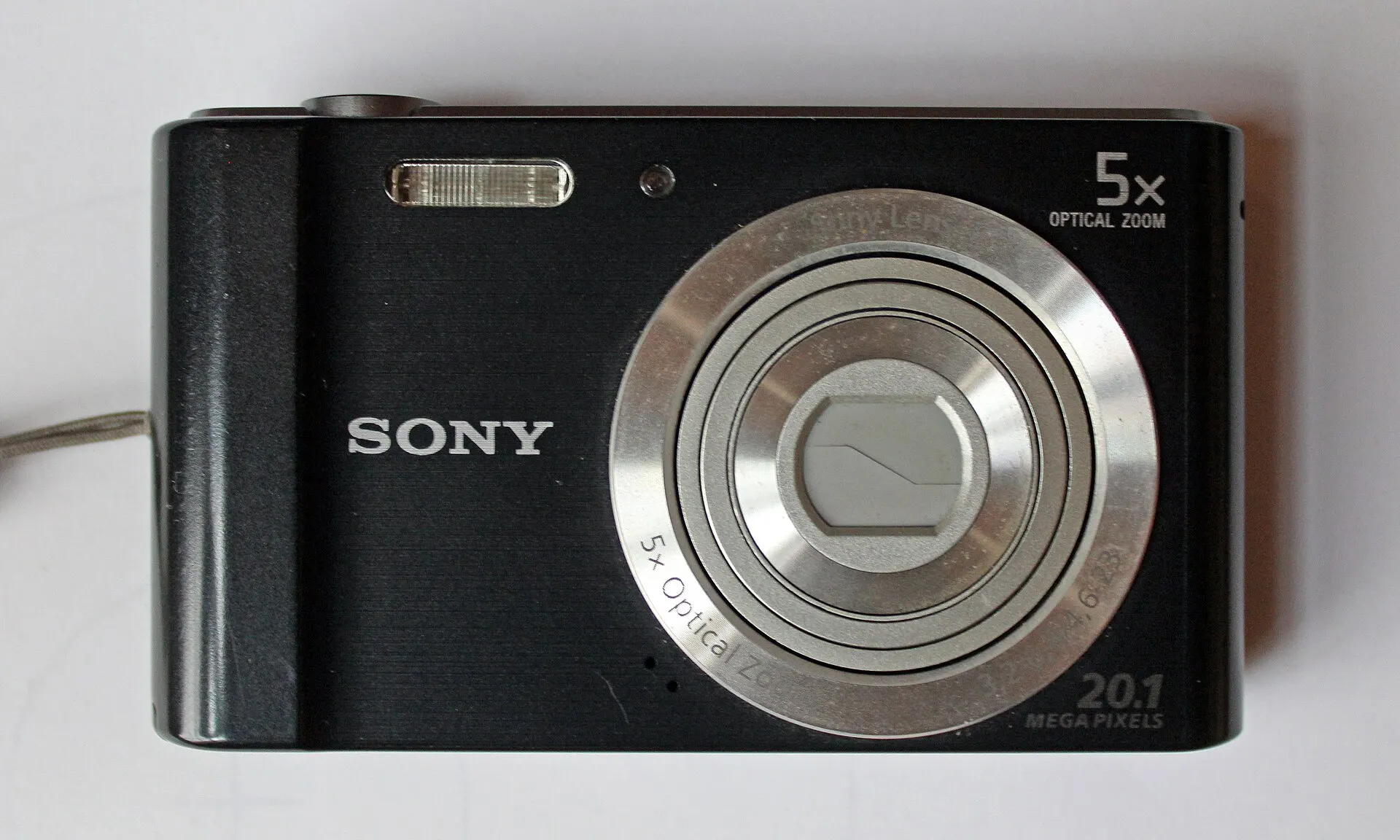
The Sony Cyber-shot DSC-W800 is a 2014 budget pocket camera with a 20.1 MP CCD sensor, a 5x 26-130mm zoom and 720p video that sold for about $80 new.
Reviewers and owners call it a tiny, simple daylight camera with natural colors that is slow between shots and weak in low light; in October 2026 working used ones were listed at $63 to $180 on Poshmark.
- Sensor
- 20.1 MP 1/2.3-inch CCD
- Lens
- 5x, 26-130mm, f/3.2-6.4
- Video
- 720p, about 30 fps
- Launch price
- About $80 (2014)
Built from 66 opinions from 21 pages and videos. Not yet tested by Camera Dojo. Updated .
The short version
Its fans like the basics. The body weighs about 125 g (4.4 oz) with the battery and slips into any pocket, Easy Mode keeps the menus simple, and Lens and Shutter says daylight files are clean enough for family photos, travel snapshots and social posts. With direct flash, two used-camera shops say it gets close to the harsh party-snapshot look of older digicams.
The complaints are speed, light and age. A 2017 blog reviewer measured about 3 seconds between shots in daylight and about 5 in low light, buying guides list weak low-light quality among its limits, and video tops out at 720p. Owners' iFixit threads describe stuck lenses, 'Turn the power off and on again' loops and card errors on aging cameras, and an iFixit answer says lens repair parts are almost non-existent.
Good fit if
- You want a tiny, cheap CCD point-and-shoot for daylight snapshots and direct-flash party photos
- You want a first camera for a kid or teen: Easy Mode, few menus, no app to set up
- You want cheap, easy accessories: NP-BN1-type batteries from $13.49 and standard SD cards
- You're fine moving photos with a card reader instead of Wi-Fi
Think twice if
- You shoot indoors or at night without flash: reviewers say low-light photos come out noisy or blurry
- You need speed: one reviewer measured about 3 seconds between shots even in daylight
- You want 1080p video or a sharp screen: video stops at 720p and the screen is a 2.7-inch, 230k-dot LCD
- You can't test it or return it: iFixit calls a stuck lens a common issue, and repair parts are scarce
- You'd pay collector prices for it: Lens and Shutter wouldn't
Sony W800 and its siblings: W710, W730, W810 and W830
Sony sold several similar CCD W models in 2013 and 2014, so a sibling's listing may be the better deal. Film Lab's short advice for a simple CCD Cyber-shot is the W830 or W810; older models are in our Sony Cyber-shot guide.
| Model | Year | Sensor | Why look for it |
|---|---|---|---|
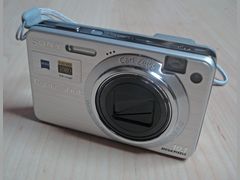 Cyber-shot DSC-W710 | 2013 | 16.1 MP 1/2.3-inch CCD | The model the W800 replaced: a 5x 28-140mm lens and no mechanical stabilization. It launched at $99; the W800 came in at about $80. |
| Cyber-shot DSC-W730 | 2013 | 16.1 MP CCD | A Carl Zeiss 8x lens with optical SteadyShot. Imaging Resource gives the range as 25-200mm; Wikipedia's table says 25-224mm. |
| Cyber-shot DSC-W800 | 2014 | 20.1 MP 1/2.3-inch CCD | This camera: the shortest zoom of the 2014 trio (5x, 26-130mm, f/3.2-6.4), about 125 g, about $80 at launch. |
| Cyber-shot DSC-W810 | 2014 | 20.1 MP 1/2.3-inch CCD | A 6x 26-156mm f/3.5-6.5 lens in a 111 g body. iFixit says it matches the W800 apart from zoom and colors. |
| Cyber-shot DSC-W830 | 2014 | 20.1 MP 1/2.3-inch CCD | A Carl Zeiss 8x lens (about 25-200mm) with optical stabilization, ISO from 80 and a 122 g body. Film Lab calls it the best of the trio for a simple long zoom. |
Sources: imaging-resource.com, imaging-resource.com, imaging-resource.com, imaging-resource.com, en.wikipedia.org, ifixit.com, filmlab.lv, cameralabs.com
What owners and reviewers say, topic by topic
We sorted 66 opinions about the Sony W800 from 21 pages and videos on 12 websites and channels. Each row shows how many people raised a topic and how many of them were positive. Open a row to read short quotes, each linked to its source.
Owner voices come from iFixit repair threads, which show what breaks but not how often, and four YouTube reviews. The rest are a 2017 blog review, two buying guides, two used-camera shop guides and Imaging Resource's 2014 first look, written before the camera shipped. Reddit, DPReview and Best Buy reviews could not be read.
Image look56% positiveof 9
Mostly positive for daylight: a blogger calls the colors natural, Lens and Shutter calls daylight files clean enough for family and travel photos, and a used-camera shop says direct flash gets close to the Y2K look. The caveats: Gagadget calls the quality not groundbreaking, one YouTube owner sees grain above ISO 1600, and another finds little dynamic range for editing.
“this camera takes decent and colorful shots. Colors are quite natural and pleasing to the eye”
El Padrino, Custominds: Sony Cybershot DSC-W800 Camera Review 2017-03Hands-on review
“the W800 excels at that messy, joyful, slightly overexposed vibe you used to get from cheap compact cameras”
Dutch|Thrift blog: Sony Cyber-Shot DSC-W800, Tiny Digital Classic for 2025 Creators 2025-12
“All of these cameras are newer than genuine Y2K digicams, but their photos can look close to them, especially with direct flash.”
Film Lab (filmlab.lv): Sony Cyber-shot, which model to choose? 2026-10
“In daylight, the W800 can produce clean enough files for family photos, travel snapshots, eBay listings, and social sharing.”
Tom, Lens and Shutter: Best Digital Camera Under $100 in 2026 2026-06
Ease of use75% positiveof 8
Mostly positive: buying guides, a shop and a YouTube owner call it simple, with Easy Mode, few menus and a straightforward sweep panorama. The two complaints are about speed: a reviewer measured about 3 seconds between daylight shots, and a new owner asks why it is so slow to be ready for the next one.
“why does my camera take so long to advance to the next shot?”
dan kachman, iFixit: Sony Cyber-shot DSC-W800 Troubleshooting (reader comments) 2016-07Owner
“this simple, ergonomical and very reasonably priced little camera”
“The Easy Mode simplifies the camera menu, making it less intimidating for complete beginners”
James Taylor, Gagadget: 5 Best Affordable Digital Cameras for Beginners in 2026 2026
“makes a friendly first camera for kids, teens, or anyone who wants to explore photography without diving into complex menus”
Dutch|Thrift blog: Sony Cyber-Shot DSC-W800, Tiny Digital Classic for 2025 Creators 2025-12
Reliability today0% positiveof 8
Skewed by iFixit repair threads, which show what fails rather than how often: owners describe a lens stuck out, a 'Turn the power off and on again' loop, a screen that dies after a second or two and a camera stuck on the language menu. A used-camera shop says to budget for repair if a copy shuts off, rejects cards or the lens sticks.
“the screen comes on for 1-2 seconds and shuts off”
jwhiett, iFixit: Sony Cyber-shot DSC-W800 Troubleshooting (reader comments) 2019-12Owner
“When I power on the camera it shows, ' turn the power off & on again '”
Naimul Islam, iFixit: Sony Cyber-shot DSC-W800 Troubleshooting (reader comments) 2020-03Owner
“lens does not retract in off position. When it is switched on it will not focus”
Okkert Oosthuizen, iFixit Answers: error on focus lens does not close 2019-10Owner
“it displays the language preference on the LCD and will not move to any other menu selection”
Kevin W. Smith, iFixit Answers: Menu stuck on language preference 2019-01Owner
Memory cards and transfer25% positiveof 8
Mostly negative: owners report 'no SD card' and 'Cannot display file' errors, a card slot that won't take a card, and a Windows 11 laptop that won't see the camera. On the plus side it takes standard SD cards as well as Memory Stick; there is no Wi-Fi.
“Any card i tried, it always says "no SD card”
ryan aguila, iFixit Answers: SD Card cannot be detected 2026-03Owner
“Sony Cybershot DSC W800 camera is not recognized when connected to my windows 11 laptop.”
Microsoft Q&A: Sony Cybershot DSC W800 camera is not recognized when connected to my Windows 11 laptop 2023-08Owner
“standard SD/SDHC cards remain widely available, so keeping the camera powered and storing your shots is simple”
Dutch|Thrift blog: Sony Cyber-Shot DSC-W800, Tiny Digital Classic for 2025 Creators 2025-12
“I can't see any of them because it says in all photos and videos. Cannot display file.”
jasperivi, iFixit Answers: Why I cannot display any photos or videos on the camara? 2016-10Owner
Video38% positiveof 8
Mostly negative: 720p is the ceiling, a 2017 blogger found the video a bit unusable, and a 2026 YouTuber finds it poor by modern standards. Two owners are content with 720p for short clips or vlogging, and one praises the outdoor sound.
“my camera's all button work but movie button not work and i cant make videos”
sammya sajid, iFixit Answers: movie button not working 2020-03Owner
“The video is a bit unusable (Thanks to the Software Image Stabilization)”
El Padrino, Custominds: Sony Cybershot DSC-W800 Camera Review 2017-03Hands-on review
“The limitations are obvious: 720p video, an old screen, old battery system, limited low-light quality, and no modern connectivity.”
Tom, Lens and Shutter: Best Digital Camera Under $100 in 2026 2026-06
Size and weight100% positiveof 6
Unanimous: all six voices call it tiny or small, most say it slips into a pocket or bag, and one shop says street shooters like it because it is tiny and draws little attention.
“Street photographers love the W800 because it is tiny and anonymous.”
Dutch|Thrift blog: Sony Cyber-Shot DSC-W800, Tiny Digital Classic for 2025 Creators 2025-12
“Weighing just 4.5 ounces, it's easy to slip into a pocket or small bag”
James Taylor, Gagadget: 5 Best Affordable Digital Cameras for Beginners in 2026 2026
“you want the smallest serious option here and you can find it used or refurbished from a reputable seller”
Tom, Lens and Shutter: Best Digital Camera Under $100 in 2026 2026-06
Price and value83% positiveof 6
Positive: at its roughly $80 launch price, reviewers and owners saw good value for a basic camera. Lens and Shutter adds a limit: buy it used at a sensible price, not at collector prices.
“the W800 clearly has no intentions of breaking the bank”
“arguably the best digital camera cheap enough to fit even the tightest budgets”
James Taylor, Gagadget: 5 Best Affordable Digital Cameras for Beginners in 2026 2026
“this camera is really budget oriented but does not lack the required features of a basic digital camera”
El Padrino, Custominds: Sony Cybershot DSC-W800 Camera Review 2017-03Hands-on review
“I would not pay collector-style prices for it.”
Tom, Lens and Shutter: Best Digital Camera Under $100 in 2026 2026-06
Low light and flash0% positiveof 5
Negative: a 2017 blogger measured about 5 seconds between shots in low light and expects blurry pictures from shaky hands, Gagadget calls low-light photos noisy, and Imaging Resource expected as much before release. An iFixit owner says the camera freezes with flash, while one shop treats the harsh direct flash as a style rather than a flaw.
“the camera freezes immediately and does not take the photo with the flash”
hannia jaramillo andrade, iFixit Answers: Why can't I take photos with flash? 2024-07Owner
“the camera will not likely wow anyone much for low light shooting”
“The camera struggles in low light conditions, producing noisy images.”
James Taylor, Gagadget: 5 Best Affordable Digital Cameras for Beginners in 2026 2026
“that harsh, candid "party snapshot" aesthetic that has become a stylistic choice in itself”
Dutch|Thrift blog: Sony Cyber-Shot DSC-W800, Tiny Digital Classic for 2025 Creators 2025-12
Batteries and charging50% positiveof 4
Positive on charging: two YouTube owners like that it charges over USB. Gagadget calls battery life average at about 200 shots per charge, and an iFixit answer notes that a pack left unused for a long time drains itself.
“Battery life is average, offering about 200 shots per charge.”
James Taylor, Gagadget: 5 Best Affordable Digital Cameras for Beginners in 2026 2026
“It may discharge automatically if not used over a long period of time.”
dhwani, iFixit Answers: Why will my device not power on? 2016-03
Screen and viewfinder0% positiveof 3
Three voices, none positive: the 2.7-inch screen looks blurry to one reviewer, shows blues as purple to another, and picked up damaged pixels after rough pocket carry for a third. There is no viewfinder.
“the display looks blur on hand”
El Padrino, Custominds: Sony Cybershot DSC-W800 Camera Review 2017-03Hands-on review
PositiveMixedNegative
Is the Sony W800 a CCD camera, and will it give you the Y2K look?
Yes, it's a CCD camera. The W800 uses a 20.1 MP, 1/2.3-inch Super HAD CCD, the usual compact-camera sensor size, and Wikipedia's list of Sony cameras describes the whole W series as CCD models (the WX series uses CMOS). Its 2014 siblings, the W810 and W830, share the same 20.1 MP CCD, 2.7-inch screen and 720p video, according to Film Lab, a Latvian used-camera shop.
The look is less automatic than listings suggest. Film Lab points out that these 2014 models are newer than real Y2K digicams, though their photos can look close, especially with direct flash. Retro Digitals, a US shop, adds that the sensor is only part of it: flash, light, the lens and in-camera processing all shape the look, and extra resolution doesn't define a camera's character, since 7 MP and 20 MP cameras can both use CCDs.
Expect soft fine detail. Cameralabs, reviewing the W830 with the same 20.1 MP sensor size, found stonework and roof tiles "frustratingly sludgy" at base ISO and the noise mottled by ISO 400, but said any setting is fairly safe at smaller sizes. That suits phone screens and social posts better than big prints.
For the full direct-flash recipe, see our Y2K digicam look guide.
Sources: imaging-resource.com, en.wikipedia.org, filmlab.lv, retro-digitals.com, cameralabs.com
How to get good photos from a Sony Cyber-shot W800
The W800 has no manual exposure mode, so good results come from picking the right auto mode and managing the flash. These steps come from Sony's help guide and shop advice.
- 1
Start in Intelligent Auto or Easy Mode
Sony's guide lists Intelligent Auto, Program Auto, Scene Selection, Sweep Panorama and Easy Mode. Gagadget says Easy Mode makes the menus less intimidating for complete beginners.
- 2
Half-press before every shot
Sony says to press the shutter halfway down first, which activates SteadyShot. The camera is slow: a 2017 reviewer measured about 3 seconds between daylight shots, so don't count on catching fast action.
- 3
In daylight, turn the flash off and find soft light
Retro Digitals suggests open shade or late-afternoon light with the flash off, at ISO 100-200 where the camera allows it. Lens and Shutter says daylight files are clean enough for family photos, travel snapshots and social sharing.
- 4
At night or at parties, use the flash a few feet away
For the party-snapshot look, Retro Digitals suggests flash on, the subject a few feet away and a darker background, stepping back if faces look too bright. Set the flash to On, which always fires; Auto, the default, fires in dark locations or against backlight, per Sony. If the lens casts a shadow at the wide end, Sony says to zoom toward T and shoot again.
- 5
No flash allowed? Use High Sensitivity or a tripod
Sony's High Sensitivity scene mode shoots without flash with less blur, and its guide recommends a flash or tripod for night scenes because the shutter gets slow. The anti-blur function reduces camera shake, not a moving subject, and it doesn't work with flash.
- 6
Decide on the date stamp before you shoot
Write Date burns the shooting date into the photo for good; Sony says it can't be removed afterward, and it doesn't work in movie, panorama, burst or Easy mode. Picture Effect also includes a Toy Camera mode if you want a heavier look straight from the camera.
Sources: helpguide.sony.net, helpguide.sony.net, helpguide.sony.net, helpguide.sony.net, helpguide.sony.net, helpguide.sony.net, retro-digitals.com, gagadget.com, custominds.blogspot.com, lensandshutter.com
Sony W800 battery, charger and memory cards
The W800 ships with an NP-BN battery, and Sony says the NP-BN1 fits too. Third-party NP-BN1 packs are cheap: Wasabi Power listed one for $13.49 in October 2026, with the W800 on its compatibility list. Gagadget puts battery life at about 200 shots per charge, and Sony warns that flash and zoom drain it faster, so it suggests carrying spare packs for two or three times the shooting you plan.
You charge the battery inside the camera, with the supplied AC adaptor or over USB from a computer ([USB Power Supply] is on by default). The adaptor powers the camera for playback but not for shooting; that needs Sony's AC-UD10 or AC-UD11, sold separately. To charge a spare outside the camera, K&M Camera sold an NP-BN1 charger for $24.99. In cold weather, Sony's tip is to keep the battery in a pocket close to your body and insert it just before shooting.
For cards, Sony lists SD, SDHC and SDXC, microSD in an adapter, and Memory Stick PRO Duo and Micro, with SD, microSD and PRO Duo cards up to 64 GB tested (Micro up to 16 GB). Use class 4 or faster for movies and format a new card in the camera first. A 32 GB card holds about 4,300 photos at the full 20M size by Sony's count, and a ProMaster 32 GB SDHC card was $29.95 at K&M Camera. Without a card, the 29 MB internal memory holds three photos.
| Card | Photos |
|---|---|
| 8 GB | About 1,050 |
| 16 GB | About 2,100 |
| 32 GB | About 4,300 |
| 64 GB | About 8,500 |
SDXC cards use exFAT: Sony says computers and devices that aren't exFAT-compatible can't read them, and not to format the card if the computer asks, since formatting erases it.
Sources: helpguide.sony.net, helpguide.sony.net, helpguide.sony.net, helpguide.sony.net, helpguide.sony.net, helpguide.sony.net, wasabipower.com, kmcamera.com, kmcamera.com, gagadget.com
How to get photos off a Sony W800 (it has no Wi-Fi)
The W800 has no Wi-Fi; Dutch Thrift, a Dutch used-camera shop, calls it a fully offline camera. You move files with the supplied USB cable or by putting the card in a reader.
The card reader is the easier route. One owner's Windows 11 laptop wouldn't recognize the camera, and a Microsoft Q&A advisor replied that Sony appears to have stopped driver support for the model since 2020 and suggested reading the SD card in a card reader instead. Retro Digitals sold a 3-in-1 USB-C SD and microSD reader for $13. Check that the reader handles SDHC or SDXC, since an SD-only reader can't read them.
To use the cable, Sony's fix list is: set [USB Connect Setting] to [Mass Storage], use the supplied cable, plug straight into the computer with no hub, and set [USB Power Supply] to [Off].
Sources: dutchthrift.com, learn.microsoft.com, retro-digitals.com, retro-digitals.com, helpguide.sony.net
What to check before buying a used Sony W800
Most W800 complaints online are about aging cameras, so a short test saves money. Dutch Thrift's rule: if a copy powers off at random, won't read SD cards or the lens sticks while extending, budget for repair or choose another copy. Lens and Shutter recommends it if you can find one used or refurbished from a reputable seller, at a sensible price.
- Lens: it should extend and retract smoothly, without catching or grinding. Film Lab says a jammed lens is most often caused by sand or a drop.
- Start-up: with a charged battery it should boot straight to the shooting screen. 'Turn the power off and on again' is how Sony's message list flags a lens malfunction.
- Card slot: insert a card and take a few shots. Owners report 'no SD card' and 'Cannot display file' errors, and one found the slot blocked.
- Moisture: none of these Cyber-shots is waterproof, so look for signs of moisture on the lens and screen.
- Model: iFixit says the label above the screen reads SteadyShot DSC-W800, and that the W810 and W830 differ only in zoom and colors, so check which one you're getting.
- What's included: Sony supplies the NP-BN battery, an AC adaptor and a USB cable. A listing that is camera only means buying a battery and a charger or cable as well.
Ask for a return window: an iFixit answer says lens repair parts are almost non-existent, so a stuck lens is hard to fix.
Sources: dutchthrift.com, lensandshutter.com, filmlab.lv, helpguide.sony.net, ifixit.com, helpguide.sony.net, helpguide.sony.net, ifixit.com
Sony W800 problems: stuck lens, card errors and what fixes cost
iFixit says the W800 has not been recalled, and Imaging Resource's advisory on the CCD failures lists no W-series Sony and covers cameras made in 2002 to 2004, about ten years earlier; the problems below come from Sony's help guide and owners' iFixit threads, which show what can go wrong, not how often.
Lens stuck out, or 'Turn the power off and on again' at every start
Raised in 5 opinions
- How you notice
- The lens won't retract or won't move, the camera shuts off with the lens extended, or every start-up shows 'Turn the power off and on again', which Sony's message list ties to a lens malfunction. Several owners on iFixit describe this, one with a camera that also won't focus.
- Fix
- Sony: don't force a lens that has stopped moving; insert a charged battery and turn the camera on again. iFixit's wiki adds blowing compressed air into the gaps around the lens barrels to clear sand or dirt. If that fails, an iFixit answer says you may have to consider replacing the lens, since repair parts for it are almost non-existent.
- Typical cost
- No US repair shop publishes a W800 price. iFixit's lens-replacement guide is a 20-25 minute DIY job rated moderate, and it warns that the ribbon wires are easy to damage. Broken W800s were listed for parts or repair at $30 to $80 on Poshmark in October 2026, a rough guide to what a donor camera costs.
Sources: helpguide.sony.net, helpguide.sony.net, ifixit.com, ifixit.com, ifixit.com, poshmark.com
Won't turn on, or the screen dies after a second or two
Raised in 2 opinions
- How you notice
- The camera stays dead after charging, the screen lights for 1-2 seconds and shuts off, or the charge lamp blinks while charging. Sony says a battery discharges by itself even when unused, and the lamp can blink on a pack that hasn't been used for a long time.
- Fix
- Sony: check that the pack is an NP-BN or NP-BN1, take it out and reinsert it, and charge it between 10 and 30 C (50 to 86 F). iFixit's wiki suggests cleaning dirty battery terminals with isopropyl alcohol on a cotton swab.
- Typical cost
- A third-party NP-BN1 battery was $13.49 at Wasabi Power and an NP-BN1 charger $24.99 at K&M Camera (October 2026).
Sources: helpguide.sony.net, helpguide.sony.net, helpguide.sony.net, ifixit.com, wasabipower.com, kmcamera.com
'No SD card', 'Cannot display file' and other memory card errors
Raised in 3 opinions
- How you notice
- Owners report every card giving a 'no SD card' message, saved photos that only show 'Cannot display file', and a card slot that won't let the card in. Sony's own message list includes 'format and use again' and cards that can't be used in the camera.
- Fix
- Sony: reinsert the card, check it isn't locked, back it up and format it in the camera (a card formatted on a computer isn't guaranteed to work), and use class 4 or faster for movies. Formatting erases everything. iFixit's wiki lists an obstruction in the card door as another cause.
- Typical cost
- A 32 GB SDHC card was $29.95 at K&M Camera (October 2026).
Sources: helpguide.sony.net, helpguide.sony.net, helpguide.sony.net, ifixit.com, kmcamera.com
Computer doesn't recognize the camera
Raised in 2 opinions
- How you notice
- A Windows 11 laptop doesn't see the camera over USB. A Microsoft Q&A advisor said Sony appears to have stopped driver support for the model since 2020; that is the advisor's reading, not a Sony notice.
- Fix
- Sony: set [USB Connect Setting] to [Mass Storage], use the supplied cable, connect directly with no hub, and set [USB Power Supply] to [Off]. Or skip the cable and read the card in a card reader.
- Typical cost
- A 3-in-1 USB-C SD and microSD reader was $13 at Retro Digitals.
Sources: helpguide.sony.net, learn.microsoft.com, retro-digitals.com
Buttons stick, do nothing or trigger the wrong function
Raised in 3 opinions
- How you notice
- Owners report a movie button that stopped working while the others still do, and buttons that perform another button's job, with the zoom misbehaving. iFixit's wiki blames dust, dirt and wear.
- Fix
- iFixit's wiki: clean the buttons with warm soapy water and cotton swabs, then a little 70 percent isopropyl alcohol; then try its reset (battery out, hold the power button for 15 seconds, battery back in). One commenter says the camera stopped working entirely after that reset, so save it for last. If the buttons still fail, the wiki says the issue may be internal.
- Typical cost
- No US repair price found. iFixit has a button-board replacement guide for a DIY repair.
Sources: ifixit.com, ifixit.com
Flash won't fire, or the camera freezes with flash
Raised in 1 opinion
- How you notice
- An iFixit owner says the camera freezes and sometimes shuts off when shooting with flash. In other cases the flash is simply blocked by the shooting mode.
- Fix
- Sony: the flash can't fire in burst mode, Night Scene, High Sensitivity, Sweep Panorama or movie mode, and in the Landscape, Gourmet, Pet, Beach and Snow scenes you have to set it to On. The iFixit thread about freezing got no answer.
- Typical cost
- Nothing for a settings problem. No published repair price for a flash fault.
Sources: helpguide.sony.net, ifixit.com
Purple streaks near bright lights, white orbs in flash photos
- How you notice
- White or purple streaks around the sun or lamps, mostly in sweep panoramas and movies; fuzzy white circles in flash photos.
- Fix
- Neither is a fault. Sony calls the streaks smearing and says they aren't recorded on still photos, only on panoramas and movies; Cameralabs saw the same on the W830 and calls it a problem of all CCD cameras. The white circles are dust or pollen near the lens lit by the flash, so turn on the room lights or shoot without flash.
- Typical cost
- None.
Sources: helpguide.sony.net, helpguide.sony.net, cameralabs.com
What a Sony Cyber-shot DSC-W800 costs today
The W800 sold for about $80 new in 2014, and Film Lab notes these Cyber-shots are now bought used because Sony no longer sells them new. In October 2026, four working W800s on Poshmark were listed at $63 to $180. Retro Digitals had sold out of tested ones priced from $170. Broken ones for parts ran $30 to $80.
Poshmark (US marketplace)
Used, working (asking), Four listings: $63 with charger; $145; $150 silver; $180 black
$63 to $180
See listingRetro Digitals (US shop)
Used, tested (sold out when checked), Check what is included on a live listing
From $170
See listingPoshmark (US marketplace)
For parts or repair (asking), Includes 'for parts only' at $30 and a broken LCD at $80
$30 to $80
See listingSony (2014)
New, launch price, The reference point; no longer sold new
About $80
See listingWasabi Power
New, third-party, NP-BN1-type battery; lists the DSC-W800 as compatible
$13.49
See listingK&M Camera
New, store brand, Battery charger for the NP-BN1
$24.99
See listingK&M Camera
New, ProMaster 32 GB SDHC card
$29.95
See listingRetro Digitals
New, 3-in-1 USB-C SD and microSD card reader
$13
See listing
Prices checked on October 2026. They move every week, so treat them as a range, not a quote. These are asking prices, not sold prices. eBay, Etsy and B&H pages block automated checks, so their listings aren't shown and there is no sold-price average here; check eBay's sold listings before paying a shop price, and ask whether a battery and charger are included.
Video reviews worth your time

REVIEW: Sony Cyber-Shot DSC-W800 Camera - 2 YEARS LATER...
The Sony Cyber-shot DSC-W800 is an easy-to-use, lightweight budget point-and-shoot camera that serves as a simple everyday photo companion.

Sony Cyber shot DSC W800
The Sony Cyber-shot DSC-W800 is a highly affordable, pocket-sized camera that delivers decent photo and video performance, despite its limited dynamic range and lack of Wi-Fi.

Sony Cybershot DSC-W800 Camera In 2026
While the Sony Cyber-shot DSC-W800 has poor video quality, limited dynamic range, and weak autofocus by modern standards, it demonstrates that compelling video content depends more on lighting and audio than high-end video gear.

FULL Review Sony Cybershot DSC W800
The Sony Cyber-shot DSC-W800 is a portable and affordable compact camera with HD video and panorama features, making it a handy everyday vlogging option despite some color accuracy quirks on the display screen.
Questions people ask about the Sony W800
Is the Sony Cyber-shot DSC-W800 a good camera?
It's a good simple daylight camera and a weak one in low light. Lens and Shutter calls it the best used pocket option in its under-$100 guide, Gagadget calls it arguably the best camera for the tightest budgets, and a 2017 blogger found its colors natural. They also flag dim light, 720p video or the screen, and Lens and Shutter wouldn't pay collector prices for it.
Sources: lensandshutter.com, gagadget.com, custominds.blogspot.com
When was the Sony Cyber-shot DSC-W800 released?
In early 2014. Imaging Resource's first look, from February 2014, said shipping would begin in March 2014 at about $80, though the same page's spec table lists May 1, 2014, and Wikipedia's Sony list gives February 2014. It launched alongside the W810 and W830.
Sources: imaging-resource.com, en.wikipedia.org, cameralabs.com
Can a Sony Cyber-shot W800 be repaired?
Partly, and mostly as a DIY job. iFixit has replacement guides for the W800's battery, button board, LCD screen, lens and motherboard, and rates the lens swap moderate at 20-25 minutes. The catch is parts: an iFixit answer says lens repair parts are almost non-existent, and no US shop publishes a W800 repair price. Broken W800s for parts were listed at $30 to $80 on Poshmark in October 2026.
Sources: ifixit.com, ifixit.com, ifixit.com, poshmark.com
Why is my Sony Cyber-shot W800 not working, and how do I reset it?
Start with the battery: Sony says a pack discharges on its own when unused, so charge it, check it's an NP-BN or NP-BN1 and reseat it. If the lens is stuck, don't force it; insert a charged battery and power on again. iFixit's reset is to remove the battery, hold the power button for 15 seconds and reinsert it, but one commenter says the camera died after trying it, so treat it as a last step.
Sources: helpguide.sony.net, helpguide.sony.net, ifixit.com
Does the Sony DSC-W800 have Wi-Fi?
No. Dutch Thrift calls it a fully offline camera: you move files with the USB cable or by putting the SD card in a reader. If a Windows computer won't recognize the camera, a Microsoft Q&A advisor's tip is to read the card in a card reader.
Sources: dutchthrift.com, learn.microsoft.com
How many shots does the Sony W800 battery last?
Gagadget puts it at about 200 shots per charge; that is the only figure we found for this model. Sony says flash and zoom drain the pack faster and cold weather shortens it, so carry a spare. A third-party NP-BN1 battery was $13.49 at Wasabi Power in October 2026.
Sources: gagadget.com, helpguide.sony.net, wasabipower.com
What memory card does the Sony W800 use?
SD, SDHC or SDXC cards, microSD in an adapter, or Memory Stick PRO Duo and Micro. Sony tested SD, microSD and PRO Duo cards up to 64 GB and recommends class 4 or faster for movies. Format a new card in the camera before you shoot.
Sources: helpguide.sony.net, helpguide.sony.net
Why won't the flash fire on my Sony W800?
Check the mode first. Sony says the flash can't fire in burst mode, Night Scene, High Sensitivity, Sweep Panorama or movie mode, and in the Landscape, Gourmet, Pet, Beach and Snow scenes you must set it to On. Auto, the default, fires in dark locations or against backlight, while On always fires, so pick On for the direct-flash look.
Sources: helpguide.sony.net, helpguide.sony.net
What people compare it with
Sony Cyber-shot DSC-W830
The same 2014 family with a Carl Zeiss 8x lens (about 25-200mm) and optical stabilization in a 122 g body. Film Lab calls it the best of the trio if you want a simple Cyber-shot with a long zoom.
Canon's 2016 equivalent: a 20 MP CCD, an 8x 28-224mm lens and a 126 g body, with no stabilization. It launched at $119.99, per Imaging Resource.
Film Lab notes the 2014 W models are newer than genuine Y2K digicams. If the era matters more than the zoom, our Cyber-shot guide covers the older W and T series.
Kodak PIXPRO FZ55
Lens and Shutter ranks this 2023 compact just above the W800 if you can stretch or find a sale: a new camera with a 16 MP 1/2.3-inch CMOS sensor, a 5x zoom and 1080p video, so you buy new and get higher video resolution but no CCD. The guide says it often sells above a strict $100 limit.
Every source behind this page
Read them yourself. How we pick and count them is in our methodology.
Show all 66 sources
Manuals and references 45
- en.wikipedia.org: List of Sony Cyber-shot cameras
- helpguide.sony.net: Help Guide
- helpguide.sony.net: Help Guide
- helpguide.sony.net: Help Guide
- helpguide.sony.net: Help Guide
- helpguide.sony.net: Help Guide
- helpguide.sony.net: Help Guide
- helpguide.sony.net: Help Guide
- helpguide.sony.net: Help Guide
- helpguide.sony.net: Help Guide
- helpguide.sony.net: Help Guide
- helpguide.sony.net: Help Guide
- helpguide.sony.net: Help Guide
- helpguide.sony.net: Help Guide
- helpguide.sony.net: Help Guide
- helpguide.sony.net: Help Guide | Charge lamp of the camera flashes while charging the battery
- helpguide.sony.net: Help Guide | Battery is not charged even if the Charge lamp turns off and charging is finished
- helpguide.sony.net: Help Guide
- helpguide.sony.net: Help Guide
- helpguide.sony.net: Help Guide | Fuzzy white circular spots appear in images shot using flash
- helpguide.sony.net: Help Guide | White or purple streaks appear in bright areas of the subject, or the whole screen of the image becomes reddish
- helpguide.sony.net: Help Guide | Your computer does not recognize the camera
- helpguide.sony.net: Help Guide | Camera turns off with the lens portion extended
- helpguide.sony.net: Help Guide
- helpguide.sony.net: Help Guide
- helpguide.sony.net: Help Guide
- helpguide.sony.net: Help Guide
- helpguide.sony.net: Help Guide
- kmcamera.com: Search
- kmcamera.com: Search: 513 results found for "sony battery charger"
- poshmark.com: sony dsc
- retro-digitals.com: CCD Camera Guide: Get the 2000s Photo Look
- retro-digitals.com: How to transfer photos to your phone or computer
- retro-digitals.com: Search: 168 results found for "elph"
- retro-digitals.com: Search: 1 result found for "w800"
- wasabipower.com: Sony NP
- cameralabs.com: Sony Cyber-shot W830 review
- cameralabs.com: Sony Cyber-shot W830 review
- ifixit.com: Why can't I take photos with flash? - Sony Cyber-shot DSC-W800
- ifixit.com: Sony Cyber-shot DSC-W800 Repair Help
- ifixit.com: Sony Cyber-shot DSC-W800 Lens Replacement
- imaging-resource.com: Sony W710 Review: Lab Tests & Sample Images
- imaging-resource.com: Sony W730 Review: Lab Tests & Sample Images
- imaging-resource.com: Sony W800 Review: Lab Tests & Sample Images
- imaging-resource.com: Sony W830 Review: Lab Tests & Sample Images
Forums 11
- Microsoft Q&A: Sony Cybershot DSC W800 camera is not recognized when connected to my Windows 11 laptop: Sony Cybershot DSC W800 camera is not recognized when connected to my windows 11 laptop.
- iFixit Answers: Why will my device not power on?: SOLVED: Why will my device not power on? - Sony Cyber-shot DSC-W800
- iFixit Answers: error on focus lens does not close: error on focus lens does not close - Sony Cyber-shot DSC-W800
- iFixit Answers: Why I cannot display any photos or videos on the camara?: Why I cannot display any photos or videos on the camara? - Sony Cyber-shot DSC-W800
- iFixit Answers: slot for memory card won't accept the card, seems to be blocked: slot for memory card won't accept the card, seems to be blocked - Sony Cyber-shot DSC-W800
- iFixit Answers: Menu stuck on language preference: Menu stuck on language preference - Sony Cyber-shot DSC-W800
- iFixit Answers: movie button not working: movie button not working - Sony Cyber-shot DSC-W800
- iFixit Answers: about button wrong functioning: about button wrong functioning - Sony Cyber-shot DSC-W800
- iFixit Answers: Why can't I take photos with flash?: Why can't I take photos with flash? - Sony Cyber-shot DSC-W800
- iFixit Answers: SD Card cannot be detected: SD Card cannot be detected - Sony Cyber-shot DSC-W800
- iFixit: Sony Cyber-shot DSC-W800 Troubleshooting: Sony Cyber-shot DSC-W800 Troubleshooting
Independent blogs 4
- Custominds: Sony Cybershot DSC-W800 Camera Review: Sony Cybershot DSC
- Dutch|Thrift blog: Sony Cyber-Shot DSC-W800, Tiny Digital Classic for 2025 Creators: Sony Cyber‑Shot DSC‑W800: Tiny Digital Classic for 2025 Creators - Dutch
- Lens and Shutter: Best Digital Camera Under $100 in 2026: Best Digital Camera Under $100 in 2026
- Film Lab (filmlab.lv): Sony Cyber-shot, which model to choose?: Sony Cyber-shot
Video reviews 4
Editorial reviews 2
Keep reading
Digicams
Vintage Sony Cyber-shot CCD cameras: which models to look for, used prices of $59.99 to $265 (Oct 2026), batteries, Memory Stick cards and common faults.
Digicams
A cheap digicam is listed at about $70 to $150 at US shops that test them, or $20 for an antique-shop find. 7 picks, October 2026 prices, cards and batteries.
Digicams
Get the Y2K digicam look: force the flash on, zoom out and stand 3 to 10 ft away in a dim room. Cameras, prices, settings and fixes for dark or blown-out shots.
Digicams
Canon PowerShot ELPH 180: what owners say, the autofocus repair notice, which battery and SD card it takes, and what restored ones cost now ($329.99 and up).
Digicams
The best vintage digital camera for most people is a Canon ELPH like the SD1000, $199 at a shop that tests. 7 digicam picks, US prices and what to check.