Sony Cyber-shot HX80: is the 30x pocket zoom still worth it?
The short answer
The Sony Cyber-shot HX80 is a 2016 pocket camera with a 30x optical zoom (24-720mm equivalent), a pop-up electronic viewfinder and a screen that flips up 180 degrees, and owners and reviewers mostly praise its small size, long zoom and flip-up screen.
Its small 1/2.3-inch sensor and f/3.5-6.4 lens make it weaker in dim light, and it saves JPEGs only. It launched at $350, and on November 2, 2026 used copies at MPB cost $494 to $619.
- Zoom
- 30x, 24-720mm equiv.
- Sensor
- 18.2 MP, 1/2.3-inch CMOS
- Viewfinder
- Pop-up OLED EVF plus flip-up screen
- Used price
- $494-$619 at MPB (Nov 2026)
Built from 33 opinions from 9 pages and videos. Not yet tested by Camera Dojo. Updated .
Is the Sony Cyber-shot HX80 a good camera? The short version
The praise is consistent across one blog review and three YouTube owner reviews: it fits a pocket, the screen flips up for selfies and vlogging, and the long lens and dedicated controls do things a phone can't. Photography Banzai, which reviewed it in 2018, calls it solid in the hand and very compact for what it includes, and thinks the estimated 390 shots per charge is not too bad for a camera this small.
The complaints fall into two groups. The design limits: the f/3.5-6.4 lens lets in less light than the blogger would like, video stops at 1080p, and there is no RAW, no manual focus, no microphone jack and no Bluetooth. Then the wear on used copies: on iFixit, owners report a battery door that won't stay shut, a pop-up viewfinder that won't release, an E91:01 error and lint inside the lens. B&H no longer sells it new, and used prices now sit above the launch price.
Good fit if
- You want 30x optical reach for travel, wildlife or kids' sports in a camera that fits a jacket pocket
- You want a built-in eye-level viewfinder for bright sun, which the WX500 and the Canon SX740 HS don't have
- You shoot mostly in daylight and are happy with JPEGs straight from the camera
- You want a flip-up screen for selfies and simple 1080p clips
Think twice if
- Indoor and night shots matter most: the small sensor and slow lens are its weak spot, so look at a larger-sensor compact such as the Sony RX100 series
- You want RAW files, manual focus or 4K video: the 2019 HX99 adds all three
- You need a microphone jack or Bluetooth
- You won't pay more than the $350 launch price for a used 2016 camera
Sony HX80, HX90V, HX99 and WX500 compared
Sony used the same 18.2 MP 1/2.3-inch sensor and 24-720mm lens in the WX500, HX90V and HX80, and Imaging Resource sums up the HX80 as basically an HX90V without GPS and without the control ring around the lens. The 2019 HX99 keeps the same sensor and viewfinder specs and adds RAW and 4K.
| Model | Year | Sensor | Why look for it |
|---|---|---|---|
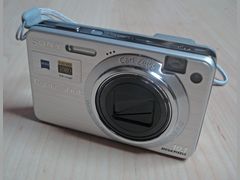 Cyber-shot WX500 | 2015 | 18.2 MP 1/2.3-inch CMOS | Same lens, sensor and NP-BX1 battery, but no viewfinder and no manual focus. It was $329.95 at launch. See our WX500 page. |
| Cyber-shot HX90V | 2015 | 18.2 MP 1/2.3-inch CMOS | The same camera plus GPS, a control ring around the lens and manual focus. It was $429.95 at launch and is still JPEG only. |
| Cyber-shot HX80 | 2016 | 18.2 MP 1/2.3-inch Exmor R CMOS | This camera: the HX90V without GPS, the control ring or manual focus, for $350 at launch, which Imaging Resource put at $50 to $80 under the HX90V depending on the retailer. |
| Cyber-shot HX99 | 2019 | 18.2 MP 1/2.3-inch CMOS | Adds RAW, 4K video, manual focus, a touchscreen and Bluetooth, with a 28x lens. It was $449.99 at launch and takes microSD or Memory Stick Micro, not full-size SD. |
Sources: imaging-resource.com, imaging-resource.com, imaging-resource.com, imaging-resource.com
Sony Cyber-shot HX80 reviews: what owners and reviewers say, topic by topic
We sorted 33 opinions about the Sony HX80 from 9 pages and videos on 5 websites and channels. Each row shows how many people raised a topic and how many of them were positive. Open a row to read short quotes, each linked to its source.
Owner voices that could be checked word for word are thin: six quotes from one 2018 blog review (Photography Banzai) and six iFixit repair posts, plus points from three small YouTube reviews. Best Buy customer reviews, YouTube comments and DPReview forum posts were also read, but they could not be re-checked automatically, so they are not counted here. Where the page cites DPReview owners, it says so.
Reliability today0% positiveof 6
All six opinions are negative, and all come from iFixit's repair forum, which collects problems by design: a battery door that won't latch, a viewfinder stuck down, an E91:01 error and lint inside the lens. They show what to check on a used copy, not how often it fails.
“How to fix E91:01 flashing on the screen of the camera?”
Kelli, iFixit Answers: Sony Cyber-shot DSC-HX80 Repair 2019-09Owner
“The door to my camera where the battery goes won’t lock closed”
Maryanne Alvino, iFixit Answers: Sony Cyber-shot DSC-HX80 Repair 2025-01Owner
“I have a little piece of lint in my lens. It shows up when I take a picture.”
Judith, iFixit Answers: Sony Cyber-shot DSC-HX80 Repair 2022-03Owner
“the plastic hold down for the battery is brocken & the disc will not stay down”
larry whetstone, iFixit Answers: Sony Cyber-shot DSC-HX80 Repair 2019-07Owner
Screen and viewfinder80% positiveof 5
Four of five opinions are positive: three praise the screen that flips up 180 degrees for selfies and vlogging, and one likes how raising the viewfinder turns the camera on and switches off the rear screen. Photography Banzai's complaint is that the pop-up viewfinder is very small.
“The pop-up viewfinder is very small. If this is a key feature for you then you might want to look into a larger camera.”
Photography Banzai 2018-05Hands-on review
Video60% positiveof 5
Two YouTube owner reviews like the 1080p footage, the way it handles shadows outdoors and the built-in mic indoors; a third finds the quality about as good as a high-end phone. Photography Banzai counts the 1080p ceiling as a drawback.
“Video recording goes up to 1080p only.”
Photography Banzai 2018-05Hands-on review
Ease of use67% positiveof 3
Two owner reviews call it easy: one likes changing exposure compensation with a single button, another calls it an excellent starter camera. The one complaint is the missing Bluetooth, so sending photos to a phone goes through Wi-Fi and Sony's app.
Build quality33% positiveof 3
The one reviewer who comments on the body calls it solid in the hand and very compact. The two complaints filed here are about features rather than build: no microphone input, and a screen protector film in one kit that peeled.
“It’s solid in the hands, very compact for what it includes.”
Photography Banzai 2018-05Hands-on review
Price and value100% positiveof 3
All three opinions are positive: the long zoom and dedicated controls do things a phone can't, and two YouTube reviewers call it good value, one for starter YouTubers and one for a budget model. Photography Banzai's quote says 24-270mm, a typo for the 24-720mm lens, and used copies now cost more than the launch price.
“It gives you features you won’t get on a smart phone such as the 24-270mm zoom lens and various dedicated camera specific control options.”
Photography Banzai 2018-05Hands-on review
PositiveMixedNegative
Sony HX80 vs Panasonic ZS70 vs Canon SX740 HS
All three put a long zoom on a 1/2.3-inch sensor in a pocketable body. The HX80 and the Panasonic Lumix ZS70 share a 24-720mm range and both have a viewfinder; the Canon SX740 HS reaches further, to 960mm, but has no viewfinder.
The HX80 is the simplest of the three: no RAW, no manual focus and no 4K, where the ZS70 has all three and the SX740 has 4K and manual focus. In its favor, it carries the best battery rating of the three (390 shots against 380 and 265 under CIPA rules), and at MPB in November 2026 its used price sat between the other two.
| Sony HX80 | Panasonic ZS70 | Canon SX740 HS | |
|---|---|---|---|
| Year | 2016 | 2017 | 2018 |
| Sensor | 18.2 MP, 1/2.3-inch | 20.3 MP, 1/2.3-inch | 20.3 MP, 1/2.3-inch |
| Zoom | 30x, 24-720mm, f/3.5-6.4 | 30x, 24-720mm, f/3.3-6.4 | 40x, 24-960mm, f/3.3-6.9 |
| Viewfinder | Pop-up OLED, 638k dots | Built-in, 1,166k dots equiv. | None |
| RAW | No | Yes | No |
| Manual focus | No | Yes | Yes |
| Best video | 1080p 60p | 4K | 4K |
| CIPA battery rating (screen) | 390 shots | 380 shots | 265 shots |
| Launch price | $350 | $449.99 | $399.99 |
| Used at MPB | $494-$619 (6 listed) | $179-$479 (3 listed, 2 sold for spares or repair) | $674-$764 (30 listed) |
Pick the ZS70 if you want RAW and manual focus with the same 24-720mm reach, the SX740 HS for the longest zoom and 4K, and the HX80 for a pop-up viewfinder and the best battery rating.
Sources: imaging-resource.com, imaging-resource.com, imaging-resource.com, mpb.com
How to get better photos from the Sony HX80
The HX80 has no RAW, so the picture you keep is the JPEG the camera makes. These settings come from Sony's help guide for the camera.
- 1
Stay within the 30x optical zoom
Clear Image Zoom (60x) and digital zoom (120x) process the image and lose some detail, and Sony says Intelligent Auto stops recognizing scenes once you go past optical zoom. Smart Zoom works only at the M, S and VGA image sizes, so at the default L size you get the plain 30x.
- 2
Mind the close-focus distance
The lens focuses down to about 5 cm at wide angle but only about 250 cm at full zoom. If a close-up comes out blurry, Sony's first suggestion is that the subject is too close for that zoom position.
- 3
Use Multi Frame NR in dim light
Native ISO runs from 80 to 3200. Multi Frame NR shoots a burst and merges it into one image with less noise, and it is the only way to reach ISO 6400 and 12800; the flash, D-Range Optimizer and Auto HDR can't be used with it.
- 4
Set the look with Creative Style
Choose Standard, Vivid, Portrait, Landscape, Sunset, Black & White or Sepia, and adjust contrast, saturation and sharpness for each. Intelligent Auto, Superior Auto, Scene Selection and any Picture Effect force it back to Standard, so use P, A, S or M.
- 5
Go easy on D-Range Optimizer
DRO (Auto or levels 1 to 5) brightens shadows, but Sony warns that images may be noisy when you push it. Check the result before you leave it on a high level.
- 6
Raise and lower the viewfinder the right way
Slide the pop-up switch, pull the eyepiece out until it clicks and set the diopter. Push the eyepiece back in before lowering the viewfinder: Sony says never to push it down with the eyepiece out or carry the camera by the viewfinder.
- 7
Turn off Release w/o Card
The default setting lets the shutter fire with no card inserted, and nothing is saved. Sony recommends switching it to Disable before you start shooting.
Sources: helpguide.sony.net, helpguide.sony.net, helpguide.sony.net, helpguide.sony.net, helpguide.sony.net, helpguide.sony.net, helpguide.sony.net, helpguide.sony.net
Sony HX80 battery, charging and memory cards
The HX80 runs on Sony's NP-BX1, rated 1240 mAh. Sony's CIPA figures are about 390 shots using the screen and 360 with the viewfinder, or about 70 minutes of actual movie recording. CIPA assumes one shot every 30 seconds with the flash firing on every second shot, so real numbers vary, and cold cuts them further.
You charge the battery inside the camera over micro USB with the camera off, and a full charge takes about 230 minutes with the supplied AC adaptor. Sony recommends charging between 10 and 30 degrees C (50 to 86 F). A flashing charge lamp means an error or a pause because of temperature: take the battery out and put it back firmly, and if the lamp flashes again the battery may be faulty.
For cards, use full-size SD, SDHC or SDXC; Sony tested cards up to 64 GB, and the camera also takes Memory Stick PRO Duo. XAVC S video needs an SDXC card of at least 64 GB rated class 10 or UHS speed class 1. A 64 GB card holds about 9,200 Fine JPEGs or about 2 hours 35 minutes of XAVC S video. Format new cards in the camera, not on a computer.
If the camera sits unused for about a month, the small internal battery that keeps the date and settings runs flat. Put in a charged battery and leave the camera off for 24 hours or more to recharge it.
| Item | Price | Note |
|---|---|---|
| Sony NP-BX1, genuine (1240 mAh) | $58.00 | B&H also listed used ones from $39.95 |
| Watson NP-BX1 (1150 mAh) | $19.99 | Third-party replacement |
| Sony NP-BX1 with travel USB charger | $65.00 | Lets you charge a spare outside the camera |
| SanDisk Ultra 64GB SDXC UHS-I | $23.99 | Sale price (listed at $37.99); meets the XAVC S minimum |
| SanDisk Extreme 64GB SDXC V30/U3 | $29.99 | Sale price (listed at $32.99) |
| Sabrent USB-A and USB-C card reader | $9.99 | A simple way to move a big batch of photos |
Buy a spare NP-BX1: B&H lists it for select Cyber-shot compacts and Sony Action Cams, so spares are easy to find.
Sources: helpguide.sony.net, helpguide.sony.net, helpguide.sony.net, helpguide.sony.net, helpguide.sony.net, helpguide.sony.net, helpguide.sony.net, helpguide.sony.net, helpguide.sony.net, bhphotovideo.com, bhphotovideo.com, bhphotovideo.com
Is the Sony HX80 good for vlogging and video?
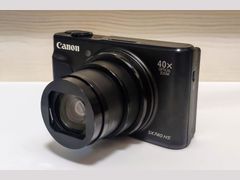 SX740 HS
For casual clips, yes, with limits. It records Full HD at up to 60p, including XAVC S at 50 Mbps, with 5-axis Optical SteadyShot, and the screen flips up 180 degrees so you can see yourself. All three YouTube owner reviews like the flip screen; two praise the footage, and the third finds it about on par with a high-end phone.
The limits: no 4K, no microphone jack and no headphone jack, so sound comes from the built-in mic only. Clips stop at about 29 minutes, or about 20 minutes in MP4 because of the 4 GB file limit, and the flash can't be used while recording. A stronger Movie SteadyShot setting also changes the angle of view.
For clips headed to a phone or social media, record MP4: Sony says that format suits playback on phones and tablets, web uploads and email. XAVC S gives the highest bitrate but needs a 64 GB or larger SDXC card, and on a 64 GB card the lower-bitrate AVCHD fits about 8 hours 15 minutes.
If 4K matters, the 2019 HX99 and the Canon SX740 HS both record it.
Sources: imaging-resource.com, imaging-resource.com, helpguide.sony.net, helpguide.sony.net, helpguide.sony.net, helpguide.sony.net, youtube.com, youtube.com, youtube.com
What to check before buying a used Sony HX80
These checks follow the faults owners report on iFixit and DPReview. MPB lists a 6-month warranty on its used copies; read what it covers before you count on it for these faults.
- 1
Raise and lower the viewfinder
Slide the pop-up switch several times. The viewfinder should rise and turn the camera on, then lock down again; an iFixit owner's viewfinder stayed latched even after he moved the release.
- 2
Close the battery door
It should click shut and stay shut. Three iFixit threads report doors that won't lock, one because the plastic stops broke.
- 3
Zoom all the way in and out
Watch for a lens that sticks or stops extended. Sony's manual says never to force the lens.
- 4
Look for error codes at power-on
Sony's manual lists E:61, E:62 and E:91 as product malfunctions. A settings reset may clear one, but if the code stays, Sony says the camera may need a repair.
- 5
Shoot test frames at both ends of the zoom
Look for a blurry spot that stays in the same place (lint inside the lens) or one side softer than the other. A DPReview forum regular who says he has owned both the HX80 and HX90V blames differences between the two on lens tolerances in the individual copy.
- 6
Check charging and what's in the box
Plug it into USB with the camera off and confirm the charge lamp lights. Sony shipped it with the NP-BX1, a micro USB cable and an AC adaptor, but used listings vary on whether the adaptor is included.
Sources: ifixit.com, ifixit.com, ifixit.com, helpguide.sony.net, helpguide.sony.net, dpreview.com, helpguide.sony.net, mpb.com
Sony HX80 problems: viewfinder, battery door, E91 error and repair costs
No recall for the HX80 turned up in the research. These problems come from iFixit owner posts and Sony's own manual, so they show what can go wrong, not how often.
Pop-up viewfinder stuck down or won't release
Raised in 1 opinion
- How you notice
- The viewfinder stays latched after you slide the release. One iFixit owner (January 2025) had a camera that otherwise worked perfectly.
- Fix
- That owner traced it to a loose spring-metal piece in the side cover that keeps the slider in its track, held it in place and fixed it with gel super glue. iFixit has a viewfinder replacement guide it rates moderate, about 1 hour. Sony's manual says not to push the viewfinder down with the eyepiece out or carry the camera by the viewfinder.
- Typical cost
- No part price found. The same owner said big repair shops wanted $200 just to put it on the bench, for a camera he valued at about $300 used.
Sources: ifixit.com, ifixit.com, helpguide.sony.net
Battery door won't lock or stay shut
Raised in 2 opinions
- How you notice
- The door closes but won't stay shut. Three iFixit threads from 2019 to 2025 report it, one with broken plastic hold-down stops.
- Fix
- Replace the battery door; iFixit answers point to replacement covers sold on eBay. On a used camera, check that the door clicks shut and stays shut.
- Typical cost
- No price found for the part.
Sources: ifixit.com, ifixit.com, ifixit.com
E:91 error code (E91:01) on the screen
Raised in 2 opinions
- How you notice
- The code flashes on the screen. Sony's manual lists E:61, E:62 and E:91 as product malfunctions.
- Fix
- Sony says to reset the camera's settings and turn it on again, and if the code stays, to contact Sony service with the full code. On iFixit, the factory reset suggested in the answer did not work for a second owner, who chatted with Sony, was told to send the camera in and said they would likely keep using it without the flash.
- Typical cost
- That second owner estimated the repair at about $151 (December 2019), an estimate rather than an invoice.
Sources: helpguide.sony.net, ifixit.com
Lens won't extend, or stops extended
- How you notice
- The camera stops or turns off with the lens out, or the lens doesn't come out at power-on.
- Fix
- Sony says to put in a charged battery and turn the camera on again, and never to force the lens. iFixit's student-written troubleshooting wiki also suggests compressed air around the barrel gaps, though it gets some specs wrong; iFixit rates its lens replacement guide difficult.
- Typical cost
- No HX80 lens repair price found.
Sources: helpguide.sony.net, ifixit.com, ifixit.com
Lint or dust inside the lens
Raised in 1 opinion
- How you notice
- A fiber or speck between the lens and the sensor shows as a blurry spot in photos and video. Two iFixit owners reported it in 2022.
- Fix
- One owner suggests opening the camera to the lens module and blowing the fiber out with compressed air; another answer warns that taking it apart outside a clean space lets in more dust. For most buyers this is a shop job.
- Typical cost
- No price found.
Sources: ifixit.com, ifixit.com
Memory card errors ('--E-' or C:13)
- How you notice
- '--E-' appears on the screen, or a C:13 code says the camera can't read or write the card, or that the card is unformatted, damaged or incompatible.
- Fix
- Take the card out and put it back. If the problem continues, back up and format the card in the camera; if C:13 persists, use a new card.
- Typical cost
- A new card: a SanDisk Ultra 64GB SDXC was $23.99 at B&H on November 2, 2026.
Sources: helpguide.sony.net, helpguide.sony.net, bhphotovideo.com
Photos taken with a Sony Cyber-shot DSC-HX80
Wikimedia Commons contributors took these photos with an HX80, from pelicans in Peru to a frosted fire tower in New York; each file's EXIF data names the camera.

Peruvian pelicans at the Islas Ballestas, Peru, 2016Photo: Cbl62, CC BY-SA 4.0 
View from the fire tower on Blue Mountain, New York, March 6, 2018Photo: B137, CC BY-SA 4.0 
Air-cooled Volkswagen Type 2 in Houyet, Belgium, 2018Photo: Stratoswift, CC BY-SA 4.0 
Strand Theater in downtown Old Forge, New York, March 2018Photo: B137, CC0 
Typical landscape of the Mani peninsula, Greece, 2017Photo: Dr Tzeferis Petros, CC BY-SA 4.0 
Church of Nuestra Señora del Carmen, 2016Photo: Cbl62, CC BY-SA 4.0
How much is a Sony HX80 worth in 2026?
The HX80 launched at about $350 in 2016, and Imaging Resource later listed a $368 street price. B&H now marks it No Longer Available, so used is the way to buy one: on November 2, 2026 MPB listed six used copies at $494 to $619, each with a 6-month warranty.
MPB
Used, like new, Body, Sony AC-UUD12 AC adaptor, NP-BX1, USB cable and wrist strap; 6-month warranty
$619
See listingMPB
Used, good, Body in the original box, NP-BX1, USB cable and wrist strap; 6-month warranty
$504
See listingMPB
Used, good, Body, AC adaptor, NP-BX1, USB cable and wrist strap; 6-month warranty
$494
See listingMPB
Used, good, Body, NP-BX1 and USB cable, no AC adaptor (three listings, two with a wrist strap); 6-month warranty
$494
See listingB&H Photo
New, Product page and specs still online
No longer available
See listingLaunch price, 2016 (Imaging Resource)
New, historical, Retail price at launch; Imaging Resource later listed $368 street
$350
See listing
Prices checked on November 2, 2026. They move every week, so treat them as a range, not a quote. MPB and B&H block automated checks, so these prices were read in a browser. eBay could not be checked from a US location, so it is left out. At MPB, the $619 copy is graded like new and includes Sony's AC adaptor, the $504 copy comes in its original box, and the four $494 copies are graded good.
Video reviews worth your time
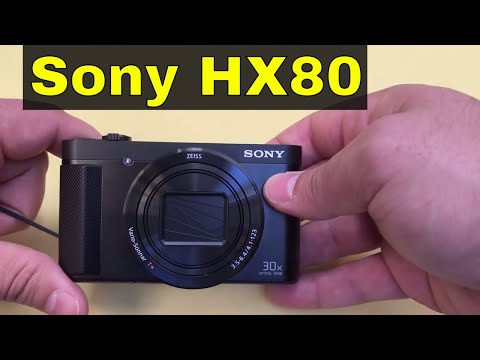
Sony Cyber-Shot DSC-HX80 Review-Compact Camera With 30x Optical Zoom
The reviewer considers the Sony Cyber-shot HX80 an excellent, highly portable camera for photos and 1080p video despite lacking an external microphone jack.

SONY CYBERSHOT DSC-HX80 CAMERA REVIEW | IS IT WORTH IT?
The reviewer highly recommends the Sony Cyber-shot DSC-HX80 for vloggers seeking a compact camera with a flip screen and long battery life, despite its lack of Bluetooth connectivity.

Sony Cyber-Shot DSC-HX80 Camera Review - Murph's Boston Sports Talk
The Sony Cyber-shot DSC-HX80 is a budget-friendly, easy-to-use compact camera featuring a flip-up screen that makes it great for beginners and vloggers.
Questions people ask about the Sony HX80
Is the Sony HX80 a good camera?
For daylight travel, yes. Owners and reviewers like its pocket size, its 30x optical zoom (24-720mm equivalent) and the screen that flips up for selfies, and it adds a pop-up viewfinder that one reviewer finds very small. The weak spots are dim light, because of the small 1/2.3-inch sensor and f/3.5-6.4 lens, and the lack of RAW, manual focus and 4K.
Sources: imaging-resource.com, imaging-resource.com
When did the Sony Cyber-shot HX80 come out?
Sony announced it in March 2016, and Imaging Resource reported it would be available from April 2016 at about $350. Imaging Resource's own spec table gives May 15, 2016 as the availability date, so the sources differ by a few weeks.
Sources: imaging-resource.com, imaging-resource.com
How much is a Sony HX80 worth?
On November 2, 2026, MPB listed six used HX80s at $494 to $619, each with a 6-month warranty. That is more than its 2016 launch price of $350 and the $368 street price Imaging Resource listed later. The $619 copy was graded like new, the $504 copy came in its original box, and four others were graded good at $494.
Sources: mpb.com, imaging-resource.com
Can you still buy a Sony Cyber-shot HX80?
Probably not new: B&H, the big US camera store, keeps its product page up but marks it No Longer Available. Used copies turn up at MPB, which listed six on November 2, 2026. For older Cyber-shot models, see our [vintage Sony Cyber-shot guide](/cameras/sony-cyber-shot/).
Sources: bhphotovideo.com, mpb.com
What is the difference between the Sony HX80 and HX90V?
They share the same 18.2 MP sensor and 24-720mm lens. Imaging Resource says the HX80 is basically an HX90V without GPS and without the control ring around the lens, and it also drops manual focus. At launch it cost $50 to $80 less, depending on the retailer. A DPReview poster who shot both at ISO 1600 thought the HX90V held more detail, and a forum member who says he owned both blamed lens variation between individual copies.
Sources: imaging-resource.com, dpreview.com
Does the Sony HX80 shoot RAW or 4K?
No to both. It saves JPEGs only, in Fine or Standard quality, and video tops out at Full HD 1080p at up to 60p. Its 2019 successor, the HX99, added RAW and 4K.
Sources: imaging-resource.com, helpguide.sony.net, imaging-resource.com
Does the Sony HX80 have a microphone jack?
No. Imaging Resource's spec list shows no microphone jack and no headphone jack, so sound comes from the built-in mic. One YouTube owner review calls that mic adequate for indoor recording.
Sources: imaging-resource.com, youtube.com
Which SD card should I use in the Sony HX80?
A full-size SD card. For XAVC S video Sony requires an SDXC card of at least 64 GB rated class 10 or UHS speed class 1; stills, AVCHD and MP4 need less. A SanDisk Ultra 64GB SDXC was $23.99 at B&H on November 2, 2026. Format any new card in the camera first.
Sources: helpguide.sony.net, helpguide.sony.net, bhphotovideo.com
What people compare it with
Sony Cyber-shot HX90V
The same sensor and 24-720mm lens plus GPS, a control ring and manual focus. The step up if you want to focus by hand.
The same sensor, lens and battery without the viewfinder, for a lower launch price.
Panasonic Lumix ZS70
The same 24-720mm reach with RAW, manual focus, 4K video and a sharper viewfinder.
A longer 40x zoom and 4K video but no viewfinder, and it cost more used at MPB in November 2026.
Every source behind this page
Read them yourself. How we pick and count them is in our methodology.
Show all 47 sources
Manuals and references 38
- helpguide.sony.net: Help Guide
- helpguide.sony.net: Help Guide
- helpguide.sony.net: Help Guide
- helpguide.sony.net: Help Guide
- helpguide.sony.net: Help Guide
- helpguide.sony.net: Help Guide | The product stops with the lens portion extended./The product turns off with the lens portion extended.
- helpguide.sony.net: Help Guide | “--E
- helpguide.sony.net: Help Guide | Self
- helpguide.sony.net: Help Guide | The zoom features available with this product
- helpguide.sony.net: Help Guide
- helpguide.sony.net: Help Guide
- helpguide.sony.net: Help Guide
- helpguide.sony.net: Help Guide
- helpguide.sony.net: Help Guide
- helpguide.sony.net: Help Guide
- helpguide.sony.net: Help Guide | D
- helpguide.sony.net: Help Guide
- helpguide.sony.net: Help Guide
- helpguide.sony.net: Help Guide
- helpguide.sony.net: Help Guide | Adjusting the viewfinder (diopter
- helpguide.sony.net: Help Guide
- helpguide.sony.net: Help Guide | Charging the battery pack while it is inserted in the camera
- helpguide.sony.net: Help Guide | Battery life and the number of images that can be recorded/played back using a battery pack
- helpguide.sony.net: Help Guide | Checking the camera and the supplied items
- helpguide.sony.net: Help Guide
- dpreview.com: Just a moment...
- ifixit.com: Sony Cyber-shot DSC-HX80 Repair Forum
- ifixit.com: My battery lid is not clossing - Sony Cyber-shot DSC-HX80 Repair
- ifixit.com: Sony Cyber-shot DSC-HX80 Lens Replacement
- ifixit.com: Sony Cyber-shot DSC-HX80 Viewfinder Replacement
- ifixit.com: Sony Cyber-shot DSC-HX80 Troubleshooting
- imaging-resource.com: Canon SX740 HS Review
- imaging-resource.com: Panasonic ZS70 Review
- imaging-resource.com: Sony HX80 Review: Lab Tests & Sample Images
- imaging-resource.com: Sony HX80 Review
- imaging-resource.com: Sony HX90V Review
- imaging-resource.com: Sony HX99 Review
- imaging-resource.com: Sony WX500 Review
Forums 5
- iFixit Answers: Sony Cyber-shot DSC-HX80 Repair: Electronic Viewfinder stuck down - Sony Cyber-shot DSC-HX80 Repair
- iFixit Answers: Sony Cyber-shot DSC-HX80 Repair: The door to the battery won’t lock - Sony Cyber-shot DSC-HX80 Repair
- iFixit Answers: Sony Cyber-shot DSC-HX80 Repair: SOLVED: Can you repair the disc-battery door as the plastic stops have broken - Sony Cyber-shot DSC-HX80 Repair
- iFixit Answers: Sony Cyber-shot DSC-HX80 Repair: E91:01 is flashing on the screen - Sony Cyber-shot DSC-HX80 Repair
- iFixit Answers: Sony Cyber-shot DSC-HX80 Repair: A piece of something inside lens - Sony Cyber-shot DSC-HX80 Repair
Video reviews 3
Independent blogs 1
Keep reading
Digicams
Vintage Sony Cyber-shot CCD cameras: which models to look for, used prices of $59.99 to $265 (Oct 2026), batteries, Memory Stick cards and common faults.
Digicams
Sony Cyber-shot WX500: what reviewers and owners say about its 30x zoom, flip-up screen and video, the black-screen fault to check, and used prices from $280.
Digicams
Canon PowerShot SX740 HS: what owners and reviewers say about its 40x zoom, low light and 4K, the faults to check, and why it now sells above $549.99.
Digicams
The best vintage digital camera for most people is a Canon ELPH like the SD1000, $199 at a shop that tests. 7 digicam picks, US prices and what to check.
Digicams
A cheap digicam is listed at about $70 to $150 at US shops that test them, or $20 for an antique-shop find. 7 picks, October 2026 prices, cards and batteries.
Digicams
Sony RX100 I to VII: what owners and reviewers say, which model to buy, lens errors to check, battery tips, and prices from $455 certified used to $1,498 new.